Get certified for free when you join Fabric Data Days 2026 and dive into Fabric, Power BI, SQL, AI, and other essential data skills.
Join nowJuly 7 - July 17 | Round 2 of the Power BI Dataviz World Championships. Don't miss your chance! Learn more
Hello You All,
I'am busy building a report in de powerbi desktop application.
I want to categorize my customers manually. Because my dataset doesn't have this information.
So is there a way to create a column or something else where I manually can add the categorisation ID?
So what I want to create is the following:
Cat. ID can be A, B or C
Customer 001 = A
Customer 002 = B
Customer 003 = B
Customer 004 = C
Customer 005 = A
Hope to hear from you soon!
Hi @Flashed,
You can do it either by using DAX or M language:
You just use the IF clause, be aware M language is case sensitive.
IF clause in M language IF in M language.
Thanks,
Ricardo
Hi @Flashed,
The solution of @ricardocamargos could solve your problem, do you have a try?
If it works, please accept his answer as a solution so that more people will find the solution easily. If you still have problems, you could post it to the forum.
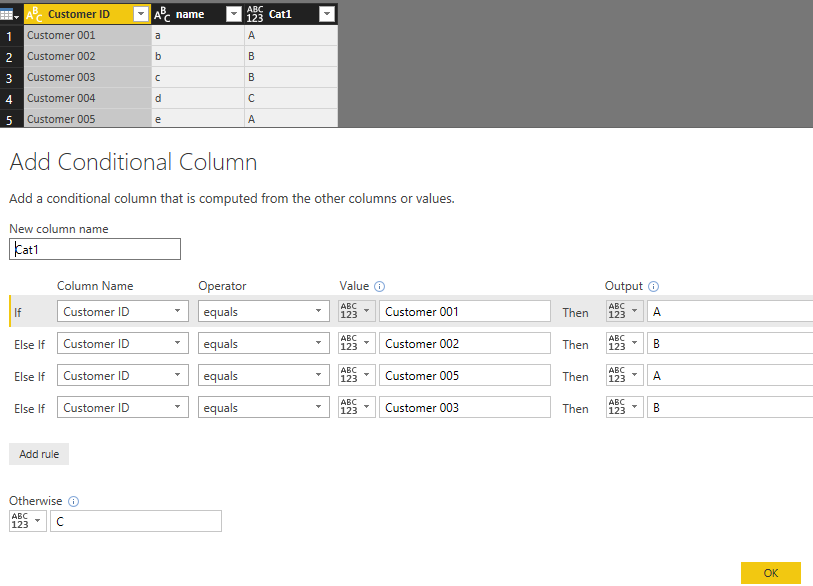
In addition, you could try to add condition column in Query Editor which is more simple without writing codes. You could refer to this picture.
Hope it can help you!
Best regards,
Cherry
Join us in Barcelona for FabCon and SQLCon, the Fabric, Power BI, SQL, and AI community event. Save €200 with code FABCMTY200.
Join Fabric Data Days 2026: 60 days of free live/on-demand sessions, challenges, study groups, and certification opportunities.
| User | Count |
|---|---|
| 22 | |
| 22 | |
| 18 | |
| 17 | |
| 13 |
| User | Count |
|---|---|
| 63 | |
| 50 | |
| 46 | |
| 41 | |
| 39 |