cancel
Showing results for 
Search instead for 
Did you mean: 

July 28 - August 9 | Final Round of the Power BI Dataviz World Championships. This is your chance. Learn more

Reply
djoellet
Frequent Visitor

Add Calculated Rows to Table

Hi Power BI Community - 

I want to add three calculated rows to a table, preferably at the top. Please see below for current and desired states (highlighted columns are the calculated rows I would like to add). The first calc. row would be the total number of responses, the second is the % of "Yes", and the third would be the % of "No" responses. Thank you for reading, I appreciate it.


djoellet_0-1668784724065.png


4 REPLIES 4
Anonymous
Not applicable

Hi  @djoellet ,

Whether your problem has been resolved? If yes, could you please mark the helpful post as Answered? It will help the others in the community find the solution easily if they face the same problem as yours. Thank you.

Best Regards

Anonymous
Not applicable

Hi @djoellet ,

It seems that you want to add customized rows in matrix visual, you can refer the following links to get it by different methods:

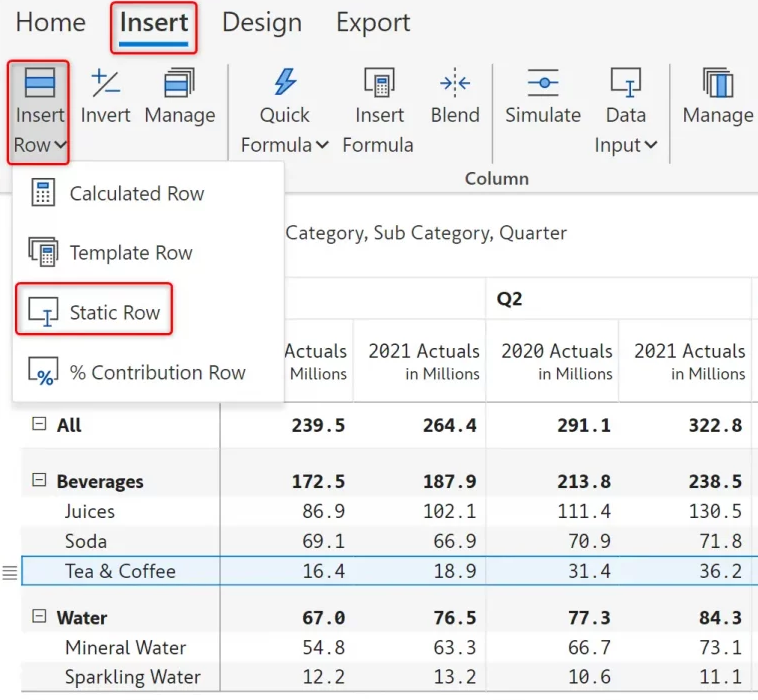
1. Create Inforiver visual:

Insert row and manually enter data in Power BI matrix reports

yingyinr_1-1669016535190.png

2. By using ROW function:

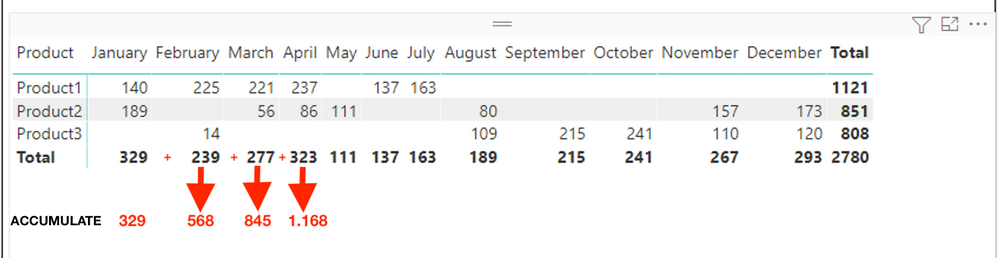
Add new row with accumulate in Matrix

Table = UNION(VALUES('Sales'[Product]),ROW("Product","XMonth Accumulate"))

yingyinr_2-1669016612517.png

Looking for difference between two values by filters

Best Regards

djoellet
Frequent Visitor

My report is already in PowerBI; that was just sample data to help explain what I was trying to achieve.  Thank you!

FreemanZ
Super User
Super User

suggest to continue with Excel

Helpful resources

Announcements
Fabric Community Sticker Design Challenge Barcelona Carousel

Fabric Community Sticker Challenge - Barcelona 2026

If you love stickers, then you will definitely want to check out our community sticker challenge, Barcelona edition!

July Power BI Update Carousel

Power BI Monthly Update - July 2026

Check out the July 2026 Power BI update to learn about new features.

Power BI DataViz World Championships carousel

Power BI DataViz World Championships - June 2026

A new Power BI DataViz World Championship is coming this June! Don't miss out on submitting your entry.

Top Solution Authors