Get certified for free when you join Fabric Data Days 2026 and dive into Fabric, Power BI, SQL, AI, and other essential data skills.
Join nowData Days is here! Join us now for 60+ days of learning, challenges, and connection. Learn more
Hi Power BI Community -
I want to add three calculated rows to a table, preferably at the top. Please see below for current and desired states (highlighted columns are the calculated rows I would like to add). The first calc. row would be the total number of responses, the second is the % of "Yes", and the third would be the % of "No" responses. Thank you for reading, I appreciate it.
Hi @djoellet ,
Whether your problem has been resolved? If yes, could you please mark the helpful post as Answered? It will help the others in the community find the solution easily if they face the same problem as yours. Thank you.
Best Regards
Hi @djoellet ,
It seems that you want to add customized rows in matrix visual, you can refer the following links to get it by different methods:
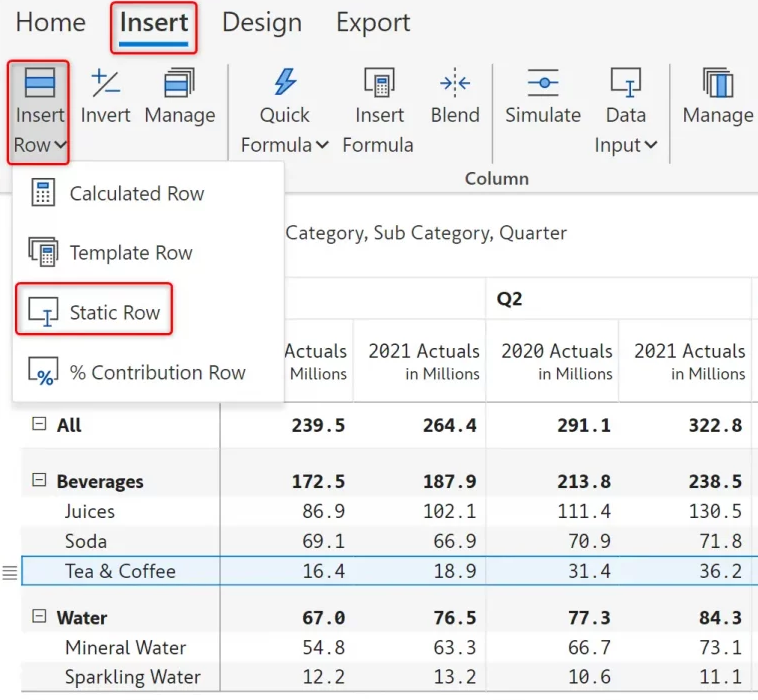
1. Create Inforiver visual:
Insert row and manually enter data in Power BI matrix reports
2. By using ROW function:
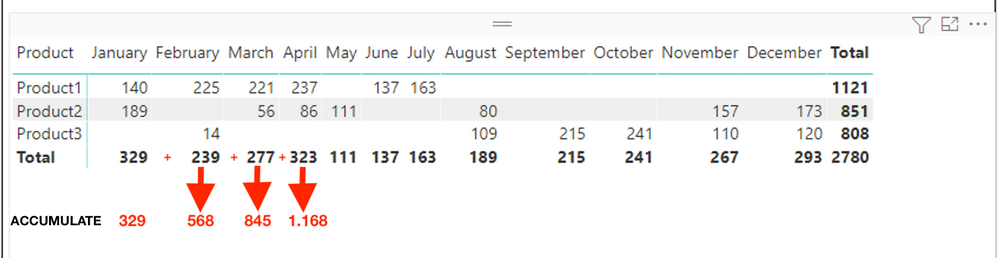
Add new row with accumulate in Matrix
Table = UNION(VALUES('Sales'[Product]),ROW("Product","XMonth Accumulate"))
Looking for difference between two values by filters
Best Regards
My report is already in PowerBI; that was just sample data to help explain what I was trying to achieve. Thank you!
suggest to continue with Excel
Don't miss out on Data Days, June 15 through August 7. Learn Fabric, Power BI, SQL, AI and more.
Check out the May 2026 Power BI update to learn about new features.
| User | Count |
|---|---|
| 23 | |
| 23 | |
| 20 | |
| 18 | |
| 14 |
| User | Count |
|---|---|
| 58 | |
| 51 | |
| 41 | |
| 30 | |
| 24 |