Join us at FabCon Atlanta from March 16 - 20, 2026, for the ultimate Fabric, Power BI, AI and SQL community-led event. Save $200 with code FABCOMM.
Register now!Vote for your favorite vizzies from the Power BI Dataviz World Championship submissions. Vote now!
Hi,
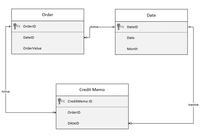
I have following tables and their relationship.
Issue is that on PowerBI report, I am not sure how to pesent both order and CreditMemo on same page filtered by Date. Orders get filtered by date and Credit Memo get filter by Order context. Cannot activate CreditMemo to date relationship due to circular dependency.
Currently in catch 22 situation...
Solved! Go to Solution.
Hi, @Anonymous
If you want to both filter Order and CreditMemo by field Date on a same visual, you need to:
1. active the relationship between the Table 'Date' and Table 'Order'
2. active the relationship between the Table 'Date' and Table 'CreditMemo'
3. inactive the relationship between table Table 'Order' and table Table 'CreditMemo'
Best Regards,
Community Support Team _ Eason
If this post helps, then please consider Accept it as the solution to help the other members find it more quickly.
Hi, @Anonymous
If you want to both filter Order and CreditMemo by field Date on a same visual, you need to:
1. active the relationship between the Table 'Date' and Table 'Order'
2. active the relationship between the Table 'Date' and Table 'CreditMemo'
3. inactive the relationship between table Table 'Order' and table Table 'CreditMemo'
Best Regards,
Community Support Team _ Eason
If this post helps, then please consider Accept it as the solution to help the other members find it more quickly.
@Anonymous , Either you should merge order and credit memo and create a table that has all required columns, say Order credit memo. Now you can use only this one table or use the Order credit memo Or use two facts Order credit memo and Order not joining to each other.
Discussed this concept here - https://youtu.be/kXls79iNPqc?t=1691
Vote for your favorite vizzies from the Power BI World Championship submissions!
If you love stickers, then you will definitely want to check out our Community Sticker Challenge!
Check out the January 2026 Power BI update to learn about new features.
| User | Count |
|---|---|
| 59 | |
| 53 | |
| 42 | |
| 20 | |
| 16 |
| User | Count |
|---|---|
| 123 | |
| 106 | |
| 44 | |
| 32 | |
| 24 |