Join us at FabCon Atlanta from March 16 - 20, 2026, for the ultimate Fabric, Power BI, AI and SQL community-led event. Save $200 with code FABCOMM.
Register now!Get Fabric certified for FREE! Don't miss your chance! Learn more
Hi
I have the following data
| Type | PoR | Amount | Month |
| A | Real | 5 | 1 |
| A | Real | 4 | 2 |
| A | Real | 5 | 3 |
| A | Real | 8 | 4 |
| A | Real | 9 | 5 |
| A | Plan | 2 | 1 |
| A | Plan | 3 | 2 |
| A | Plan | 6 | 3 |
| A | Plan | 3 | 4 |
| A | Plan | 7 | 5 |
| B | Real | 6 | 1 |
| B | Real | 7 | 2 |
| B | Real | 7 | 3 |
| B | Real | 7 | 4 |
| B | Real | 10 | 5 |
| B | Plan | 5 | 1 |
| B | Plan | 5 | 2 |
| B | Plan | 7 | 3 |
| B | Plan | 8 | 4 |
| B | Plan | 8 | 5 |
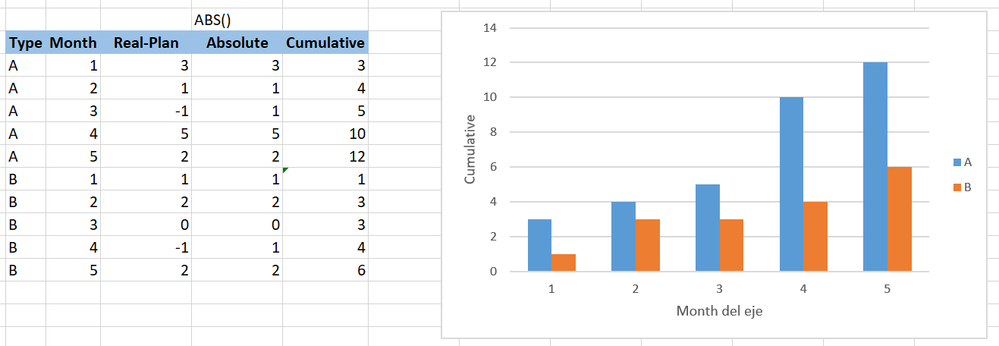
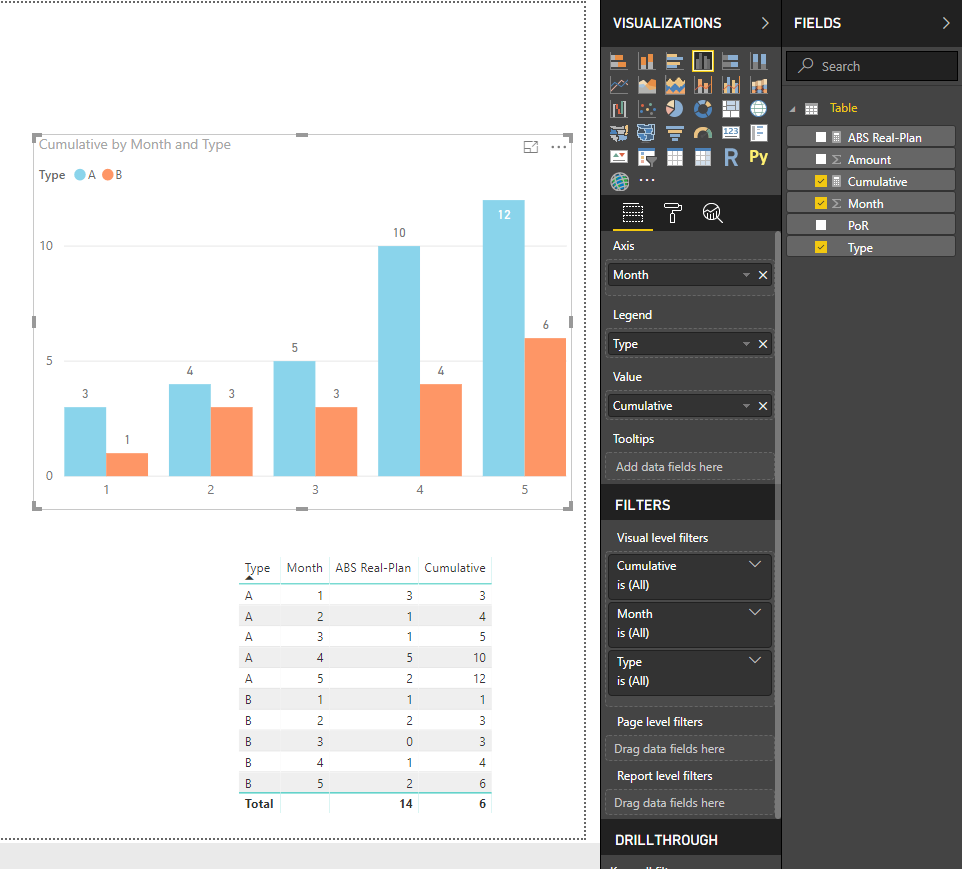
And with a measure i need to create the following absolute cumulative graph
the graph show the cumulative column by type and month. The cumulative column is the absolute value of Real - Plan for each type
Im Using this measure to create the Absolute column of Real - Plan
ABS Real-Plan =
abs(CALCULATE ( SUM ( Table[Amount] ); Table[PoR] = "Real" )
- CALCULATE ( SUM ( Table[Amount] ); Table[PoR] = "Plan" ))and im using this measure for the cumulative column that i'm graphing
Cumulative =
CALCULATE (
SUMX (Table; [ABS Real-Plan] );
FILTER ( ALLSELECTED ( Table[Month] ); Table[Month] <= MAX ( Table[Month] ) )
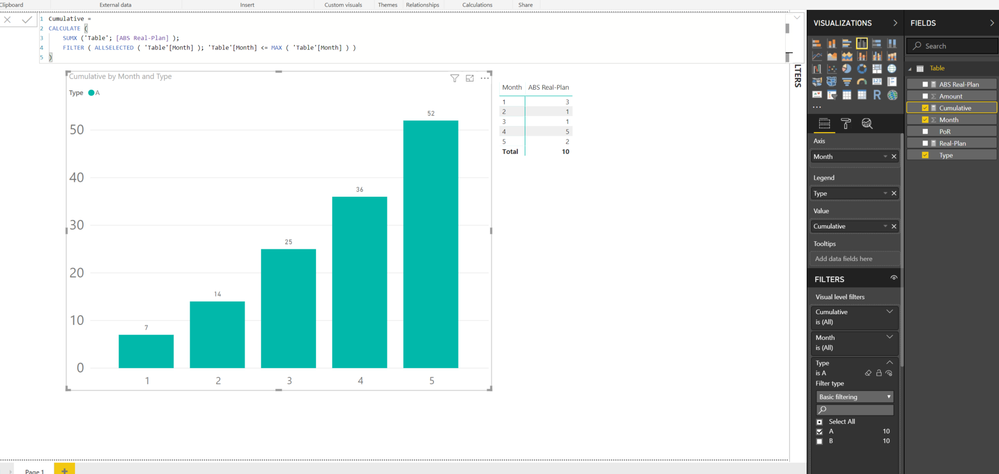
but i'm getting a strange results in the grad total on the table and in the graphs numbers. EXAMPLE for type A
Thanks
Solved! Go to Solution.
Create these measures instead
ABS Real-Plan =
ABS (
CALCULATE (
SUM ( 'Table'[Amount] ),
FILTER (
ALLEXCEPT ( 'Table', 'Table'[Type], 'Table'[Month] ),
'Table'[PoR] = "Real"
)
)
- CALCULATE (
SUM ( 'Table'[Amount] ),
FILTER (
ALLEXCEPT ( 'Table', 'Table'[Type], 'Table'[Month] ),
'Table'[PoR] = "Plan"
)
)
)
Cumulative =
SUMX (
FILTER (
ALL ( 'Table' ),
'Table'[Type] = MAX ( 'Table'[Type] )
&& 'Table'[PoR] = MAX ( 'Table'[PoR] )
&& [Month] <= MAX ( [Month] )
),
[ABS Real-Plan]
)
Best Regards
Maggie
Create these measures instead
ABS Real-Plan =
ABS (
CALCULATE (
SUM ( 'Table'[Amount] ),
FILTER (
ALLEXCEPT ( 'Table', 'Table'[Type], 'Table'[Month] ),
'Table'[PoR] = "Real"
)
)
- CALCULATE (
SUM ( 'Table'[Amount] ),
FILTER (
ALLEXCEPT ( 'Table', 'Table'[Type], 'Table'[Month] ),
'Table'[PoR] = "Plan"
)
)
)
Cumulative =
SUMX (
FILTER (
ALL ( 'Table' ),
'Table'[Type] = MAX ( 'Table'[Type] )
&& 'Table'[PoR] = MAX ( 'Table'[PoR] )
&& [Month] <= MAX ( [Month] )
),
[ABS Real-Plan]
)
Best Regards
Maggie
Share feedback directly with Fabric product managers, participate in targeted research studies and influence the Fabric roadmap.
Check out the January 2026 Power BI update to learn about new features.
| User | Count |
|---|---|
| 67 | |
| 59 | |
| 47 | |
| 20 | |
| 15 |
| User | Count |
|---|---|
| 104 | |
| 103 | |
| 37 | |
| 27 | |
| 26 |