cancel
Showing results for 
Search instead for 
Did you mean: 

The Power BI Data Visualization World Championships is back! Get ahead of the game and start preparing now! Learn more

Reply
rodfernandez
Helper I
Helper I

Absolute Cumulative Graph

Hi
I have the following data 

TypePoRAmountMonth
AReal51
AReal42
AReal53
AReal84
AReal95
APlan21
APlan32
APlan63
APlan34
APlan75
BReal61
BReal72
BReal73
BReal74
BReal105
BPlan51
BPlan52
BPlan73
BPlan84
BPlan85


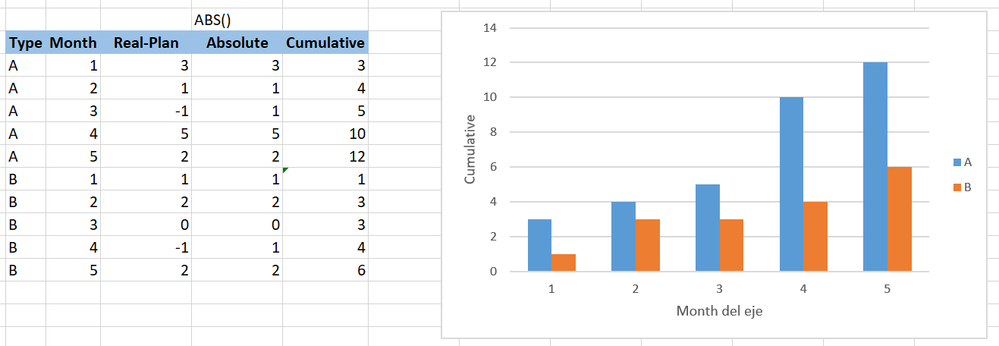
And with a measure i need to create the following absolute cumulative graph

acomulado.png

the graph show the cumulative column by type and month. The cumulative column is the absolute value of Real - Plan for each type


Im Using this measure to create the Absolute column of Real - Plan

ABS Real-Plan = 
abs(CALCULATE ( SUM ( Table[Amount] ); Table[PoR] = "Real" )
    - CALCULATE ( SUM ( Table[Amount] ); Table[PoR] = "Plan" ))

and im using this measure for the cumulative column that i'm graphing

Cumulative = 
CALCULATE (
    SUMX (Table; [ABS Real-Plan] );
    FILTER ( ALLSELECTED ( Table[Month] ); Table[Month] <= MAX ( Table[Month] ) )


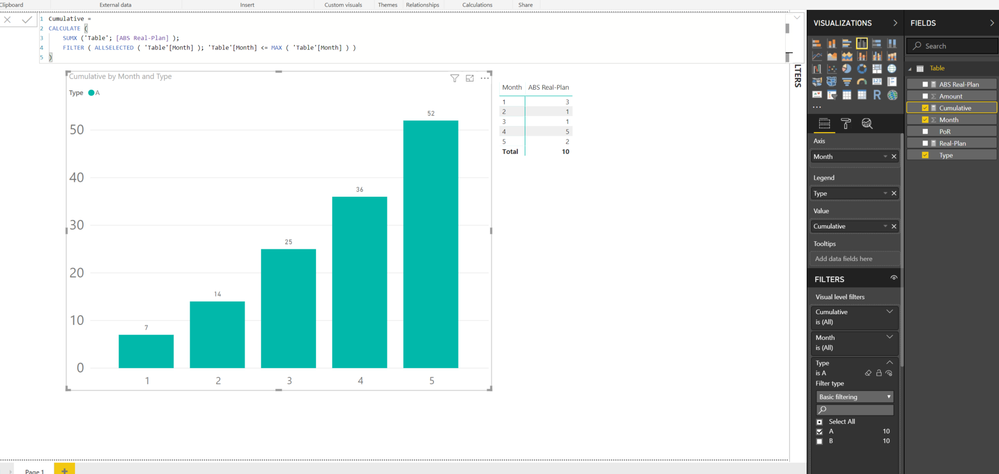
but i'm getting a strange results in the grad total on the table and in the graphs numbers. EXAMPLE for type A

table.png


Thanks

1 ACCEPTED SOLUTION
v-juanli-msft
Community Support
Community Support

Hi @rodfernandez

Create these measures instead

ABS Real-Plan =
ABS (
    CALCULATE (
        SUM ( 'Table'[Amount] ),
        FILTER (
            ALLEXCEPT ( 'Table', 'Table'[Type], 'Table'[Month] ),
            'Table'[PoR] = "Real"
        )
    )
        - CALCULATE (
            SUM ( 'Table'[Amount] ),
            FILTER (
                ALLEXCEPT ( 'Table', 'Table'[Type], 'Table'[Month] ),
                'Table'[PoR] = "Plan"
            )
        )
)

Cumulative =
SUMX (
    FILTER (
        ALL ( 'Table' ),
        'Table'[Type] = MAX ( 'Table'[Type] )
            && 'Table'[PoR] = MAX ( 'Table'[PoR] )
            && [Month] <= MAX ( [Month] )
    ),
    [ABS Real-Plan]
)

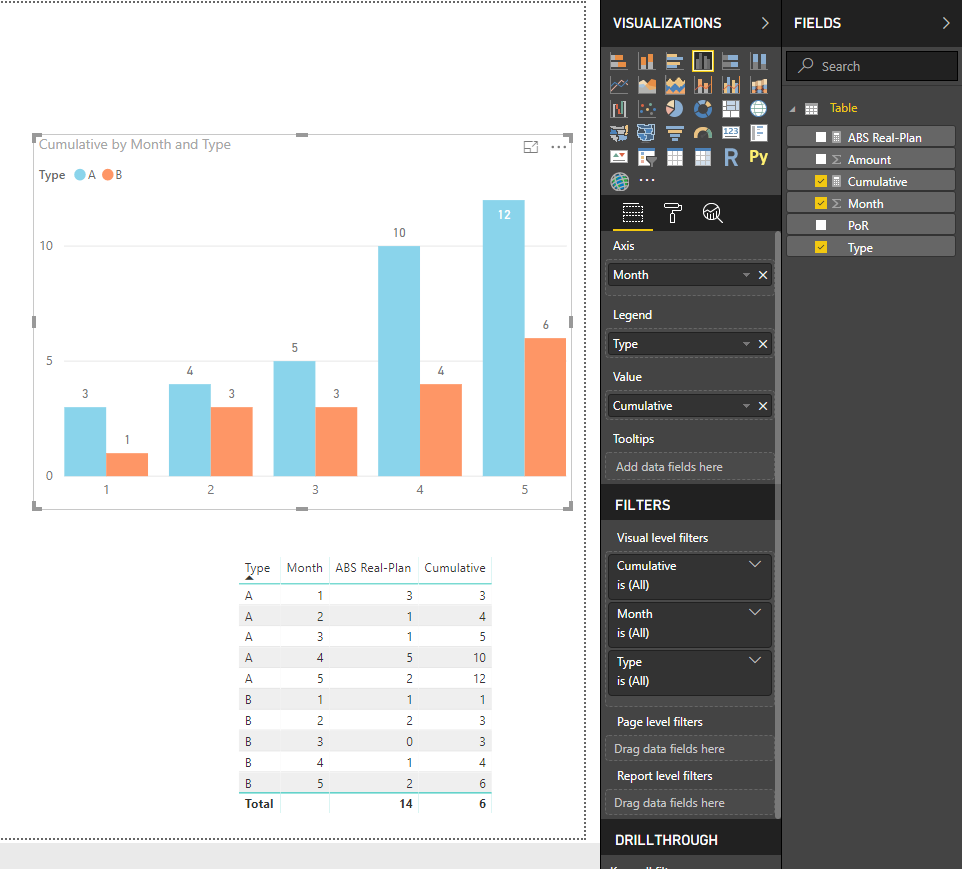
6.png


Best Regards

Maggie

View solution in original post

1 REPLY 1
v-juanli-msft
Community Support
Community Support

Hi @rodfernandez

Create these measures instead

ABS Real-Plan =
ABS (
    CALCULATE (
        SUM ( 'Table'[Amount] ),
        FILTER (
            ALLEXCEPT ( 'Table', 'Table'[Type], 'Table'[Month] ),
            'Table'[PoR] = "Real"
        )
    )
        - CALCULATE (
            SUM ( 'Table'[Amount] ),
            FILTER (
                ALLEXCEPT ( 'Table', 'Table'[Type], 'Table'[Month] ),
                'Table'[PoR] = "Plan"
            )
        )
)

Cumulative =
SUMX (
    FILTER (
        ALL ( 'Table' ),
        'Table'[Type] = MAX ( 'Table'[Type] )
            && 'Table'[PoR] = MAX ( 'Table'[PoR] )
            && [Month] <= MAX ( [Month] )
    ),
    [ABS Real-Plan]
)

6.png


Best Regards

Maggie

Helpful resources

Announcements
Power BI DataViz World Championships

Power BI Dataviz World Championships

The Power BI Data Visualization World Championships is back! Get ahead of the game and start preparing now!

December 2025 Power BI Update Carousel

Power BI Monthly Update - December 2025

Check out the December 2025 Power BI Holiday Recap!

FabCon Atlanta 2026 carousel

FabCon Atlanta 2026

Join us at FabCon Atlanta, March 16-20, for the ultimate Fabric, Power BI, AI and SQL community-led event. Save $200 with code FABCOMM.