Join us in Barcelona for FabCon and SQLCon, September 28 - October 1, 2026.
This is best Fabric, Power BI, SQL and AI community event. How do we know? The last event sold out! Save €200 with code FABCMTY200.
Register now- Power BI forums
- Get Help with Power BI
- Desktop
- Service
- Report Server
- Power Query
- Mobile Apps
- Developer
- DAX Commands and Tips
- Custom Visuals Development Discussion
- Health and Life Sciences
- Power BI Spanish forums
- Translated Spanish Desktop
- Training and Consulting
- Instructor Led Training
- Dashboard in a Day for Women, by Women
- Galleries
- Data Stories Gallery
- Themes Gallery
- Contests Gallery
- QuickViz Gallery
- Quick Measures Gallery
- Visual Calculations Gallery
- Fabric Apps Gallery
- Notebook Gallery
- Translytical Task Flow Gallery
- TMDL Gallery
- R Script Showcase
- Webinars and Video Gallery
- Ideas
- Custom Visuals Ideas (read-only)
- Issues
- Issues
- Events
- Upcoming Events
July 28 - August 9 | Final Round of the Power BI Dataviz World Championships. This is your chance. Learn more
- Power BI forums
- Forums
- Get Help with Power BI
- Desktop
- Re: ASAP - Need formula
- Subscribe to RSS Feed
- Mark Topic as New
- Mark Topic as Read
- Float this Topic for Current User
- Bookmark
- Subscribe
- Printer Friendly Page


- Mark as New
- Bookmark
- Subscribe
- Mute
- Subscribe to RSS Feed
- Permalink
- Report Inappropriate Content
ASAP - Need formula
Hi guys,
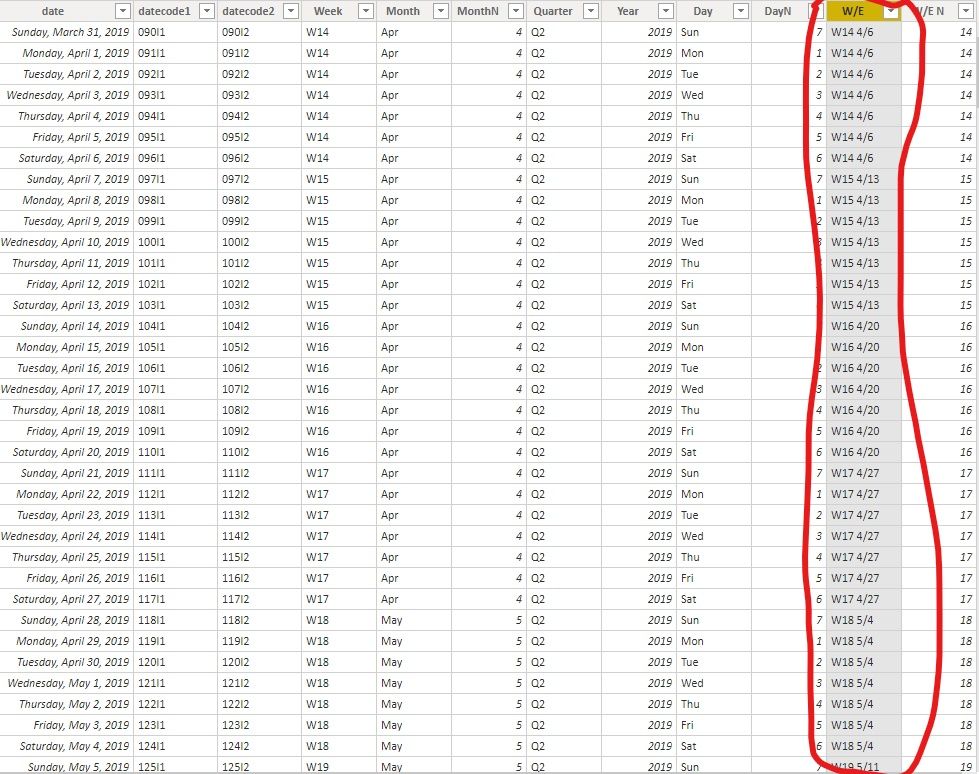
Anyone have formulation to generate weekending data like the picture below (rounded in red line)?
I need colum of data that contain week ending date with format just like in the pict attached.
Thank you.
Solved! Go to Solution.


- Mark as New
- Bookmark
- Subscribe
- Mute
- Subscribe to RSS Feed
- Permalink
- Report Inappropriate Content
Hi @Irussaa ,
If you want a DAX formula, you could try the following DAX:
Column =
"W" & WEEKNUM ( 'DateDim'[WeekEnding], 1 ) & " "
    & MONTH ( 'DateDim'[WeekEnding] ) & "/"
    & DAY ( 'DateDim'[WeekEnding] )
If this post helps, then please consider Accept it as the solution to help the other members find it.
- Mark as New
- Bookmark
- Subscribe
- Mute
- Subscribe to RSS Feed
- Permalink
- Report Inappropriate Content
Hi @Irussaa ,
If you want a DAX formula, you could try the following DAX:
Column =
"W" & WEEKNUM ( 'DateDim'[WeekEnding], 1 ) & " "
    & MONTH ( 'DateDim'[WeekEnding] ) & "/"
    & DAY ( 'DateDim'[WeekEnding] )
If this post helps, then please consider Accept it as the solution to help the other members find it.
- Mark as New
- Bookmark
- Subscribe
- Mute
- Subscribe to RSS Feed
- Permalink
- Report Inappropriate Content
It works! @v-eachen-msft
But I have one more question, why is that first week ending in the beginning of the month (which is the first week in january) already generate WE2 not WE1?

Thank you
- Mark as New
- Bookmark
- Subscribe
- Mute
- Subscribe to RSS Feed
- Permalink
- Report Inappropriate Content
Hi @Irussaa ,
Replace WEEKNUM ( 'DateDim'[WeekEnding], 1 ) with WEEKNUM ( 'DateDim'[WeekEnding], 2 ). After my tests, it will work.
If this post helps, then please consider Accept it as the solution to help the other members find it.
- Mark as New
- Bookmark
- Subscribe
- Mute
- Subscribe to RSS Feed
- Permalink
- Report Inappropriate Content
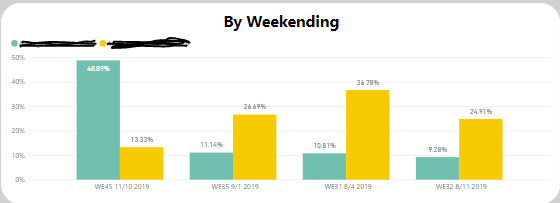
@v-eachen-msft I'm sorry can I ask one more question?
Why the WE data isn't arranged in the chart?
Thank you!


- Mark as New
- Bookmark
- Subscribe
- Mute
- Subscribe to RSS Feed
- Permalink
- Report Inappropriate Content
@Irussaa Please change your WE column "Sort By Column" to the WeekEndingNumber that needs to be derived from WeekEndingDate. (As you can't directly use the WeekEndingDate for Sort By Column, as WE is using that field)
Did I answer your question? Mark my post as a solution!
Proud to be a PBI Community Champion
- Mark as New
- Bookmark
- Subscribe
- Mute
- Subscribe to RSS Feed
- Permalink
- Report Inappropriate Content
- Mark as New
- Bookmark
- Subscribe
- Mute
- Subscribe to RSS Feed
- Permalink
- Report Inappropriate Content

- Mark as New
- Bookmark
- Subscribe
- Mute
- Subscribe to RSS Feed
- Permalink
- Report Inappropriate Content
Hi @Irussaa
ColumnName =

Text.Combine({[Week]," ",Number.ToText([MonthN]),"/", Number.ToText(Date.Day
 (Date.EndOfWeek([date]))})
Tell me if this works, since I did not have your table, I did this free hand. This is in Power Query.
Let me know if you have any questions.
If this solves your issues, please mark it as the solution, so that others can find it easily. Kudos 👍are nice too.
Nathaniel
Did I answer your question? Mark my post as a solution!
Proud to be a Super User!
- Mark as New
- Bookmark
- Subscribe
- Mute
- Subscribe to RSS Feed
- Permalink
- Report Inappropriate Content
Hi @Nathaniel_C
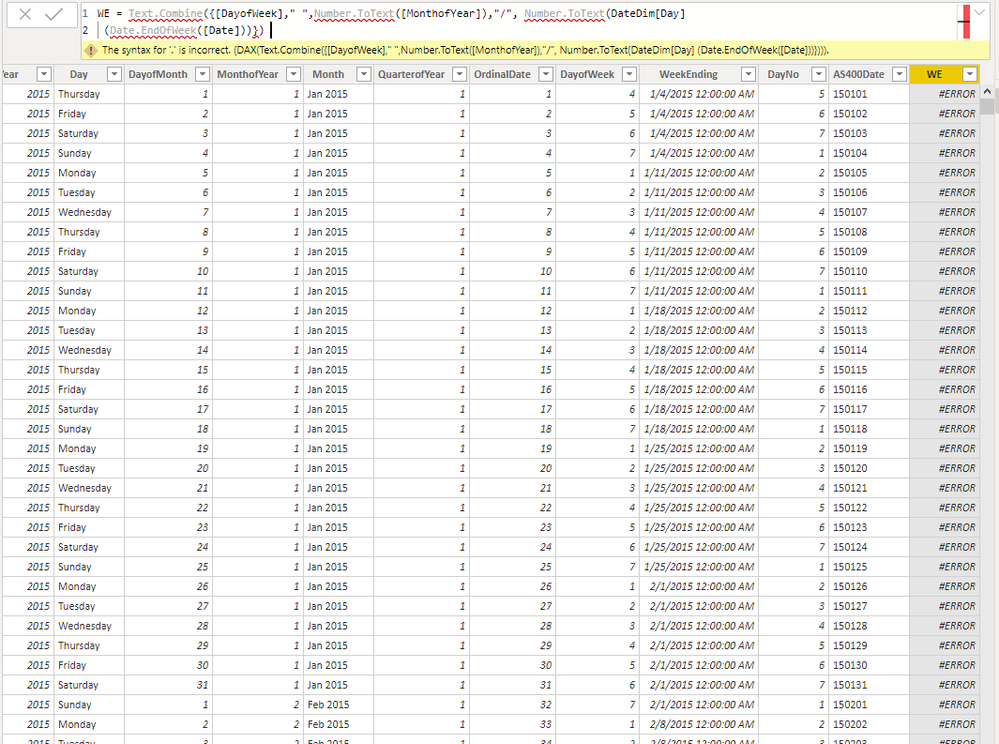
I try to apply
ColumnName =

Text.Combine({[Week]," ",Number.ToText([MonthN]),"/", Number.ToText(Date.Day
 (Date.EndOfWeek([date]))})
Inside my data set:
[Week]
[MonthN]
Date.Day
(Date.EndOfWeek([date])
- Mark as New
- Bookmark
- Subscribe
- Mute
- Subscribe to RSS Feed
- Permalink
- Report Inappropriate Content
Hello @Irussaa ,
Here is a link to Power Query Power Query . It is the best place to add Calculated Columns.
However this is a way that you can do it in Power BI.
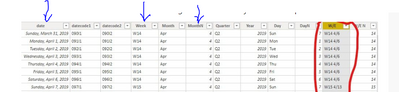
WE= table[Week] && " " && table[MonthN] && "/" && Day(table[Date]+ 7-WEEKDAY(table[Date],1))In your post you show a table with columns. I took the name of the columns from that picture. You will want to replace "table" in my formula with your table name.
Let me know if you have any questions.
If this solves your issues, please mark it as the solution, so that others can find it easily. Kudos 👍are nice too.
Nathaniel
Did I answer your question? Mark my post as a solution!
Proud to be a Super User!

Helpful resources

FabCon & SQLCon – Barcelona 2026
Join us in Barcelona for FabCon and SQLCon, the Fabric, Power BI, SQL, and AI community event. Save €200 with code FABCMTY200.

Power BI Monthly Update - July 2026
Check out the July 2026 Power BI update to learn about new features.

Power BI DataViz World Championships - June 2026
A new Power BI DataViz World Championship is coming this June! Don't miss out on submitting your entry.

| User | Count |
|---|---|
| 25 | |
| 23 | |
| 20 | |
| 18 | |
| 14 |


| User | Count |
|---|---|
| 24 | |
| 20 | |
| 20 | |
| 20 | |
| 19 |


