Learn from the best! Meet the four finalists headed to the FINALS of the Power BI Dataviz World Championships! Register now
Hi All,
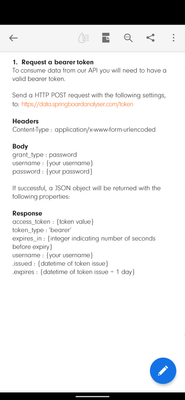
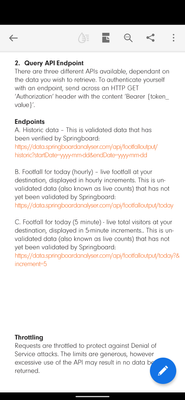
I am fairly new to PowerBI and trying to connect to an API to load data into my report. The API documentation requires a POST request for a bearer token which should then be used when calling the data query endpoint.
I need some help on the best way to set this up.
I have attached some screenshots to show what is required and would be grateful for any assistance to get this up and running!
Thanks!
Solved! Go to Solution.
Hi @PieterS
You could refer to these links:
powerbi - How do I retrieve a bearer token from a service in Power BI? - Stack Overflow
powerbi - Where do I save token in Power BI web connection? - Stack Overflow
Regards,
Community Support Team _ Jing
If this post helps, please Accept it as the solution to help other members find it.
Hi @PieterS
You could refer to these links:
powerbi - How do I retrieve a bearer token from a service in Power BI? - Stack Overflow
powerbi - Where do I save token in Power BI web connection? - Stack Overflow
Regards,
Community Support Team _ Jing
If this post helps, please Accept it as the solution to help other members find it.
Thansk for your reply! I managed to get it to work as follows:
let
url = "https://data.springboardanalyser.com/token",
GetJson = Web.Contents(url,
[
Headers = [#"Accept"="application/json",
#"Content-Type"="application/x-www-form-urlencoded;charset=UTF-8"],
Content = Text.ToBinary("username=MYUSERNAME&password=MYPASWORD&grant_type=password")
]
),
FormatAsJson = Json.Document(GetJson),
// Gets token from the Json response
AccessToken = FormatAsJson[access_token],
AccessTokenHeader = "bearer " & AccessToken,
GetJsonQuery = Web.Contents("https://data.springboardanalyser.com/api/footfalloutput/historic?StartDate=2019-01-01&endDate=2021-1...",
[
Headers = [#"Authorization"=AccessTokenHeader]
]
),
FormatAsJsonQuery = Json.Document(GetJsonQuery),
#"Converted to Table" = Table.FromList(FormatAsJsonQuery, Splitter.SplitByNothing(), null, null, ExtraValues.Error)
in
I'm somewhat new to PowerBI (I've been a full stack dev for 25 years). My questions are:
1) What data source do I select for the report when I have a service that issues a token from the client secret and client id? Web? Because if I select web, it wants the url of the service.
2) Where does the code listed above go? Do I click the Transform Data and get into the advanced editor?
I guess I'm asking this: From the time you click "File" -> "Blank Report", how do I get to the point where I am writing this code to get the token and then call the api endpoint to get the data?
Thanks!
If you have recently started exploring Fabric, we'd love to hear how it's going. Your feedback can help with product improvements.
A new Power BI DataViz World Championship is coming this June! Don't miss out on submitting your entry.
Share feedback directly with Fabric product managers, participate in targeted research studies and influence the Fabric roadmap.
| User | Count |
|---|---|
| 57 | |
| 38 | |
| 33 | |
| 19 | |
| 16 |
| User | Count |
|---|---|
| 69 | |
| 67 | |
| 41 | |
| 32 | |
| 24 |