cancel
Showing results for 
Search instead for 
Did you mean: 

July 7 - July 17 | Round 2 of the Power BI Dataviz World Championships. Don't miss your chance! Learn more

Reply
Anonymous
Not applicable

【API CALL】 Python scripts return nothing

Hi guys,


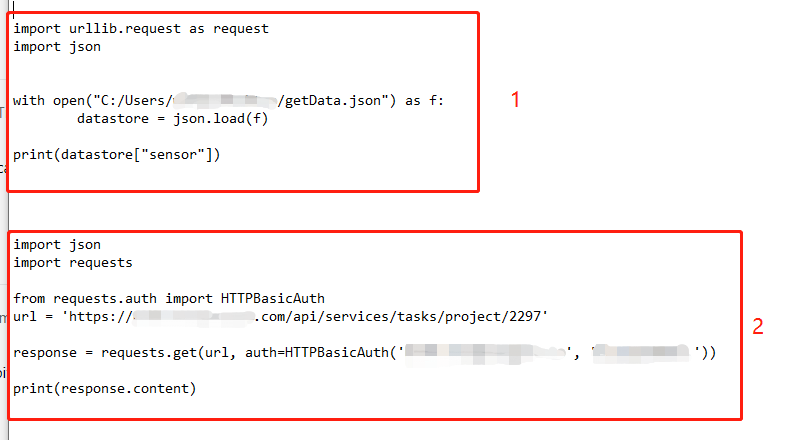
I have two python scripts. Both https links are worked when I use them as "Web" sources. 


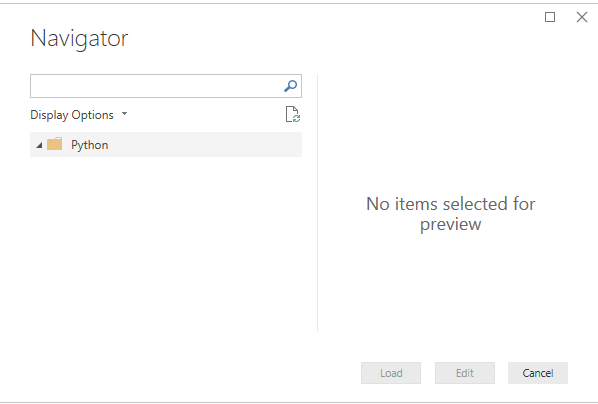
However, when I try to use them as "python script" source, they return nothing and shows "no item selected for preview".


I tried these two scripts on my local CMD prompt with python, they returned the web pages successfully.


I am not sure that is the failure because these two websites are on my company's internal server? If so, why I can use "web" source to get data in power bi?


python API call.png


python API call 2.png

1 ACCEPTED SOLUTION

Hi @Anonymous ,


Based on my research, it does support other package, but imported data must be in a pandas data frame, you can refer to thread about how to store result in the PD data frame.


Best regards,


Community Support Team _ Dong Li
If this post helps, then please consider Accept it as the solution to help the other members find it more quickly.

View solution in original post

4 REPLIES 4
v-lid-msft
Community Support
Community Support

Hi @Anonymous ,


Based on this document,  The Power BI Python integration requires the installation of two Python packages: Pandas and Matplotlib


When preparing and running a Python script in Power BI Desktop, there are a few limitations:

  • Only pandas data frames are imported, so make sure the data you want to import to Power BI is represented in a data frame
  • Any Python script that runs longer than 30 minutes times out
  • Interactive calls in the Python script, such as waiting for user input, halts the script’s execution
  • When setting the working directory within the Python script, you must define a full path to the working directory, rather than a relative path
  • Nested tables are currently not supported


Best regards,


Community Support Team _ Dong Li
If this post helps, then please consider Accept it as the solution to help the other members find it more quickly.
Anonymous
Not applicable

Hi @v-lid-msft ,


Thank you for replying. I have read this document .


Do you mean that, so far Power BI Python only support Pandas and Matplotlib packages?


Because I don't think these two packages can be used for API CALL. 


Does that mean Power BI Python not support web API data pulling?

Hi @Anonymous ,


Based on my research, it does support other package, but imported data must be in a pandas data frame, you can refer to thread about how to store result in the PD data frame.


Best regards,


Community Support Team _ Dong Li
If this post helps, then please consider Accept it as the solution to help the other members find it more quickly.
Anonymous
Not applicable

Hi @v-lid-msft ,


Yes, you are right. I tried pd.DataFrame and it works!


Thank you so much!


Sherry

Helpful resources

Announcements
FabCon and SQLCon Barcelona 2026

FabCon & SQLCon – Barcelona 2026

Join us in Barcelona for FabCon and SQLCon, the Fabric, Power BI, SQL, and AI community event. Save €200 with code FABCMTY200.

60 days of Data Days Carousel

Data Days 2026

Join Data Days 2026: 60 days of free live/on-demand sessions, challenges, study groups, and certification opportunities.

Power BI DataViz World Championships carousel

Power BI DataViz World Championships - June 2026

A new Power BI DataViz World Championship is coming this June! Don't miss out on submitting your entry.

Top Solution Authors