cancel
Showing results for 
Search instead for 
Did you mean: 

The Power BI Data Visualization World Championships is back! Get ahead of the game and start preparing now! Learn more

Reply
Anonymous
Not applicable

【API CALL】 Python scripts return nothing

Hi guys,


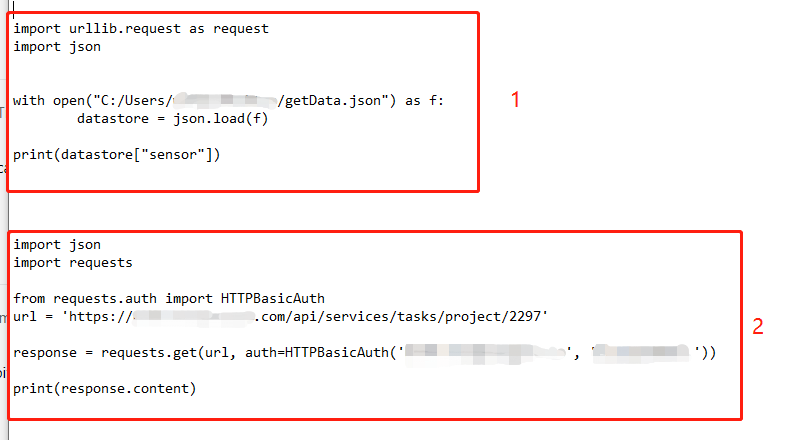
I have two python scripts. Both https links are worked when I use them as "Web" sources. 


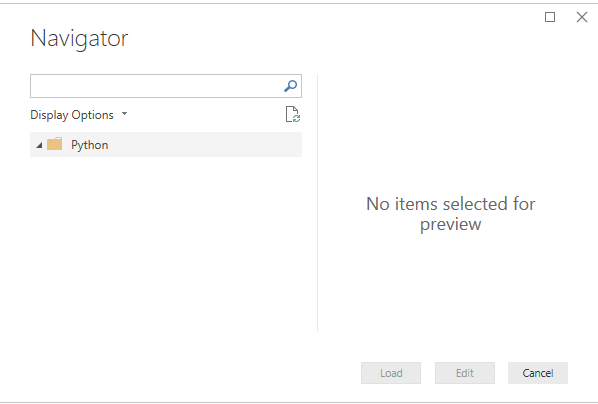
However, when I try to use them as "python script" source, they return nothing and shows "no item selected for preview".


I tried these two scripts on my local CMD prompt with python, they returned the web pages successfully.


I am not sure that is the failure because these two websites are on my company's internal server? If so, why I can use "web" source to get data in power bi?


python API call.png


python API call 2.png

1 ACCEPTED SOLUTION

Hi @Anonymous ,


Based on my research, it does support other package, but imported data must be in a pandas data frame, you can refer to thread about how to store result in the PD data frame.


Best regards,


Community Support Team _ Dong Li
If this post helps, then please consider Accept it as the solution to help the other members find it more quickly.

View solution in original post

4 REPLIES 4
v-lid-msft
Community Support
Community Support

Hi @Anonymous ,


Based on this document,  The Power BI Python integration requires the installation of two Python packages: Pandas and Matplotlib


When preparing and running a Python script in Power BI Desktop, there are a few limitations:

  • Only pandas data frames are imported, so make sure the data you want to import to Power BI is represented in a data frame
  • Any Python script that runs longer than 30 minutes times out
  • Interactive calls in the Python script, such as waiting for user input, halts the script’s execution
  • When setting the working directory within the Python script, you must define a full path to the working directory, rather than a relative path
  • Nested tables are currently not supported


Best regards,


Community Support Team _ Dong Li
If this post helps, then please consider Accept it as the solution to help the other members find it more quickly.
Anonymous
Not applicable

Hi @v-lid-msft ,


Thank you for replying. I have read this document .


Do you mean that, so far Power BI Python only support Pandas and Matplotlib packages?


Because I don't think these two packages can be used for API CALL. 


Does that mean Power BI Python not support web API data pulling?

Hi @Anonymous ,


Based on my research, it does support other package, but imported data must be in a pandas data frame, you can refer to thread about how to store result in the PD data frame.


Best regards,


Community Support Team _ Dong Li
If this post helps, then please consider Accept it as the solution to help the other members find it more quickly.
Anonymous
Not applicable

Hi @v-lid-msft ,


Yes, you are right. I tried pd.DataFrame and it works!


Thank you so much!


Sherry

Helpful resources

Announcements
Power BI DataViz World Championships

Power BI Dataviz World Championships

The Power BI Data Visualization World Championships is back! Get ahead of the game and start preparing now!

December 2025 Power BI Update Carousel

Power BI Monthly Update - December 2025

Check out the December 2025 Power BI Holiday Recap!

FabCon Atlanta 2026 carousel

FabCon Atlanta 2026

Join us at FabCon Atlanta, March 16-20, for the ultimate Fabric, Power BI, AI and SQL community-led event. Save $200 with code FABCOMM.