Get certified for free when you join Fabric Data Days 2026 and dive into Fabric, Power BI, SQL, AI, and other essential data skills.
Join nowData Days is here! Join us now for 60+ days of learning, challenges, and connection. Learn more
Hi guys,
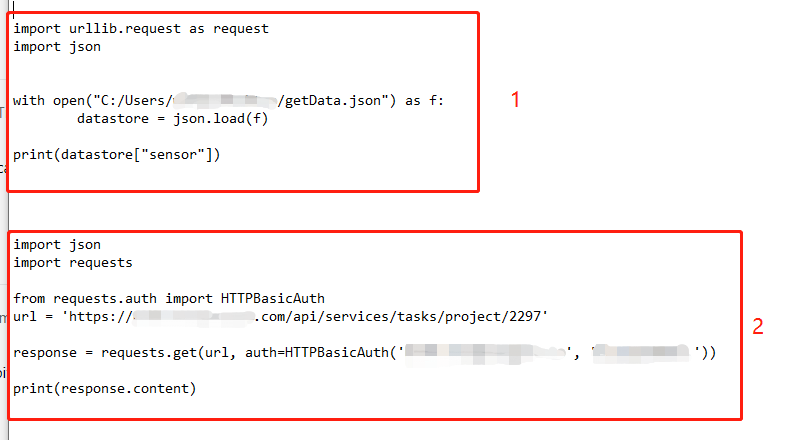
I have two python scripts. Both https links are worked when I use them as "Web" sources.
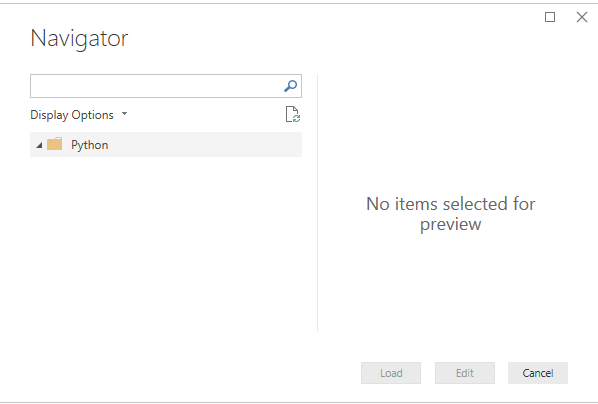
However, when I try to use them as "python script" source, they return nothing and shows "no item selected for preview".
I tried these two scripts on my local CMD prompt with python, they returned the web pages successfully.
I am not sure that is the failure because these two websites are on my company's internal server? If so, why I can use "web" source to get data in power bi?
Solved! Go to Solution.
Hi @Anonymous ,
Based on my research, it does support other package, but imported data must be in a pandas data frame, you can refer to thread about how to store result in the PD data frame.
Best regards,
Hi @Anonymous ,
Based on this document, The Power BI Python integration requires the installation of two Python packages: Pandas and Matplotlib
When preparing and running a Python script in Power BI Desktop, there are a few limitations:
Best regards,
Hi @v-lid-msft ,
Thank you for replying. I have read this document .
Do you mean that, so far Power BI Python only support Pandas and Matplotlib packages?
Because I don't think these two packages can be used for API CALL.
Does that mean Power BI Python not support web API data pulling?
Hi @Anonymous ,
Based on my research, it does support other package, but imported data must be in a pandas data frame, you can refer to thread about how to store result in the PD data frame.
Best regards,
Don't miss out on Data Days, June 15 through August 7. Learn Fabric, Power BI, SQL, AI and more.
Check out the May 2026 Power BI update to learn about new features.
| User | Count |
|---|---|
| 23 | |
| 23 | |
| 21 | |
| 20 | |
| 15 |
| User | Count |
|---|---|
| 58 | |
| 53 | |
| 42 | |
| 30 | |
| 24 |