cancel
Showing results for 
Search instead for 
Did you mean: 

July 7 - July 17 | Round 2 of the Power BI Dataviz World Championships. Don't miss your chance! Learn more

Reply
Anonymous
Not applicable

ALL function strage behaviour

Hi All,

I am facing strange behaviour of ALL function

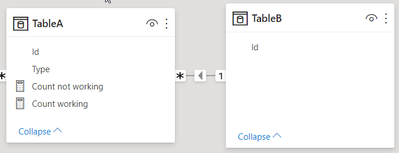
Let me explain, model is simple in this case and i am having fact table (tableA) and dimension table (TableB). You can also download PBIX here it is probably easier to understand it 
 

morz3d_1-1623705968632.png


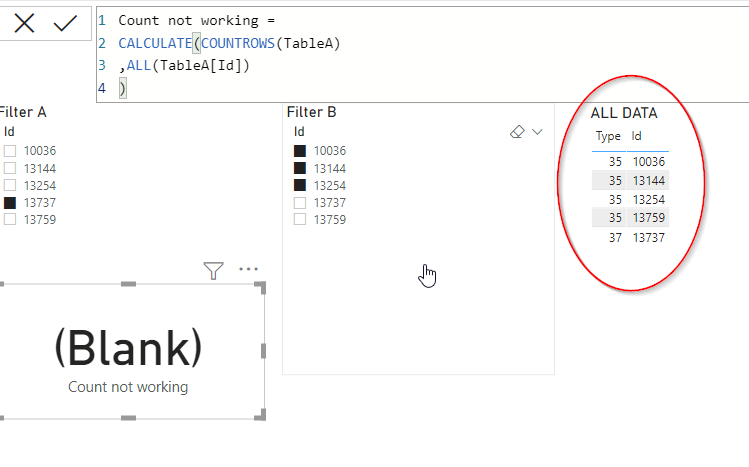
There are only few records in TableA and the logic is following: i would like to get rowcount of tableA but only considering filter from tableB, this is the reason why ALL(tableA[ID]) is used to clear any filter ID column of Table A. FIlterB is constant like shown in the picture

Problem is following, this logic is working for FilterA Id = 13759 but it is not working for 13737 (one shown on the picture), i am not quite sure why is this happening, only difference is type of those two IDs, but i dont see how that could influence this result.

IT could be solved by adding anohter tableC and using it as a slicer, I already checked this solution on the second tab, but for this approach i would need to change my reports heavily so i would prefer if i get it working with measure fix.


morz3d_2-1623706160198.png


1 ACCEPTED SOLUTION
selimovd
Most Valuable Professional

Hey @Anonymous ,


the reason is that you are using a slicer for the same table as you do a COUNTROWS.

In that case the Auto-Exist feature kicks in, what is a technique to optimize unnecessary calculations in DAX. You can easily solve that by using a star schema, filtering only on dimensional tables and using the IDs from the fact table only to create the relationships.


There is also an article about the details of Auto-Exist:

Understanding DAX Auto-Exist - SQLBI


If you need any help please let me know.
If I answered your question I would be happy if you could mark my post as a solution ✔️ and give it a thumbs up 👍
 
Best regards
Denis
 

View solution in original post

3 REPLIES 3
Syndicate_Admin
Administrator
Administrator

Thanks @selimovd this explains it exactly.

I'll switch to start the schema

Anonymous
Not applicable

Thanks @selimovd this exactly explains it.

I will switch to start schema

selimovd
Most Valuable Professional

Hey @Anonymous ,


the reason is that you are using a slicer for the same table as you do a COUNTROWS.

In that case the Auto-Exist feature kicks in, what is a technique to optimize unnecessary calculations in DAX. You can easily solve that by using a star schema, filtering only on dimensional tables and using the IDs from the fact table only to create the relationships.


There is also an article about the details of Auto-Exist:

Understanding DAX Auto-Exist - SQLBI


If you need any help please let me know.
If I answered your question I would be happy if you could mark my post as a solution ✔️ and give it a thumbs up 👍
 
Best regards
Denis
 

Helpful resources

Announcements
FabCon and SQLCon Barcelona 2026

FabCon & SQLCon – Barcelona 2026

Join us in Barcelona for FabCon and SQLCon, the Fabric, Power BI, SQL, and AI community event. Save €200 with code FABCMTY200.

60 days of Data Days Carousel

Data Days 2026

Join Data Days 2026: 60 days of free live/on-demand sessions, challenges, study groups, and certification opportunities.

Power BI DataViz World Championships carousel

Power BI DataViz World Championships - June 2026

A new Power BI DataViz World Championship is coming this June! Don't miss out on submitting your entry.

Top Solution Authors