cancel
Showing results for 
Search instead for 
Did you mean: 

Try your skills in the Power BI Dataviz World Championship! Round one ends June 26. Join now

Reply
Anonymous
Not applicable

ALL function not working as expected

Hi all,


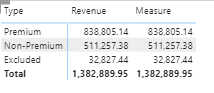
I am trying to get the grand total (1382889.95) showing for each row in "Measure" by using ALL function, but it doesn't seem like it's working. Anyone know what's wrong with my dax?


Both columns are from the same Fact table

Measure = CALCULATE(SUM(Fact_Actual[Revenue]), ALL(Fact_Sales[Type]))


beekee_0-1620235591950.png


Regards,

BK

1 ACCEPTED SOLUTION
selimovd
Most Valuable Professional

Hey @Anonymous ,


can you check if the column Fact_Sales[Type] has a sort by column?

If yes, then you also have to remove that filter:

MyMeasure =
CALCULATE(
    SUM( Fact_Actual[Revenue] ),
    ALL( Fact_Sales[Type] ),
    ALL( Fact_Sales[SortByColumn] )
)


If you need any help please let me know.
If I answered your question I would be happy if you could mark my post as a solution ✔️ and give it a thumbs up 👍
 
Best regards
Denis
 

View solution in original post

4 REPLIES 4
Jihwan_Kim
Super User
Super User

Hi, @Anonymous 

Please try the below.


Measure = CALCULATE(SUM(Fact_Actual[Revenue]), ALL(Fact_Actual))


Hi, My name is Jihwan Kim.


If this post helps, then please consider accept it as the solution to help other members find it faster, and give a big thumbs up.


Linkedin: linkedin.com/in/jihwankim1975/

Twitter: twitter.com/Jihwan_JHKIM


If this post helps, then please consider accepting it as the solution to help other members find it faster, and give a big thumbs up.


Click here to visit my LinkedIn page

selimovd
Most Valuable Professional

Hey @Anonymous ,


can you check if the column Fact_Sales[Type] has a sort by column?

If yes, then you also have to remove that filter:

MyMeasure =
CALCULATE(
    SUM( Fact_Actual[Revenue] ),
    ALL( Fact_Sales[Type] ),
    ALL( Fact_Sales[SortByColumn] )
)


If you need any help please let me know.
If I answered your question I would be happy if you could mark my post as a solution ✔️ and give it a thumbs up 👍
 
Best regards
Denis
 
Anonymous
Not applicable

Just wanted to thank you for this, I was having the same exact issue and this solved it perfectly!! Now I know I have to remove a sort by feature on a column as well

vanessafvg
Community Champion
Community Champion

maybe do the all on the table instead of the column?

Measure = CALCULATE(SUM(Fact_Actual[Revenue]), ALL(Fact_Sales))


If I took the time to answer your question and I came up with a solution, please mark my post as a solution and /or give kudos freely for the effort 🙂 Thank you!

Proud to be a Super User!


Helpful resources

Announcements
Fabric Data Days is here Carousel

Fabric Data Days 2026

Don't miss out on Data Days, June 15 through August 7. Learn Fabric, Power BI, SQL, AI and more.

Power BI DataViz World Championships carousel

Power BI DataViz World Championships - June 2026

A new Power BI DataViz World Championship is coming this June! Don't miss out on submitting your entry.