cancel
Showing results for 
Search instead for 
Did you mean: 

Learn from the best! Meet the four finalists headed to the FINALS of the Power BI Dataviz World Championships! Register now

Reply
cham
Post Patron
Post Patron

3CX Report Import

Hi,


I want to know how to import 3CX phone report directly to the Power BI. 

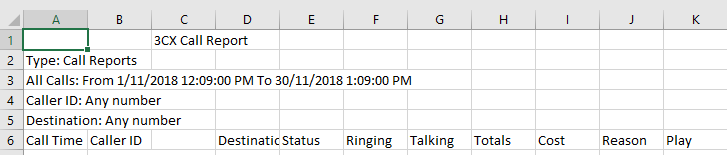
3CX report format is having first five rows of the report details and last row is having total. How to remove those rows automatically in power bi. And column "C" is not having any details. I want to remove that column automatically in Power Bi.

Is there any way to do that?

3cx error.PNG

1 ACCEPTED SOLUTION
Anonymous
Not applicable

I don't know 3CX specifically, so whether you can directly get the data from them I wouldn't be able to comment.  That would entirely depend where the data is stored and what access you have.


Power BI can check back with a source either Daily or Weekly.


Getting it to remove the Top X rows is easy, as i described.  Getting rid of the last row could be done by using the "Filter Rows" option and using whatever is unique about that last row to remove it.  Something like a column where it is always null, but not null in your data.  Or if its labeled something like "Grand Total", you could filter out specifically by that.

View solution in original post

5 REPLIES 5
Anonymous
Not applicable

Good evening,


It's an old thread but what i did is create a logic app which downloads the scheduled csv file to a file server. On this file server there is a script which imports the information into a SQL database. This happens every night.

Anonymous
Not applicable

In the menu ribbon, click on the option "Edit Queries".  In here you will find the queries, and their data import steps, before they become tables in your data model.


Normally when you bring in an excel document a few steps are done for you, based on the common import steps most people would need to take.


When you use your Get Date to bring in your 3CX report, you might have to remove any problematic steps, such as promote headers, if they occured to early.


There is also an option called "Remove Top X Rows".  Here you'll need to specify how many rows to remove.  Assuming those junk rows are always going to be the same number, this will work great!


Failing that, if this header block is different every time, you could find a column that should always have data and do a Filter and remove blank rows.  This should achieve the same goal.

Hi Ross,


I want to import that sheet monthly. Also I need to remove top five rows and last row in that sheet.Is there any way to directly get data from 3CX to Power BI?

Anonymous
Not applicable

I don't know 3CX specifically, so whether you can directly get the data from them I wouldn't be able to comment.  That would entirely depend where the data is stored and what access you have.


Power BI can check back with a source either Daily or Weekly.


Getting it to remove the Top X rows is easy, as i described.  Getting rid of the last row could be done by using the "Filter Rows" option and using whatever is unique about that last row to remove it.  Something like a column where it is always null, but not null in your data.  Or if its labeled something like "Grand Total", you could filter out specifically by that.

Thank You so much for your help

Helpful resources

Announcements
New to Fabric survey Carousel

New to Fabric Survey

If you have recently started exploring Fabric, we'd love to hear how it's going. Your feedback can help with product improvements.

Power BI DataViz World Championships carousel

Power BI DataViz World Championships - June 2026

A new Power BI DataViz World Championship is coming this June! Don't miss out on submitting your entry.

Join our Fabric User Panel

Join our Fabric User Panel

Share feedback directly with Fabric product managers, participate in targeted research studies and influence the Fabric roadmap.

March Power BI Update Carousel

Power BI Community Update - March 2026

Check out the March 2026 Power BI update to learn about new features.