cancel
Showing results for 
Search instead for 
Did you mean: 

The Power BI Data Visualization World Championships is back! Get ahead of the game and start preparing now! Learn more

Reply
naoki
Helper I
Helper I

24 Months Scatter Plot Graph

Hi, 


I would like to create a scatter plot graph with the past 24 mths trend.  


The dots are the sales of each respective sales person, and I would like to show a median line of all the sales person. 


How do I get the past 24 months trend and to put the respective sales person as an individual dot? 


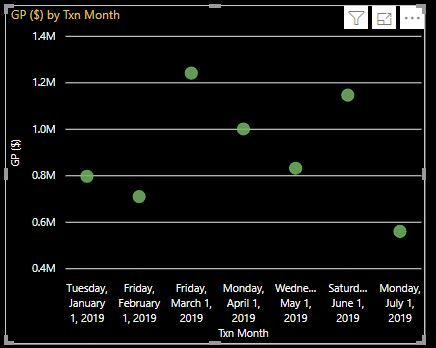
Capture.JPG

4 REPLIES 4
v-juanli-msft
Community Support
Community Support

Hi @naoki 

The dots are the sales of each respective sales person, and I would like to show a median line of all the sales person. 

You could add a median line. (Analytics->Median line)


How do I get the past 24 months trend and to put the respective sales person as an individual dot? 

You could add datetime field in “Play axis", add "person name" in the "legend" field.

Reference:

https://radacad.com/storytelling-with-power-bi-scatter-chart


Best Regards
Maggie
Community Support Team _ Maggie Li
If this post helps, then please consider Accept it as the solution to help the other members find it more quickly.


@v-juanli-msft 


Apologies, I realised I was unclear with my question. 


For the scatter plot, I would need couple of things 


1. 24 Months trend (To show their sales for the past 24 months), from month 1 to 24. 

- This will show the total sales per month up till 24 months for all sales person. (E.g) Salesperson A, Month 1 10k, Month 2, 20k and so on), however I would need to show for all, as I am intending to create a corelation at a later stage using this result. 

2. I also would like to plot my own average line which should be showing an upwards trend as that is the benchmark that I would want to see the sales person growth vs my predetermine sales person. 


Thank you.

Hi @naoki 

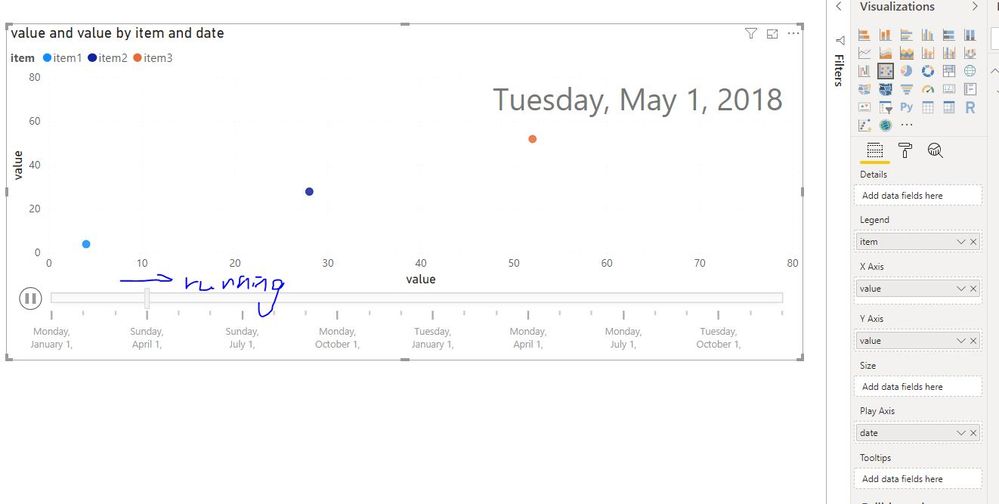
You could add "date" in the "Play Axis" as this article suggested.

Capture13.JPG

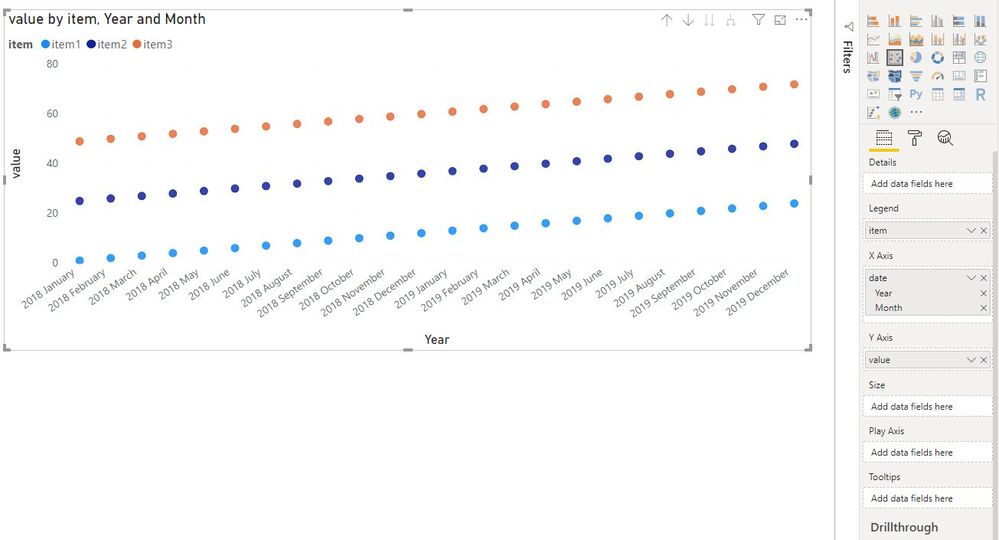
Or add "date" in "Axis", add "sales person" in "Legend" field.

Capture12.JPG

There are 12 months a year, which 24 months do you mean? the last 24 months from the current months?

What is the Independent variable and Dependent variable of the corelation?


Best Regards
Maggie

The 24 months that I meant from the day that the sales person joined. It doesn't matter to me when do they join, what matters is when did they made the sales. So if a sales person had their first sales in his 3rd month, a dot will appear on the 3rd month.  

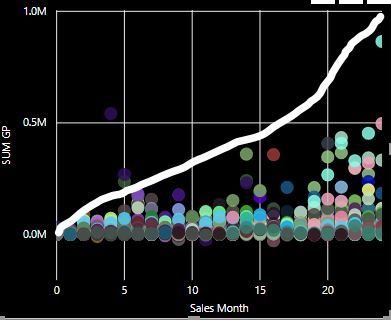
Something like my graph here, I sort of managed to get the data to show for 24 months, however, I have yet to check for issues.  As for the white line, it should be an average line that is preset by me, whereby i will be able to identify which sales person is performing below average and it needs to be as per what I drawn a growing line. 


Capture.JPG

Helpful resources

Announcements
Power BI DataViz World Championships

Power BI Dataviz World Championships

The Power BI Data Visualization World Championships is back! Get ahead of the game and start preparing now!

December 2025 Power BI Update Carousel

Power BI Monthly Update - December 2025

Check out the December 2025 Power BI Holiday Recap!

FabCon Atlanta 2026 carousel

FabCon Atlanta 2026

Join us at FabCon Atlanta, March 16-20, for the ultimate Fabric, Power BI, AI and SQL community-led event. Save $200 with code FABCOMM.