Learn from the best! Meet the four finalists headed to the FINALS of the Power BI Dataviz World Championships! Register now
Hi,
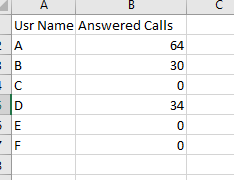
I have a data set which includes answered and unanswered call details.
If i select one user name it will show "0' because that user didnt answer any calls. So, I want to show a card showing that "this user did not answer any calls at this moment".
If the user select that particular user name if filter slicer, card need to be show automatically saying that "this user did not answer any calls."
Solved! Go to Solution.
Measure for your card:
Measure =
VAR NumCalls =
SUM ( Table1[Answered Calls] )
RETURN
IF ( NumCalls = 0; "hasn't answered any calls"; NumCalls )
Hi @cham
You'd have to provide more info on your tables/ data model so that we can get a detailed answer. Can you show a sample?
Hi,
This is the sample data set. If I select user name as "C" in my filter slicer then i want to show a card that showing "he is not answered any calls"
Measure for your card:
Measure =
VAR NumCalls =
SUM ( Table1[Answered Calls] )
RETURN
IF ( NumCalls = 0; "hasn't answered any calls"; NumCalls )
Hi @AlB
I want to know the following thing as well.
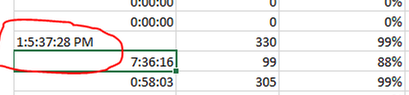
After I upload the below excel sheet into power bi it will show an error in the highlighted row.
How can i change the data type in Power BI as dd:hh:mm:ss?( days, hours, minitues and seconds)
If you select the column with the issue and go to the 'Modelling' pane you have 'Data type' and 'Format'. You can see the options for the format there.
Afte I do that its giving errors
Thank You so much
A new Power BI DataViz World Championship is coming this June! Don't miss out on submitting your entry.
Share feedback directly with Fabric product managers, participate in targeted research studies and influence the Fabric roadmap.
| User | Count |
|---|---|
| 56 | |
| 33 | |
| 33 | |
| 18 | |
| 16 |
| User | Count |
|---|---|
| 68 | |
| 67 | |
| 45 | |
| 30 | |
| 26 |