Join us at FabCon Atlanta from March 16 - 20, 2026, for the ultimate Fabric, Power BI, AI and SQL community-led event. Save $200 with code FABCOMM.
Register now!The Power BI Data Visualization World Championships is back! It's time to submit your entry. Live now!
Hi,
I'm making some experiments acessing a lakehouse from Power BI.
I tried the acess in 3 different ways. In all the three attempts, I created the absolutely same visual.
- Using SQL Endpoint Connection: Everything works
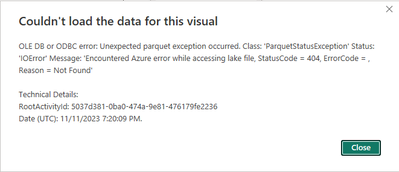
- Using live connection (choosing the lakehouse and starting the work) the visual fails with a PARQUET IO Error
- Using a local modal (clicking on the button to create a local model): the visual fails with a PARQUET IO error
This image shows the error with a live connect (I understand only the live connection is a direct lake connection, am I correct?):
This image shows the error with a local dataset:
Considering it works well when connecting to the SQL endpoint, I believe the other two errors are anomalies. What should I check and what steps should I do to investigate and solve this problem?
Kind Regards,
Dennes
Hi @DennesTorres ,
Thanks for using Fabric Community.
Can you please explain how are you trying to access the Lakehouse in Power BI?
If you could share some repro steps and screenshots , I can understand the issue better.
When I am trying to access the Lakehouse using Live connection, I am not facing any error. I am able to create a visual. I have attached the screenshots for your reference.
Please refer to this link for more information: Link1
Thanks.
Hi,
It's not any lakehouse, it's one specific lakehouse. I tried the same with a different one and it works.
But the problem remains: The access through SQL Endpoint works, the Live connection doesn't.
The two that doen'st work:
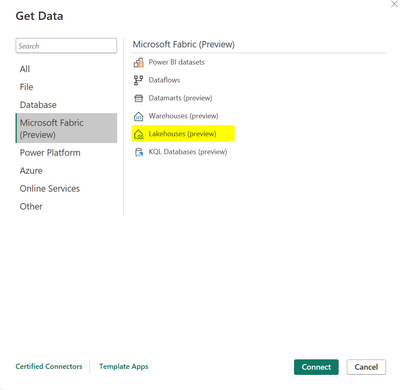
Get data -> Lakehouse -> Connect
and it continues not working if I go to model and choose to create a local dataset.
I don't know what to check in this kind of situation.
Kind Regards,
Dennes
Hi @DennesTorres ,
Are you still facing an issue in connecting to the Lakehouse?
When we are trying to repro there is no error.
Can you please try again and confirm? Try creating a new Lakehouse and connecting it to Power BI.
Thanks.
Hi @DennesTorres
Apologies for the issue you have been facing.
As per the issue with connecting the Lakehouse to Power BI desktop , I have reached the internal team for help.
This might require a deeper investigation from our engineering team about your workspace, the Lakehouse details and the logic behind it to properly understand what might be happening.
Please go ahead and raise a support ticket to reach our support team:
https://support.fabric.microsoft.com/support
Please provide the ticket number here as we can keep an eye on it.
Thank you.
Hi @DennesTorres
We haven’t heard from you on the last response and was just checking back to see if you got a chance to create a support ticket.
Please let us know if you have any further queries.
Hi @DennesTorres
Following up to check if you got a chance to create a support ticket. If yes please provide the ticket number here as we can keep an eye on it.
Please let us know if you have any further queries.