Forum Discussion
remove filter complicated case issue
Hello,
I've got this PBIX
and this measure
Measure = (CALCULATE(SUM('Table'[Value]);'Table'[Type1]<>"REVENUE")*-1)/CALCULATE(SUM('Table'[Value]);'Table'[Type1]="REVENUE")that I'd like to correct in order to divide costs (in every hierarchy level) with whatever value I obtain under total REVENUE from my filter visual selection.
By design Type 3 column could have a value that has a value as cost, revenue, both or none.
I tried changing calculate argument with filter function but without success. Is it possible?
Thanks in advance
- Anonymous6 years ago
Hi AGo ,
Your requirement is not very clear. However, you can try this measure.
Measure =var __nrt1 = CALCULATE(SUMX('Table','Table'[Value]),FILTER(ALL('Table'),'Table'[Type1] <> "Revenue"))var __rt1 = CALCULATE(SUMX('Table','Table'[Value]),FILTER(ALL('Table'),'Table'[Type1] = "Revenue"))var __nrt2 = CALCULATE(SUMX('Table','Table'[Value]),FILTER(ALLEXCEPT('Table','Table'[Type2]),'Table'[Type1] <> "Revenue"))var __rt2 = CALCULATE(SUMX('Table','Table'[Value]),FILTER(ALL('Table'),'Table'[Type1] = "Revenue"))var __rt3 = CALCULATE(SUMX('Table','Table'[Value]),FILTER(ALLEXCEPT('Table','Table'[Type3]),'Table'[Type1] = "Revenue"))var __nrt3 = CALCULATE(SUMX('Table','Table'[Value]),FILTER(ALLEXCEPT('Table','Table'[Type2],'Table'[Type3]),'Table'[Type1] <> "Revenue"))var __t1inscope = ISINSCOPE('Table'[Type1])var __t2inscope = ISINSCOPE('Table'[Type2])var __t3inscope = ISINSCOPE('Table'[Type3])returnswitch(true(),__t3inscope,DIVIDE(__nrt3,__rt3),__t2inscope,DIVIDE(__nrt2,__rt2),__t1inscope,DIVIDE(__nrt1,__rt1))Regards,HarshIf I resolve your problem Mark it as a solution and give kudos.
4 Replies
- camargos88
Community Champion
Hi AGo ,
I didn't get exaclty what you want to do. But perhaps it should work:
Measure = CALCULATE(SUM('Table'[Value]);'Table'[Type1]<>"REVENUE")*-1/CALCULATE(SUM('Table'[Value]); FILTER(ALL('Table'); 'Table'[Type1]="REVENUE"))Give it a shoot and let me know, if no give us some example.Ricardo - AnonymousNot applicable
Hi AGo ,
Your requirement is not very clear. However, you can try this measure.
Measure =var __nrt1 = CALCULATE(SUMX('Table','Table'[Value]),FILTER(ALL('Table'),'Table'[Type1] <> "Revenue"))var __rt1 = CALCULATE(SUMX('Table','Table'[Value]),FILTER(ALL('Table'),'Table'[Type1] = "Revenue"))var __nrt2 = CALCULATE(SUMX('Table','Table'[Value]),FILTER(ALLEXCEPT('Table','Table'[Type2]),'Table'[Type1] <> "Revenue"))var __rt2 = CALCULATE(SUMX('Table','Table'[Value]),FILTER(ALL('Table'),'Table'[Type1] = "Revenue"))var __rt3 = CALCULATE(SUMX('Table','Table'[Value]),FILTER(ALLEXCEPT('Table','Table'[Type3]),'Table'[Type1] = "Revenue"))var __nrt3 = CALCULATE(SUMX('Table','Table'[Value]),FILTER(ALLEXCEPT('Table','Table'[Type2],'Table'[Type3]),'Table'[Type1] <> "Revenue"))var __t1inscope = ISINSCOPE('Table'[Type1])var __t2inscope = ISINSCOPE('Table'[Type2])var __t3inscope = ISINSCOPE('Table'[Type3])returnswitch(true(),__t3inscope,DIVIDE(__nrt3,__rt3),__t2inscope,DIVIDE(__nrt2,__rt2),__t1inscope,DIVIDE(__nrt1,__rt1))Regards,HarshIf I resolve your problem Mark it as a solution and give kudos.- AGo
Post Patron
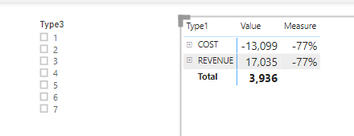
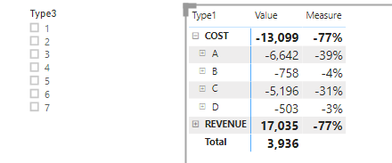
Your solution worked like a charm for costs! Thanks. The only strange fact is that the measure gives a result of 76% under REVENUE that should be totalrevenue/totalrevenue=x/x=1=100% or better hidden
- AnonymousNot applicable
Hi AGo ,
Thanks that you liked the solution.
Please use this formula for __nrt1. This will remove the 77% from Revenue.
var __nrt1 = CALCULATE(SUMX('Table','Table'[Value]),FILTER('Table','Table'[Type1] <> "Revenue"))Thanks and Regards,Harsh Nathani