

cancel
Showing results for 
Search instead for 
Did you mean: 

The Power BI Data Visualization World Championships is back! Get ahead of the game and start preparing now! Learn more

Reply
Anonymous
Not applicable

% of grand total of a measure shows incorrectly

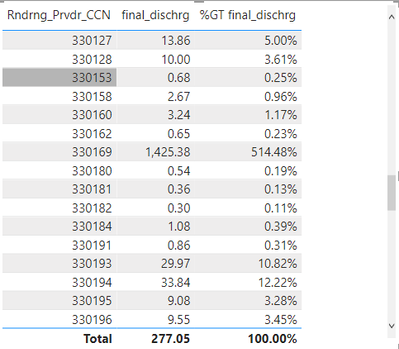
I calculate a measure called total_dischrg, I would like to see the percentage number of the measure by each poverder, I put provider and measure in a table, but when I choose show as % of grand total, it shows incorrectly as shown below, some number is even > 100% which doesn't make sense. The total also is not correct.. Any solution for this issue? 

bilzebubnight_0-1636729217678.png


5 REPLIES 5
v-angzheng-msft
Community Support
Community Support

Hi, @Anonymous 


If the logic of the formula is correct, then you could try to replace the ALLEXCEPT function with Filter+All+Max:

FILTER ( ALL ( table ), 'table'[A] = MAX ( 'table'[A] ) )

I have occasionally encountered cases where the ALLEXCEPT function does not calculate correctly and FilterAllMax works.


like this:

vangzhengmsft_0-1637031894886.png

If this does not work, then please consdier sharing more details about it and posting expected result or a simple sample file without any sesentive information for further discussion.  It makes it easier to give you a solution.


Best Regards,
Community Support Team _ Zeon Zheng


If this post helps, then please consider Accept it as the solution to help the other members find it more quickly

Anonymous
Not applicable

final_dischrg is calculated by mutiply one column with other 2 measures together which shown below..

bilzebubnight_1-1636746680659.pngbilzebubnight_2-1636746760670.png


bilzebubnight_3-1636746772454.png


PaulOlding
Solution Sage
Solution Sage

Hi @Anonymous 

What's the code for final_dischrg measure?

Anonymous
Not applicable

And final_dischrg is calcualted by spe_ratio*zip_ratio* total_discharge(which is a column is the table). It may because the calculation of final_dischrg is also involved with provider_number?

Anonymous
Not applicable

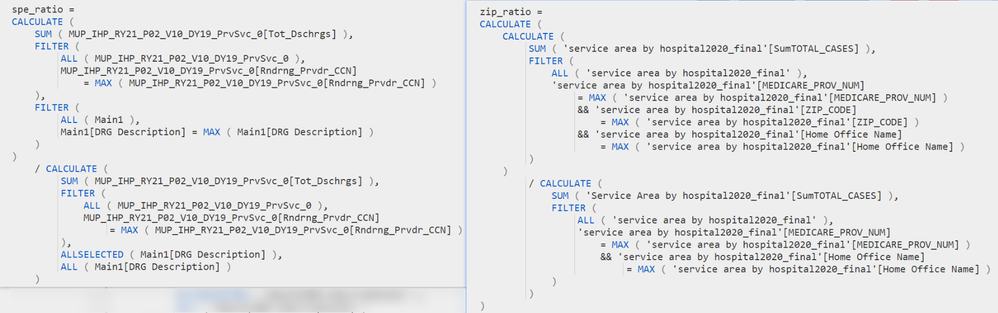
Just noticed the screenshot is too small. I paste the formula below. Both of the two ratio are just a divend function combine some ALLEXCEPT

spe_ratio = CALCULATE(SUM(MUP_IHP_RY21_P02_V10_DY19_PrvSvc_0[Tot_Dschrgs]), ALLEXCEPT(MUP_IHP_RY21_P02_V10_DY19_PrvSvc_0,MUP_IHP_RY21_P02_V10_DY19_PrvSvc_0[Rndrng_Prvdr_CCN]), ALLEXCEPT(Main1,Main1[DRG Description]))/CALCULATE(SUM(MUP_IHP_RY21_P02_V10_DY19_PrvSvc_0[Tot_Dschrgs]), ALLEXCEPT(MUP_IHP_RY21_P02_V10_DY19_PrvSvc_0,MUP_IHP_RY21_P02_V10_DY19_PrvSvc_0[Rndrng_Prvdr_CCN]), ALLSELECTED(Main1[DRG Description]), ALL(Main1[DRG Description]))
 
zip_ratio = CALCULATE(CALCULATE(SUM('service area by hospital2020_final'[SumTOTAL_CASES]), ALLEXCEPT('service area by hospital2020_final', 'service area by hospital2020_final'[MEDICARE_PROV_NUM], 'service area by hospital2020_final'[ZIP_CODE], 'service area by hospital2020_final'[Home Office Name]))/CALCULATE(SUM('Service Area by hospital2020_final'[SumTOTAL_CASES]), ALLEXCEPT('service area by hospital2020_final', 'service area by hospital2020_final'[MEDICARE_PROV_NUM], 'service area by hospital2020_final'[Home Office Name])))

Helpful resources

Announcements
Power BI DataViz World Championships

Power BI Dataviz World Championships

The Power BI Data Visualization World Championships is back! Get ahead of the game and start preparing now!

November Power BI Update Carousel

Power BI Monthly Update - November 2025

Check out the November 2025 Power BI update to learn about new features.

FabCon Atlanta 2026 carousel

FabCon Atlanta 2026

Join us at FabCon Atlanta, March 16-20, for the ultimate Fabric, Power BI, AI and SQL community-led event. Save $200 with code FABCOMM.