cancel
Showing results for 
Search instead for 
Did you mean: 

We've captured the moments from FabCon & SQLCon that everyone is talking about, and we are bringing them to the community, live and on-demand. Starts on April 14th. Register now

Reply
scabral
Helper IV
Helper IV

measure to count number of accounts that meet criteria within a matrix

Hi,


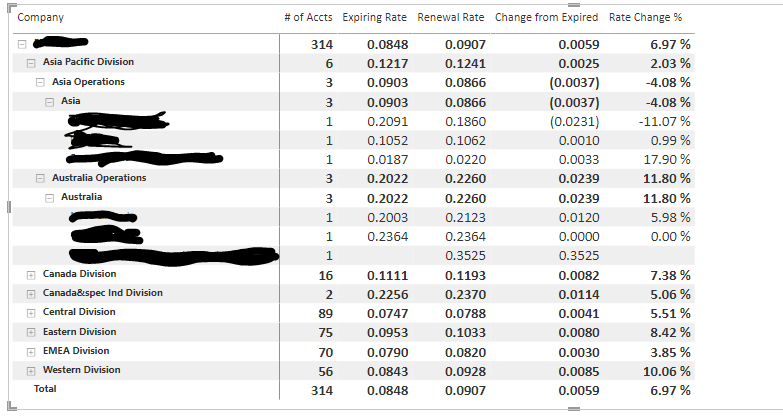
i have the following matrix in Power BI Report:

Capture1.PNG

It using a heirarchy of Company/Division/Ops/Branch and Account to build the matrix.  the measures are # of accounts (sum of accounts at each level), and then expiring rate, renewal rate, rate change from expiring and rate change %.  These are all measures that work at each level as seen in the screenshot.


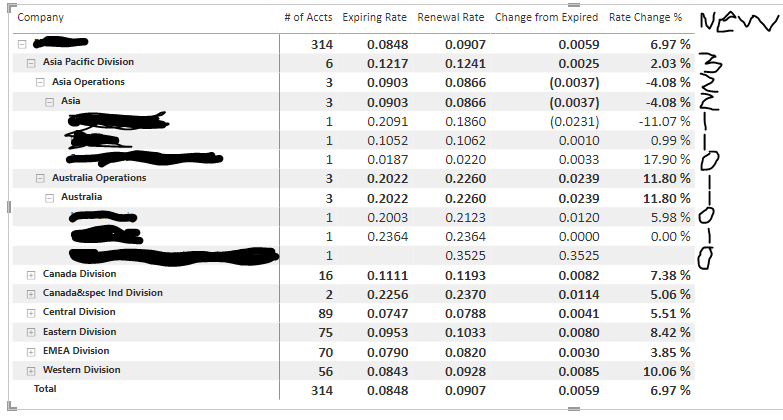
What I want to do is create a new measure that will give me the number of accounts at each level who have a Rate Change % less then 5%., so for example in the screenshot above, the measure should have these values (sorry for the handwriting):

Capture1.PNG

I tried to use the existing # of accounts measure and filter it for only accounts that have Rate Change % < 5, but isn't working.


Any assistance would be appreciated.


Scott

5 REPLIES 5
tamerj1
Community Champion
Community Champion

Hi @scabral 

please try

New =
SUMX (
SUMMARIZE (
'Table',
'Table'[Company],
'Table'[Division],
'Table'[Ops],
'Table'[Branch],
'Table'[Account]
),
IF ( [Rate Change %] < 0.05, 1, 0 )
)


you may also try

New =
SUMX (
VALUES ( 'Table'[Account] ),
IF ( [Rate Change %] < 0.05, 1, 0 )
)

Hi tamerj1,


thanks for the advice.  In the first query, if my account field belongs to another dimension table, how would i write the DAX?  So the Hierarchy fields Company/Division/Ops/Branch are in a dimension table called 'Host Office' and account is in another table called 'Client'.  I need to basically summarize columns from both those tables, but Summarize doesn't allow it.

tamerj1
Community Champion
Community Champion

@scabral 

You try summarizing the fact table 

New =
SUMX (
SUMMARIZE (
FactTable,
'Dim1'[Company],
'Dim1'[Division],
'Dim1'[Ops],
'Dim1'[Branch],
'Dim2'[Account]
),
IF ( [Rate Change %] < 0.05, 1, 0 )
)

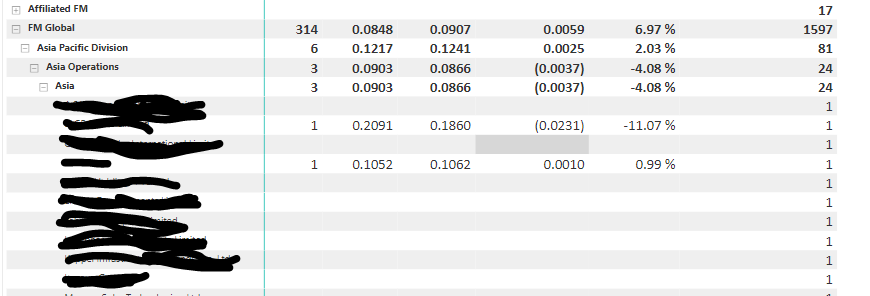
sorry for all the questions, but I now get all the accounts with blanks for the other measures but also get the correct ones that have the measures like this:

Capture1.PNG

tamerj1
Community Champion
Community Champion

@scabral 

New =
SUMX (

IF ( 

[# of Accts] <> BLANK ( ),
SUMMARIZE (
FactTable,
'Dim1'[Company],
'Dim1'[Division],
'Dim1'[Ops],
'Dim1'[Branch],
'Dim2'[Account]
),
IF ( [Rate Change %] < 0.05, 1, 0 )
)

)

Helpful resources

Announcements
New to Fabric survey Carousel

New to Fabric Survey

If you have recently started exploring Fabric, we'd love to hear how it's going. Your feedback can help with product improvements.

Power BI DataViz World Championships carousel

Power BI DataViz World Championships - June 2026

A new Power BI DataViz World Championship is coming this June! Don't miss out on submitting your entry.

Join our Fabric User Panel

Join our Fabric User Panel

Share feedback directly with Fabric product managers, participate in targeted research studies and influence the Fabric roadmap.

March Power BI Update Carousel

Power BI Community Update - March 2026

Check out the March 2026 Power BI update to learn about new features.