Join us at FabCon Vienna from September 15-18, 2025
The ultimate Fabric, Power BI, SQL, and AI community-led learning event. Save €200 with code FABCOMM.
Get registered- Power BI forums
- Get Help with Power BI
- Desktop
- Service
- Report Server
- Power Query
- Mobile Apps
- Developer
- DAX Commands and Tips
- Custom Visuals Development Discussion
- Health and Life Sciences
- Power BI Spanish forums
- Translated Spanish Desktop
- Training and Consulting
- Instructor Led Training
- Dashboard in a Day for Women, by Women
- Galleries
- Data Stories Gallery
- Themes Gallery
- Contests Gallery
- Quick Measures Gallery
- Notebook Gallery
- Translytical Task Flow Gallery
- TMDL Gallery
- R Script Showcase
- Webinars and Video Gallery
- Ideas
- Custom Visuals Ideas (read-only)
- Issues
- Issues
- Events
- Upcoming Events
Compete to become Power BI Data Viz World Champion! First round ends August 18th. Get started.
- Power BI forums
- Forums
- Get Help with Power BI
- DAX Commands and Tips
- help with formula to calculate time
- Subscribe to RSS Feed
- Mark Topic as New
- Mark Topic as Read
- Float this Topic for Current User
- Bookmark
- Subscribe
- Printer Friendly Page

- Mark as New
- Bookmark
- Subscribe
- Mute
- Subscribe to RSS Feed
- Permalink
- Report Inappropriate Content
help with formula to calculate time
Hi
i am having issues with trying to get hours counted, i want it to return Substantive Filled total hours
| Month | Status | Hours |
| Oct | Substantive Filled | 01:00:00 |
| Oct | Filled | 01:00:00 |
| Oct | Filled | 01:01:00 |
| Oct | Substantive Filled | 02:00:00 |
my hourscolumn is formatted as below

Solved! Go to Solution.


- Mark as New
- Bookmark
- Subscribe
- Mute
- Subscribe to RSS Feed
- Permalink
- Report Inappropriate Content
HI @Dougers1 ,
create the measure below. Replace"TimeCalc" with your table name.
total time (hours and mins) =
IF(SELECTEDVALUE(TimeCalc[Status]) ="Substantive Filled",
    FORMAT( SUM(TimeCalc[Hours]),"HH:MM"),
    blank()
)
If this doesn't resolve the issue, please provide a sample output.
If my response(s) assisted you in any way, don't forget to drop me a Kudos 🙂
Kind Regards,
Avinash

- Mark as New
- Bookmark
- Subscribe
- Mute
- Subscribe to RSS Feed
- Permalink
- Report Inappropriate Content
Hi @Dougers1,
You can create a measure as follows.
total hours = CALCULATE(SUM('Table'[Hours]),FILTER('Table', 'Table'[Status] = "Substantive Filled"))
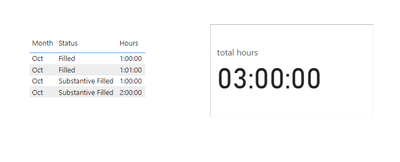
Is this the result you expect?
Best Regards,
Yuliax
If this post helps, then please consider Accept it as the solution to help the other members find it more quickly.
- Mark as New
- Bookmark
- Subscribe
- Mute
- Subscribe to RSS Feed
- Permalink
- Report Inappropriate Content
bringing back wrong sum ?
- Mark as New
- Bookmark
- Subscribe
- Mute
- Subscribe to RSS Feed
- Permalink
- Report Inappropriate Content
HI @Dougers1 ,
create the measure below. Replace"TimeCalc" with your table name.
total time (hours and mins) =
IF(SELECTEDVALUE(TimeCalc[Status]) ="Substantive Filled",
    FORMAT( SUM(TimeCalc[Hours]),"HH:MM"),
    blank()
)
If this doesn't resolve the issue, please provide a sample output.
If my response(s) assisted you in any way, don't forget to drop me a Kudos 🙂
Kind Regards,
Avinash
- Mark as New
- Bookmark
- Subscribe
- Mute
- Subscribe to RSS Feed
- Permalink
- Report Inappropriate Content
this is bringing me back wrong sum - its saying person A has worked 6hr 35 mins for oct - thats not correct answer should be 116hrs:15 mins
- Mark as New
- Bookmark
- Subscribe
- Mute
- Subscribe to RSS Feed
- Permalink
- Report Inappropriate Content
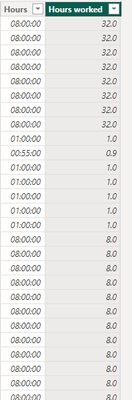
i added this but it not adding them up correct sometimes it is but other times it saying 32 hrs when it only 8
- Mark as New
- Bookmark
- Subscribe
- Mute
- Subscribe to RSS Feed
- Permalink
- Report Inappropriate Content
The VAR result is adding hour and minutes as integer value, not a time value to which works display it in hh:mm format
Would you be able to share the pbix/raw data masking sensitive information?
If my response(s) assisted you in any way, don't forget to drop me a Kudos 🙂
Kind Regards,
Avinash
Helpful resources

Power BI Monthly Update - August 2025
Check out the August 2025 Power BI update to learn about new features.

Fabric Community Update - August 2025
Find out what's new and trending in the Fabric community.

| User | Count |
|---|---|
| 16 | |
| 8 | |
| 7 | |
| 6 | |
| 6 |


| User | Count |
|---|---|
| 26 | |
| 13 | |
| 12 | |
| 8 | |
| 8 |


