This time we’re going bigger than ever. Fabric, Power BI, SQL, AI and more. We're covering it all. You won't want to miss it.
Learn moreLevel up your Power BI skills this month - build one visual each week and tell better stories with data! Get started
Hi Guys.
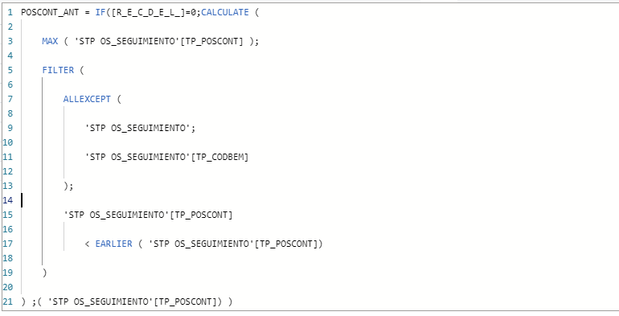
Currently I use this code to find the last position of a counter for a team within the same column, which is fed by multiple teams.
The model was in import mode, which presented several connection problems with other DirectQuery tables, I want to convert the table to DirectQuery but it tells me that I cannot use CALCULATE for DirectQuery, how can I find this same result without having formula restriction in DirectQuery
In calculated columns in DQ mode CALCULATE is not allowed. You can read about it here: https://dax.guide/calculate
You have to rewrite the logic to only use FILTER and other functions that are allowed in this mode. By the way, I find it hard to understand what problems you've had with "other DQ tables." The best and fastest model is one that's fully in Import mode. Also, you can mix and match by creating the so-called composite models.
I suspect that if you create a calculated column on a table that's in DQ mode, the whole table will nevertheless be imported into the model and stored in memory. Am I right?
Check out the April 2026 Power BI update to learn about new features.
Sign up to receive a private message when registration opens and key events begin.
If you have recently started exploring Fabric, we'd love to hear how it's going. Your feedback can help with product improvements.
| User | Count |
|---|---|
| 5 | |
| 4 | |
| 3 | |
| 2 | |
| 2 |
| User | Count |
|---|---|
| 7 | |
| 6 | |
| 6 | |
| 5 | |
| 4 |