Don't miss your chance to take the Fabric Data Engineer (DP-600) exam for FREE! Find out how by attending the DP-600 session on April 23rd (pacific time), live or on-demand.
Learn moreNext up in the FabCon + SQLCon recap series: The roadmap for Microsoft SQL and Maximizing Developer experiences in Fabric. All sessions are available on-demand after the live show. Register now
Hi Guys.
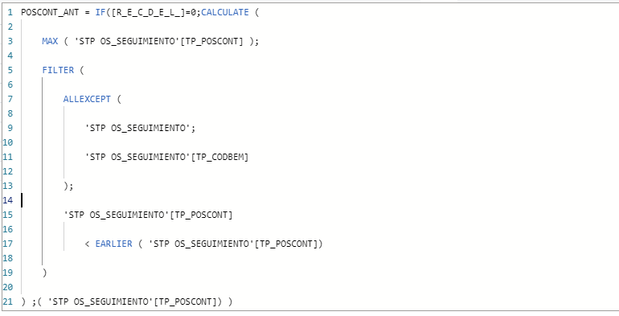
Currently I use this code to find the last position of a counter for a team within the same column, which is fed by multiple teams.
The model was in import mode, which presented several connection problems with other DirectQuery tables, I want to convert the table to DirectQuery but it tells me that I cannot use CALCULATE for DirectQuery, how can I find this same result without having formula restriction in DirectQuery
In calculated columns in DQ mode CALCULATE is not allowed. You can read about it here: https://dax.guide/calculate
You have to rewrite the logic to only use FILTER and other functions that are allowed in this mode. By the way, I find it hard to understand what problems you've had with "other DQ tables." The best and fastest model is one that's fully in Import mode. Also, you can mix and match by creating the so-called composite models.
I suspect that if you create a calculated column on a table that's in DQ mode, the whole table will nevertheless be imported into the model and stored in memory. Am I right?
If you have recently started exploring Fabric, we'd love to hear how it's going. Your feedback can help with product improvements.
A new Power BI DataViz World Championship is coming this June! Don't miss out on submitting your entry.
Share feedback directly with Fabric product managers, participate in targeted research studies and influence the Fabric roadmap.
| User | Count |
|---|---|
| 9 | |
| 6 | |
| 3 | |
| 2 | |
| 2 |
| User | Count |
|---|---|
| 21 | |
| 14 | |
| 9 | |
| 5 | |
| 5 |