cancel
Showing results for 
Search instead for 
Did you mean: 

Get Fabric Certified for FREE during Fabric Data Days. Don't miss your chance! Request now

Reply
lawada4
Frequent Visitor

create area chart with green and red colors to indicate profit and loss

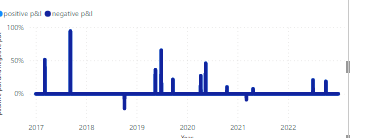
I have created area chart that that shows profit and loss % over time. I would like to show the loss (negative part) in red color and the profit ( positive part) in geen color.

lawada4_0-1671111048890.png


i created 2 measures one for profit % and one for loss % 

positive p&l =
var pl=[p&l %]
var result= IF(pl>0 , pl,0)
return result
 
negative p&l =
var pl=[p&l %]
var result= IF(pl<0 , pl,0)
return result


when i added the measures in the chart it looked  like:

lawada4_2-1671111301053.png


any idea on how to create the area chart with green/red colors instead of 1 color

2 REPLIES 2
Anonymous
Not applicable

Could you solve this?

Anonymous
Not applicable

Hi @lawada4 ,


Please share some sample data so that we could test the formula.


Helpful resources

Announcements
November Power BI Update Carousel

Power BI Monthly Update - November 2025

Check out the November 2025 Power BI update to learn about new features.

Fabric Data Days Carousel

Fabric Data Days

Advance your Data & AI career with 50 days of live learning, contests, hands-on challenges, study groups & certifications and more!

FabCon Atlanta 2026 carousel

FabCon Atlanta 2026

Join us at FabCon Atlanta, March 16-20, for the ultimate Fabric, Power BI, AI and SQL community-led event. Save $200 with code FABCOMM.