Join us at FabCon Vienna from September 15-18, 2025
The ultimate Fabric, Power BI, SQL, and AI community-led learning event. Save €200 with code FABCOMM.
Get registered- Power BI forums
- Get Help with Power BI
- Desktop
- Service
- Report Server
- Power Query
- Mobile Apps
- Developer
- DAX Commands and Tips
- Custom Visuals Development Discussion
- Health and Life Sciences
- Power BI Spanish forums
- Translated Spanish Desktop
- Training and Consulting
- Instructor Led Training
- Dashboard in a Day for Women, by Women
- Galleries
- Data Stories Gallery
- Themes Gallery
- Contests Gallery
- Quick Measures Gallery
- Notebook Gallery
- Translytical Task Flow Gallery
- TMDL Gallery
- R Script Showcase
- Webinars and Video Gallery
- Ideas
- Custom Visuals Ideas (read-only)
- Issues
- Issues
- Events
- Upcoming Events
Enhance your career with this limited time 50% discount on Fabric and Power BI exams. Ends August 31st. Request your voucher.
- Power BI forums
- Forums
- Get Help with Power BI
- DAX Commands and Tips
- Re: check if the specific value is in related tabl...
- Subscribe to RSS Feed
- Mark Topic as New
- Mark Topic as Read
- Float this Topic for Current User
- Bookmark
- Subscribe
- Printer Friendly Page


- Mark as New
- Bookmark
- Subscribe
- Mute
- Subscribe to RSS Feed
- Permalink
- Report Inappropriate Content
check if the specific value is in related tablecolumn and set to 1
Hello,
I'm relatively new to DAX.
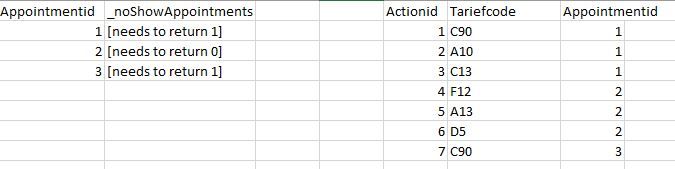
I have 2 related tables (Azure SQL database). Appointments and Actions. They are connected via AppointmentID.
Every Appointment has 1 or more Actions. What I want to do is, If one or more Actions have the value "C90", set the value of _noShowAppointment to 1.
I tried with different types of formulas but I wont get the good result. What is the correct formula to do this? Am I even close to the correct formula? I tried among other things this formulas (column is made in Appointments table):
_noShowAppointment = CALCULATE( COUNTROWS(actions),FILTER(actions,action[tariefCode]="C90"))
_noShowAppointments= if(SEARCH("C90",LOOKUPVALUE(action[tariefCode],action[appointmentId],appointment[appointmentid]),1,0),1,0)
_noShowAppointments = COUNTX(action,action[tariefCode]="C90")
Thank you for your help.
Jelle
Solved! Go to Solution.

- Mark as New
- Bookmark
- Subscribe
- Mute
- Subscribe to RSS Feed
- Permalink
- Report Inappropriate Content
here is how i would solve this:
_noShowAppointment =

IF(COUNTX(FILTER(RELATEDTABLE(Actions), Actions[Tariefcode] = "C90"), Appointments[Appointmentid]) > 0, 1, 0)
Best regards,
Markus
Did this answer your question? Mark my post as a solution!
- Mark as New
- Bookmark
- Subscribe
- Mute
- Subscribe to RSS Feed
- Permalink
- Report Inappropriate Content
Hi @jelleschuurman,
for this to work you would have to add a unique Index-Column in PowerQuery, otherwise DAX can´t evaluate this case.
(https://sqlskull.com/2020/09/08/create-index-column-using-a-power-query/)
After adding the index column my table looks like this:
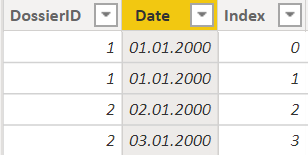
To create the column you are looking for i used this:
YourColumn =

var _currentID = Dossier[DossierID]
var _currentDate = Dossier[Date]
var _currentIndex = Dossier[Index]

RETURN
IF(COUNTX(FILTER(Dossier, Dossier[DossierID] = _currentID && Dossier[Date] = _currentDate && Dossier[Index] < _currentIndex), Dossier[Index]) > 0, 0, 1)
Best regards,
Markus
- Mark as New
- Bookmark
- Subscribe
- Mute
- Subscribe to RSS Feed
- Permalink
- Report Inappropriate Content
The database looks like this:
- Mark as New
- Bookmark
- Subscribe
- Mute
- Subscribe to RSS Feed
- Permalink
- Report Inappropriate Content
here is how i would solve this:
_noShowAppointment =

IF(COUNTX(FILTER(RELATEDTABLE(Actions), Actions[Tariefcode] = "C90"), Appointments[Appointmentid]) > 0, 1, 0)
Best regards,
Markus
Did this answer your question? Mark my post as a solution!
- Mark as New
- Bookmark
- Subscribe
- Mute
- Subscribe to RSS Feed
- Permalink
- Report Inappropriate Content
Thank you. I have another similar question, but then for the same table.
This is the database:

Is it possible to calculate this?
Thank you
- Mark as New
- Bookmark
- Subscribe
- Mute
- Subscribe to RSS Feed
- Permalink
- Report Inappropriate Content
I tried this measure; It seems to give the correct result. Is this the best way to do this?
- Mark as New
- Bookmark
- Subscribe
- Mute
- Subscribe to RSS Feed
- Permalink
- Report Inappropriate Content
Hi @jelleschuurman,
for this to work you would have to add a unique Index-Column in PowerQuery, otherwise DAX can´t evaluate this case.
(https://sqlskull.com/2020/09/08/create-index-column-using-a-power-query/)
After adding the index column my table looks like this:
To create the column you are looking for i used this:
YourColumn =

var _currentID = Dossier[DossierID]
var _currentDate = Dossier[Date]
var _currentIndex = Dossier[Index]

RETURN
IF(COUNTX(FILTER(Dossier, Dossier[DossierID] = _currentID && Dossier[Date] = _currentDate && Dossier[Index] < _currentIndex), Dossier[Index]) > 0, 0, 1)
Best regards,
Markus
- Mark as New
- Bookmark
- Subscribe
- Mute
- Subscribe to RSS Feed
- Permalink
- Report Inappropriate Content
Thank you. I just saw your comment and it differs from the 'solution' I thought I found (previous post). It also seems to work (but I only used it on a very small table). I'm interessested what i'm missing 🙂
- Mark as New
- Bookmark
- Subscribe
- Mute
- Subscribe to RSS Feed
- Permalink
- Report Inappropriate Content
It depends on your usecase. Sometimes I prefer to use a calculated column instead of a Measure, but if your Formula works for you, thats great too😀

Helpful resources

Power BI Monthly Update - August 2025
Check out the August 2025 Power BI update to learn about new features.

Fabric Community Update - August 2025
Find out what's new and trending in the Fabric community.

| User | Count |
|---|---|
| 10 | |
| 9 | |
| 6 | |
| 6 | |
| 5 |


| User | Count |
|---|---|
| 21 | |
| 14 | |
| 14 | |
| 9 | |
| 7 |


