cancel
Showing results for 
Search instead for 
Did you mean: 

Vote for your favorite vizzies from the Power BI Dataviz World Championship submissions. Vote now!

Reply
musafasih
Frequent Visitor

calculating average of two numbers within a measure, if the number appears unreasonable.

Hi,


I have a measure which calculates the odometer readings of each vehicle. I use it with the month columns from my date table to see the odometer reading for each month. The issue is that because staff often type inaccurate odometer readings, some of the data does not make sense. For example, odometer readings for July in one instance is 40,000, then for August is 100,000 and then for September is it 45,000. So I clearly know that for August the data is inaccurate. How can I write a measure which takes the average of the months with 'normal' data and uses it in the month where data is unreasonable (so in the above eg, I would want to see 42500 for August ((40,000 + 45000)/2)). 

1 ACCEPTED SOLUTION
Jihwan_Kim
Super User
Super User

Hi, @musafasih 

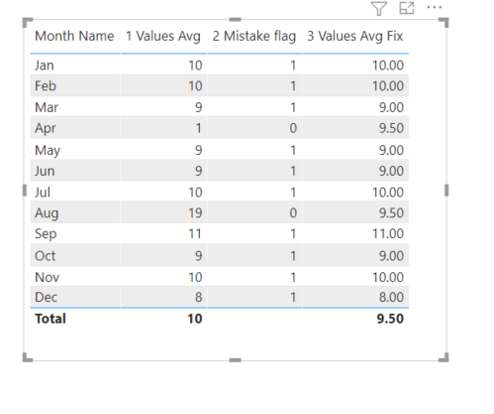
Please check the below picture and the sample pbix file's link, whether it is what you are looking for.

All measures are in the sample pbix file, and the steps are numbered in front of each measure.


Picture1.png


https://www.dropbox.com/s/br3yexur4r5xvkk/musafasihv2.pbix?dl=0 


Hi, My name is Jihwan Kim.


If this post helps, then please consider accept it as the solution to help other members find it faster, and give a big thumbs up.


Linkedin: https://www.linkedin.com/in/jihwankim1975/


If this post helps, then please consider accepting it as the solution to help other members find it faster, and give a big thumbs up.


Click here to visit my LinkedIn page

View solution in original post

2 REPLIES 2
Jihwan_Kim
Super User
Super User

Hi, @musafasih 

Please check the below picture and the sample pbix file's link, whether it is what you are looking for.

All measures are in the sample pbix file, and the steps are numbered in front of each measure.


Picture1.png


https://www.dropbox.com/s/br3yexur4r5xvkk/musafasihv2.pbix?dl=0 


Hi, My name is Jihwan Kim.


If this post helps, then please consider accept it as the solution to help other members find it faster, and give a big thumbs up.


Linkedin: https://www.linkedin.com/in/jihwankim1975/


If this post helps, then please consider accepting it as the solution to help other members find it faster, and give a big thumbs up.


Click here to visit my LinkedIn page

amitchandak
Super User
Super User

@musafasih , example with time intelligence

Next and Previous = (CALCULATE(SUM(Sales[Sales Amount]),DATESMTD(dateadd('Date'[Date],-1,MONTH))) + CALCULATE(SUM(Sales[Sales Amount]),DATESMTD(dateadd('Date'[Date],1,MONTH))))/2


Power BI — Month on Month with or Without Time Intelligence
https://medium.com/@amitchandak.1978/power-bi-mtd-questions-time-intelligence-3-5-64b0b4a4090e
https://www.youtube.com/watch?v=6LUBbvcxtKA


To get the best of the time intelligence function. Make sure you have a date calendar and it has been marked as the date in model view. Also, join it with the date column of your fact/s. Refer :radacad sqlbi My Video Series Appreciate your Kudos.

Share with Power BI Enthusiasts: Full Power BI Video (20 Hours) YouTube
Microsoft Fabric Series 60+ Videos YouTube
Microsoft Fabric Hindi End to End YouTube

Helpful resources

Announcements
Sticker Challenge 2026 Carousel

Join our Community Sticker Challenge 2026

If you love stickers, then you will definitely want to check out our Community Sticker Challenge!

January Power BI Update Carousel

Power BI Monthly Update - January 2026

Check out the January 2026 Power BI update to learn about new features.

FabCon Atlanta 2026 carousel

FabCon Atlanta 2026

Join us at FabCon Atlanta, March 16-20, for the ultimate Fabric, Power BI, AI and SQL community-led event. Save $200 with code FABCOMM.