
cancel
Showing results for 
Search instead for 
Did you mean: 

The Power BI Data Visualization World Championships is back! Get ahead of the game and start preparing now! Learn more

Reply

YTD average time - reset each year

Hi,


I have a line chart with a daily average response time and a YTD average response time, but I need to reset this YTD average time when the year changes. Is this possible? 

The measure that I'm using is this:


YTD_Average Time = CALCULATE(AVERAGE(COMPLAINTS[RESPONSE_TIME]); COMPLAINTS[RESPONSE_TIME]<>BLANK(); FILTER(VALUES(COMPLAINTS[RESPONSE_TIME]); COMPLAINTS[RESPONSE_TIME] < MAX('Calendar'[Date]));YEAR(COMPLAINTS[RESPONSE_TIME])<=year(today()))


 The chart is as following:

jorge_oliveira_0-1648546762797.png


The blue line is the YTD average response time.


What do I need to change in the measure for it reset for 2022?


Thanks for your help.

Jorge

2 ACCEPTED SOLUTIONS
johnt75
Super User
Super User

You are comparing the year of the response time to today, not to the date from your calendar table. Try

YTD_Average Time =
var maxDate = MAX ( 'Calendar'[Date] )
CALCULATE (
    AVERAGE ( COMPLAINTS[RESPONSE_TIME] );
    COMPLAINTS[RESPONSE_TIME] <> BLANK ();
    FILTER (
        VALUES ( COMPLAINTS[RESPONSE_TIME] );
        COMPLAINTS[RESPONSE_TIME] < maxDate
    );
    YEAR ( COMPLAINTS[RESPONSE_TIME] ) = YEAR ( maxDate )
)

View solution in original post

v-cazheng-msft
Community Support
Community Support

Hi @jorge_oliveira ,


You need another Measure to help you with that.


YTD_Reset_Year =
CALCULATE (
    [YTD_Average Time],
    FILTER (
        'Calendar',
        YEAR ( 'Calendar'[Date] ) = SELECTEDVALUE ( 'Calendar'[Year] ) 
        //If you just need the YTD of 2022, please replace SELECTEDVALUE part with 2022
    )
)


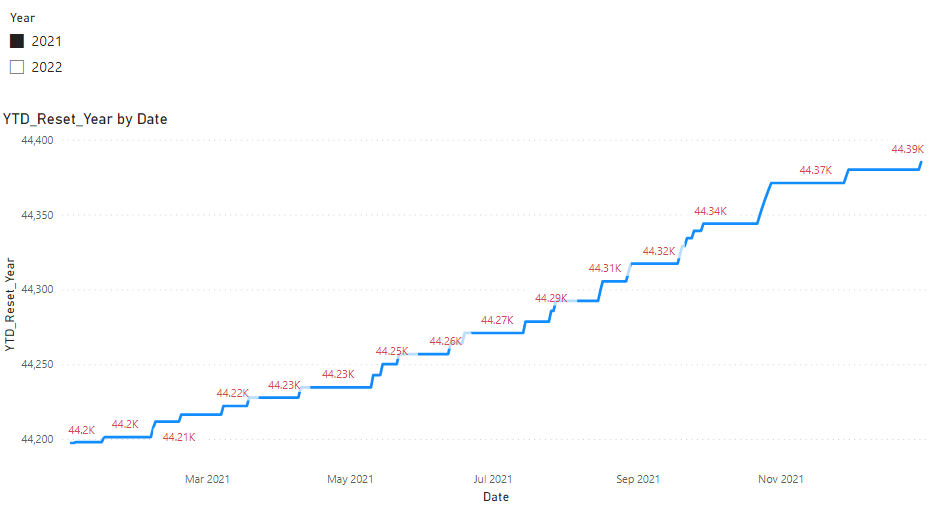
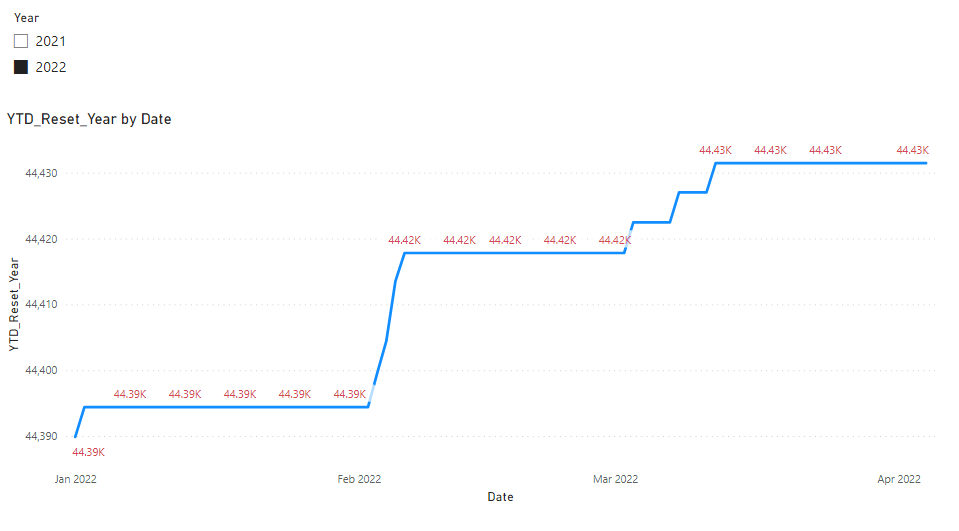
Then the result will look like this.

vcazhengmsft_0-1649041524291.png

vcazhengmsft_1-1649041524293.png


If this post helps, then please consider Accept it as the solution to help the other members find it more quickly. If I misunderstand your needs or you still have problems on it, please feel free to let me know. Thanks a lot!


Best Regards,

Community Support Team _ Caiyun

View solution in original post

3 REPLIES 3

Thanks to all the users who heldped me. I'm sorry for the delay, but I've been away for some time. Back now.

Thanks,

Jorge Oliveira

v-cazheng-msft
Community Support
Community Support

Hi @jorge_oliveira ,


You need another Measure to help you with that.


YTD_Reset_Year =
CALCULATE (
    [YTD_Average Time],
    FILTER (
        'Calendar',
        YEAR ( 'Calendar'[Date] ) = SELECTEDVALUE ( 'Calendar'[Year] ) 
        //If you just need the YTD of 2022, please replace SELECTEDVALUE part with 2022
    )
)


Then the result will look like this.

vcazhengmsft_0-1649041524291.png

vcazhengmsft_1-1649041524293.png


If this post helps, then please consider Accept it as the solution to help the other members find it more quickly. If I misunderstand your needs or you still have problems on it, please feel free to let me know. Thanks a lot!


Best Regards,

Community Support Team _ Caiyun

johnt75
Super User
Super User

You are comparing the year of the response time to today, not to the date from your calendar table. Try

YTD_Average Time =
var maxDate = MAX ( 'Calendar'[Date] )
CALCULATE (
    AVERAGE ( COMPLAINTS[RESPONSE_TIME] );
    COMPLAINTS[RESPONSE_TIME] <> BLANK ();
    FILTER (
        VALUES ( COMPLAINTS[RESPONSE_TIME] );
        COMPLAINTS[RESPONSE_TIME] < maxDate
    );
    YEAR ( COMPLAINTS[RESPONSE_TIME] ) = YEAR ( maxDate )
)

Helpful resources

Announcements
Power BI DataViz World Championships

Power BI Dataviz World Championships

The Power BI Data Visualization World Championships is back! Get ahead of the game and start preparing now!

December 2025 Power BI Update Carousel

Power BI Monthly Update - December 2025

Check out the December 2025 Power BI Holiday Recap!

FabCon Atlanta 2026 carousel

FabCon Atlanta 2026

Join us at FabCon Atlanta, March 16-20, for the ultimate Fabric, Power BI, AI and SQL community-led event. Save $200 with code FABCOMM.