cancel
Showing results for 
Search instead for 
Did you mean: 

The Power BI Data Visualization World Championships is back! Get ahead of the game and start preparing now! Learn more

Reply
fraserward
Frequent Visitor

Visual Filter using a a value from a column after looking up another table


I need some dax that I can use as a visual filter to filter out rows based on this logic.


Table 1

NameREFSort
AA10011
B 1
C 1
DA10022
E 2
FA10033


Table 2

REF
A1001
A1002


I want to filter Table 1 rows, If the record exists in Table 1 and Table 2 then filter out all rows from Table 1 with the same Table1 Sort value.   


Looking at the Ref column in both tables we can see A1001 exists in both tables.  From here I need to find the value in the Sort Column for Ref A1001 and whatever that value is, filter all rows with that value.  In this case that is value 1, removing 3 rows.


1 ACCEPTED SOLUTION
FreemanZ
Super User
Super User

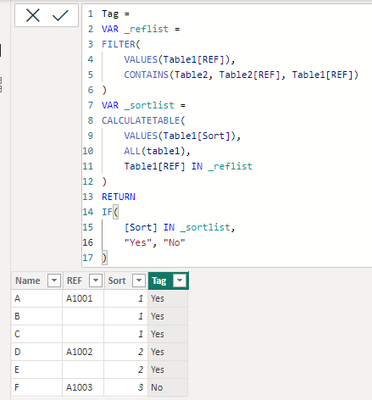
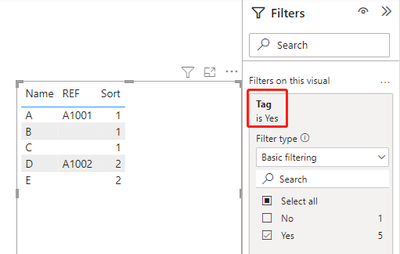
or your write a Tag column and use the Tag column to filter table1, like this:

Tag = 
VAR _reflist =
FILTER(
    VALUES(Table1[REF]),
    CONTAINS(Table2, Table2[REF], Table1[REF])
)
VAR _sortlist =
CALCULATETABLE(
    VALUES(Table1[Sort]),
    ALL(table1),
    Table1[REF] IN _reflist
)
RETURN
IF(
    [Sort] IN _sortlist,
    "Yes", "No"
)

FreemanZ_1-1676678163321.png

FreemanZ_2-1676678241445.png


View solution in original post

2 REPLIES 2
FreemanZ
Super User
Super User

or your write a Tag column and use the Tag column to filter table1, like this:

Tag = 
VAR _reflist =
FILTER(
    VALUES(Table1[REF]),
    CONTAINS(Table2, Table2[REF], Table1[REF])
)
VAR _sortlist =
CALCULATETABLE(
    VALUES(Table1[Sort]),
    ALL(table1),
    Table1[REF] IN _reflist
)
RETURN
IF(
    [Sort] IN _sortlist,
    "Yes", "No"
)

FreemanZ_1-1676678163321.png

FreemanZ_2-1676678241445.png


FreemanZ
Super User
Super User

hi @fraserward 

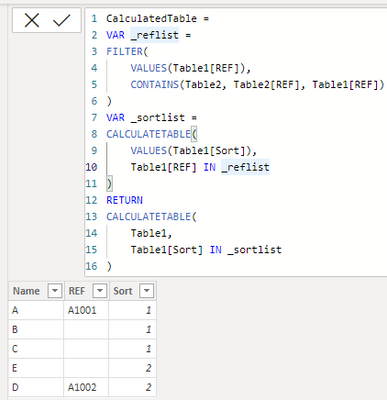
try to add a calculated table like:

CalculatedTable = 
VAR _reflist =
FILTER(
    VALUES(Table1[REF]),
    CONTAINS(Table2, Table2[REF], Table1[REF])
)
VAR _sortlist =
CALCULATETABLE(
    VALUES(Table1[Sort]),
    Table1[REF] IN _reflist
)
RETURN
CALCULATETABLE(
    Table1, 
    Table1[Sort] IN _sortlist
)


it worked like:

FreemanZ_0-1676677616761.png


Helpful resources

Announcements
Power BI DataViz World Championships

Power BI Dataviz World Championships

The Power BI Data Visualization World Championships is back! Get ahead of the game and start preparing now!

December 2025 Power BI Update Carousel

Power BI Monthly Update - December 2025

Check out the December 2025 Power BI Holiday Recap!

FabCon Atlanta 2026 carousel

FabCon Atlanta 2026

Join us at FabCon Atlanta, March 16-20, for the ultimate Fabric, Power BI, AI and SQL community-led event. Save $200 with code FABCOMM.