Join us at FabCon Atlanta from March 16 - 20, 2026, for the ultimate Fabric, Power BI, AI and SQL community-led event. Save $200 with code FABCOMM.
Register now!The Power BI Data Visualization World Championships is back! Get ahead of the game and start preparing now! Learn more
Hi everyone,
In part of a larger DAX I'm writing, I'm trying to isolate the VALUES(), or a virtual table with one column that has the dates prior to X.
For example, instead of this, which only isolates the previous month:
VAR previousMonthDates = PREVIOUSMONTH('Sales table'[date])
I am trying to have something like this, which isolates all dates prior to a given date:
CALCULATE(VALUES('Date Table'[Date]), Filter('Date Table','Date Table'[Date]<DATE(2020,05,01))
VAR previousMonthsDates = CALCULATE(VALUES('Date Table'[Date]), Filter('Date Table','Date Table'[Date]<DATE(2020,05,01))
VAR previousMonthCustomers = CALCULATETABLE(VALUES(Orders[User Id]),
ALL('Date Table'[Date])
, previousMonthsDates, USERELATIONSHIP(Orders[Completed At],'Date Table'[Date])
)
The intention of the above DAX is to get the VALUES() of the USER IDs for those that completed orders within the previousMonthsDates
Any ideas of how I can get arond this?
Solved! Go to Solution.
Hello, I solved it, I used DATESBETWEEN
VAR MinDate = MIN ( 'Date Table'[Date] )-1
VAR currentCustomers = CALCULATETABLE(VALUES('Orders'[User Id]), Orders[Status]="Completed", USERELATIONSHIP(Orders[Completed At],'Date Table'[Date]))
VAR previousMonthDates = DATESBETWEEN('Date Table'[Date], BLANK(), MinDate)
VAR previousMonthCustomers = CALCULATETABLE(distinct(Orders[User Id]),ALL('Date Table'[Date]), previousMonthDates, Orders[Status]="Completed", USERELATIONSHIP(Orders[Completed At],'Date Table'[Date])
)
VAR repeatCustomersPreviousMonth = INTERSECT(currentCustomers, previousMonthCustomers)
RETURN
calculate(SUMX(repeatCustomersPreviousMonth, [Total Completed Sales]))
Cheers!
BTW this worked when creating a calculated table, but when I try to create measure it gives me an error
Calcuated Table that works to isolate the USER Ids that :
VAR currentCustomers = CALCULATETABLE(VALUES(Orders[User Id]), filter(Orders, Orders[Completed At]>=DATE(2020,04,01)&&Orders[Completed At]<DATE(2020,05,01)))
VAR previousMonthDates = SUMMARIZECOLUMNS (
'Date Table'[Date],
FILTER('Date Table', 'Date Table'[Date]<DATE(2020,04,01)))
VAR previousMonthCustomers = CALCULATETABLE(VALUES(Orders[User Id]),
ALL('Date Table'[Date])
, previousMonthDates, USERELATIONSHIP(Orders[Completed At],'Date Table'[Date])
)
VAR repeatCustomersPreviousMonth = INTERSECT(currentCustomers, previousMonthCustomers)
RETURN
repeatCustomersPreviousMonth
RETURN
repeatCustomersPreviousMonth
Measure throws error: SummarizeColumns() and AddMissingItems() may not be used in this context
VAR currentCustomers = VALUES('Orders'[User Id])
VAR previousMonthDates = SUMMARIZECOLUMNS (
'Date Table'[Date],
FILTER('Date Table', 'Date Table'[Date]<DATE(2020,05,01)))
VAR previousMonthCustomers = CALCULATETABLE(VALUES(Orders[User Id]),
ALL('Date Table'[Date])
, previousMonthDates, USERELATIONSHIP(Orders[Completed At],'Date Table'[Date])
)
VAR repeatCustomersPreviousMonth = INTERSECT(currentCustomers, previousMonthCustomers)
RETURN
SUMX(repeatCustomersPreviousMonth, [Total Completed Sales])
the measure seems to work when I thorugh it in a card, but when I'm trying to get a table or a matrix it gives the error. This is my table:
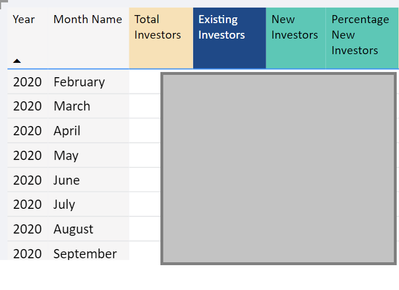
😭I'm so close yet so far away, how can i address this?
Hello, I solved it, I used DATESBETWEEN
VAR MinDate = MIN ( 'Date Table'[Date] )-1
VAR currentCustomers = CALCULATETABLE(VALUES('Orders'[User Id]), Orders[Status]="Completed", USERELATIONSHIP(Orders[Completed At],'Date Table'[Date]))
VAR previousMonthDates = DATESBETWEEN('Date Table'[Date], BLANK(), MinDate)
VAR previousMonthCustomers = CALCULATETABLE(distinct(Orders[User Id]),ALL('Date Table'[Date]), previousMonthDates, Orders[Status]="Completed", USERELATIONSHIP(Orders[Completed At],'Date Table'[Date])
)
VAR repeatCustomersPreviousMonth = INTERSECT(currentCustomers, previousMonthCustomers)
RETURN
calculate(SUMX(repeatCustomersPreviousMonth, [Total Completed Sales]))
Cheers!
The Power BI Data Visualization World Championships is back! Get ahead of the game and start preparing now!
Check out the November 2025 Power BI update to learn about new features.
| User | Count |
|---|---|
| 19 | |
| 11 | |
| 9 | |
| 4 | |
| 4 |
| User | Count |
|---|---|
| 35 | |
| 32 | |
| 20 | |
| 12 | |
| 10 |