cancel
Showing results for 
Search instead for 
Did you mean: 

The Power BI Data Visualization World Championships is back! Get ahead of the game and start preparing now! Learn more

Reply
Yonko
Helper I
Helper I

Using Format function with Calculated Groups to convert numbers to millions doesn't work properly

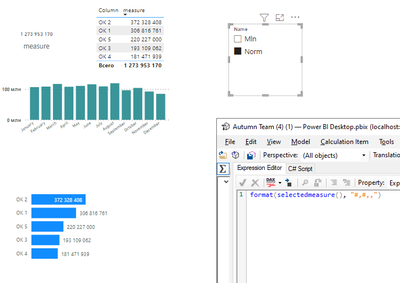
Hello. I have some data with big numbers and what i want is to create a slicer so a user can choose what format he want to see: usual (like 1 234 567) or in millions (1.2 M). To make this i created a calculation group with two values - first one is nothing but a SELECTEDMEASURE() and the second one is FORMAT function (you can see it on screen).
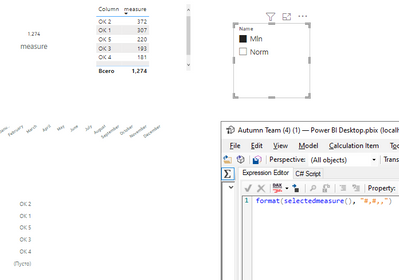
The problem that when i activate Mln option on slicer it works only with card or table visual but don't work with line or bar chart. I guess the problem may be because it convers it to text format and it can't calculate it properly or something else. Anyway, any suggestions to force it work on every visual?

Without applying format:

Yonko_0-1666866246901.png

With format:

Yonko_1-1666866272777.png


1 ACCEPTED SOLUTION
johnt75
Super User
Super User

Change the calculation item for the millions. Change the expression to just return SELECTEDMEASURE(), as the other one does, and instead edit the format string expression for the millions.

View solution in original post

2 REPLIES 2
johnt75
Super User
Super User

Change the calculation item for the millions. Change the expression to just return SELECTEDMEASURE(), as the other one does, and instead edit the format string expression for the millions.

Thanks, it worked.

Helpful resources

Announcements
Power BI DataViz World Championships

Power BI Dataviz World Championships

The Power BI Data Visualization World Championships is back! Get ahead of the game and start preparing now!

December 2025 Power BI Update Carousel

Power BI Monthly Update - December 2025

Check out the December 2025 Power BI Holiday Recap!

FabCon Atlanta 2026 carousel

FabCon Atlanta 2026

Join us at FabCon Atlanta, March 16-20, for the ultimate Fabric, Power BI, AI and SQL community-led event. Save $200 with code FABCOMM.