cancel
Showing results for 
Search instead for 
Did you mean: 

Next up in the FabCon + SQLCon recap series: The roadmap for Microsoft SQL and Maximizing Developer experiences in Fabric. All sessions are available on-demand after the live show. Register now

Reply
Yonko
Helper I
Helper I

Using Format function with Calculated Groups to convert numbers to millions doesn't work properly

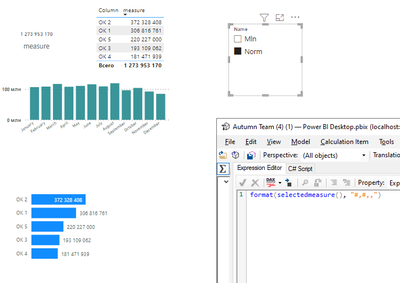
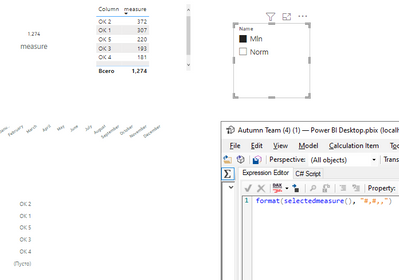
Hello. I have some data with big numbers and what i want is to create a slicer so a user can choose what format he want to see: usual (like 1 234 567) or in millions (1.2 M). To make this i created a calculation group with two values - first one is nothing but a SELECTEDMEASURE() and the second one is FORMAT function (you can see it on screen).
The problem that when i activate Mln option on slicer it works only with card or table visual but don't work with line or bar chart. I guess the problem may be because it convers it to text format and it can't calculate it properly or something else. Anyway, any suggestions to force it work on every visual?

Without applying format:

Yonko_0-1666866246901.png

With format:

Yonko_1-1666866272777.png


1 ACCEPTED SOLUTION
johnt75
Super User
Super User

Change the calculation item for the millions. Change the expression to just return SELECTEDMEASURE(), as the other one does, and instead edit the format string expression for the millions.

View solution in original post

2 REPLIES 2
johnt75
Super User
Super User

Change the calculation item for the millions. Change the expression to just return SELECTEDMEASURE(), as the other one does, and instead edit the format string expression for the millions.

Thanks, it worked.

Helpful resources

Announcements
New to Fabric survey Carousel

New to Fabric Survey

If you have recently started exploring Fabric, we'd love to hear how it's going. Your feedback can help with product improvements.

Power BI DataViz World Championships carousel

Power BI DataViz World Championships - June 2026

A new Power BI DataViz World Championship is coming this June! Don't miss out on submitting your entry.

Join our Fabric User Panel

Join our Fabric User Panel

Share feedback directly with Fabric product managers, participate in targeted research studies and influence the Fabric roadmap.

March Power BI Update Carousel

Power BI Community Update - March 2026

Check out the March 2026 Power BI update to learn about new features.