cancel
Showing results for 
Search instead for 
Did you mean: 

Next up in the FabCon + SQLCon recap series: The roadmap for Microsoft SQL and Maximizing Developer experiences in Fabric. All sessions are available on-demand after the live show. Register now

Reply
PBCIT
Frequent Visitor

Using DAX to filter

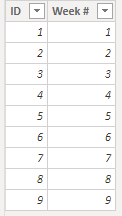
Ok so I feel like I am missing something. I have a table that I use to get 3 or four other tables on the same axis in visuals (column charts, etc.). The table only has 2 columns and looks like this:
PBCIT_0-1595604758664.png

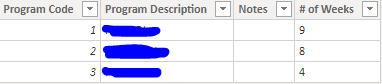
Depending on what "track" a person is on, we calculate stats for a different number of weeks. For instance, if a person is on track 1, they will have 9 weeks that we need to track. If a person is on track 2, they will have 8 weeks we need to track. If a person is on track 3, they will have 5 weeks we need to track. I have what I call a Program table that defines what the program is and how many weeks that program needs to be tracked for:
PBCIT_1-1595605009517.png

and then the program code is placed in a column for the particular individual in a different table that has information on the individual. My question is. How can I get a column chart to show only the number of weeks that the person is being tracked for? For instance, how can I get it to where, if the person is on Track 2, it will only show 8 in the axis?  I have tried to use a couple of different DAX formula measures, but nothing has really panned out. Any ideas?

PBCIT_2-1595605180112.png


1 REPLY 1
Anonymous
Not applicable

// Assuming that Weeks table is disconnected.
// Create an auxiliary measure
// that will return for each Week #
// 1 if it should be shown and
// 0/BLANK if it shouldn't. Then, filter
// the visual by this measure's value
// = 1.

[Show Week #] =
var __maxNumOfWeeksVisible =
	MAX( Program[# Weeks] )
var __result =
	SELECTEDVALUE(
		// this must start with 1
		// and go up continuously
		// up to the number of weeks
		// in the table
		Weeks[ID],
		// this in case many weeks visible
		1000 
	) <= __maxNumOfWeeksVisible
return
  1 * __result
	
// Bear in mind that if many people are
// selected, then the number of weeks
// visible will be the maximum number
// of weeks among all the people and
// their programs.

Helpful resources

Announcements
New to Fabric survey Carousel

New to Fabric Survey

If you have recently started exploring Fabric, we'd love to hear how it's going. Your feedback can help with product improvements.

Power BI DataViz World Championships carousel

Power BI DataViz World Championships - June 2026

A new Power BI DataViz World Championship is coming this June! Don't miss out on submitting your entry.

March Power BI Update Carousel

Power BI Community Update - March 2026

Check out the March 2026 Power BI update to learn about new features.