Get certified for free when you join Fabric Data Days 2026 and dive into Fabric, Power BI, SQL, AI, and other essential data skills.
Join nowJuly 7 - July 17 | Round 2 of the Power BI Dataviz World Championships. Don't miss your chance! Learn more
Hi Folks
Good day to you.
Need some help over here.
I am trying to use a text filter visual for the Employee ID here. Has been trying to figure how can I, upon entering the Employee ID, filter out and show a table visual of the details of the person with same NRIC No.
I have got a set of sample data here.
| NRIC No | Employee ID | Name | Date Joined | Date Resigned | Dept |
| S1111111S | 1201111 | Patrick Goh | 03-May-86 | 05-Jul-88 | HR |
| S1111111S | 1203332 | Patrick Goh | 06-Jan-92 | 23-Dec-99 | HR |
| S1111111S | 1201212 | Patrick Goh | 25-Aug-18 | IT | |
| S2222222S | 1201313 | Susan Ong | 31-Jan-15 | 23-Aug-18 | IT |
| S2222222S | 1304431 | Susan Ong | 16-Sep-22 | HR | |
| S3333333S | 1312353 | Alison Lim | 12-Dec | HR | |
| S4444444S | 1233332 | Joseph Tan | 08-Oct-18 | 15-Jan-21 | HR |
| S4444444S | 16705555 | Joseph Tan | 16-Jan-21 | HR |
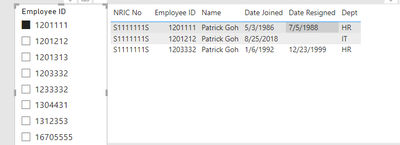
For example when I key in 1203332, I will see the 3 records of this person (1201111, 1203332 and 1201212) of the same NRIC no.
Purpose: To track rejoining staff. A staff may leave a company and rejoin again. A rejoin staff will be given a new Employee ID. However, NRIC No is the number that will never change, from the day we are birth till we die. Trying to see how I can create this to check.
Thanks for your help!
Solved! Go to Solution.
try the following:
1) plot a slicer based on a calculated table like:
Slicer = ALL(data[Employee ID])2) plot a table visual with all the columns, but filter the visual with a measure like:
measure =
VAR _no =
MAXX(
FILTER(
ALL(data),
data[Employee ID]=SELECTEDVALUE(Slicer[Employee ID])
),
data[NRIC NO]
)
RETURN
IF(
MAX(data[NRIC NO])=_no,
1, 0
)choose 1.
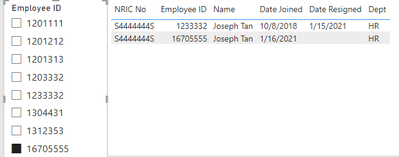
it worked like:
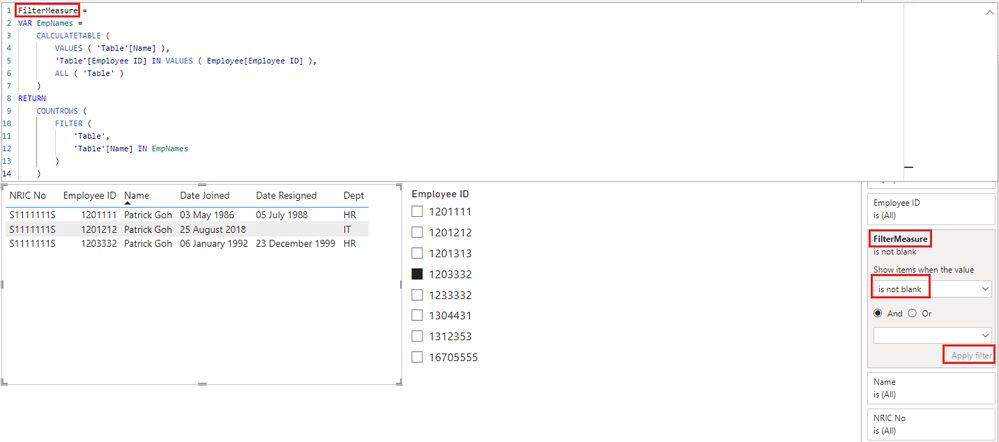
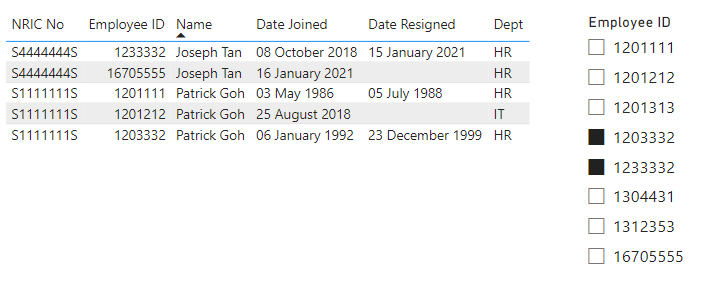
Please refer to attached sample file with the proposed solution
FilterMeasure =
VAR EmpNames =
CALCULATETABLE (
VALUES ( 'Table'[Name] ),
'Table'[Employee ID] IN VALUES ( Employee[Employee ID] ),
ALL ( 'Table' )
)
RETURN
COUNTROWS (
FILTER (
'Table',
'Table'[Name] IN EmpNames
)
)
Thank you so much both!
Please refer to attached sample file with the proposed solution
FilterMeasure =
VAR EmpNames =
CALCULATETABLE (
VALUES ( 'Table'[Name] ),
'Table'[Employee ID] IN VALUES ( Employee[Employee ID] ),
ALL ( 'Table' )
)
RETURN
COUNTROWS (
FILTER (
'Table',
'Table'[Name] IN EmpNames
)
)
Here's the sample data in a cleaner view
| NRIC No | Employee ID | Name | Date Joined | Date Resigned | Dept |
S1111111S | 1201111 | Patrick Goh | 03-May-86 | 05-Jul-88 | HR |
| S1111111S | 1203332 | Patrick Goh | 06-Jan-92 | 23-Dec-99 | HR |
| S1111111S | 1201212 | Patrick Goh | 25-Aug-18 | IT | |
| S2222222S | 1201313 | Susan Ong | 31-Jan-15 | 23-Aug-18 | IT |
| S2222222S | 1304431 | Susan Ong | 16-Sep-22 | HR | |
| S3333333S | 1312353 | Alison Lim | 12-Dec-22 | HR | |
| S4444444S | 1233332 | Joseph Tan | 08-Oct-18 | 15-Jan-21 | HR |
| S4444444S | 1670555 | Joseph Tan | 16-Jan-21 | HR |
try the following:
1) plot a slicer based on a calculated table like:
Slicer = ALL(data[Employee ID])2) plot a table visual with all the columns, but filter the visual with a measure like:
measure =
VAR _no =
MAXX(
FILTER(
ALL(data),
data[Employee ID]=SELECTEDVALUE(Slicer[Employee ID])
),
data[NRIC NO]
)
RETURN
IF(
MAX(data[NRIC NO])=_no,
1, 0
)choose 1.
it worked like:
Join us in Barcelona for FabCon and SQLCon, the Fabric, Power BI, SQL, and AI community event. Save €200 with code FABCMTY200.
Join Fabric Data Days 2026: 60 days of free live/on-demand sessions, challenges, study groups, and certification opportunities.
| User | Count |
|---|---|
| 2 | |
| 1 | |
| 1 | |
| 1 | |
| 1 |
| User | Count |
|---|---|
| 4 | |
| 3 | |
| 3 | |
| 3 | |
| 3 |