Get certified for free when you join Fabric Data Days 2026 and dive into Fabric, Power BI, SQL, AI, and other essential data skills.
Join nowTry your skills in the Power BI Dataviz World Championship! Round one ends June 26. Join now
Hello all.
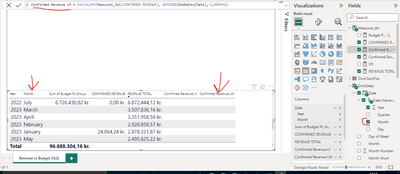
I have been having difficulties using the Calculate function in addition to the DateAdd.
In this example, I am not getting any results with the DAX formula as you can see in the highlighted column. Ignore the arrow on the Months please.
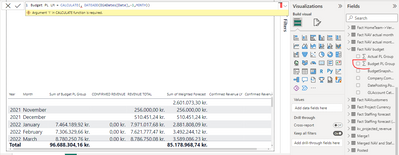
Then in this example, how can I use the Budget PL Group as a variable in the DAX formula? Should I transform it to a Measure first in order to use it in the Calculate?
For the columns in the table that are Measure (REVENUE TOTAL and CONFIRMED REVENUE) the row Total is not appearing filled. Why is that and how can I change it?
Best regards,
Bernardo Macieira
Solved! Go to Solution.
@Anonymous , Use sum(Table[Budget PL Group]) in the expression
refer Why TI do not work
Why Time Intelligence Fails - Powerbi 5 Savior Steps for TI :https://youtu.be/OBf0rjpp5Hw
https://amitchandak.medium.com/power-bi-5-key-points-to-make-time-intelligence-successful-bd52912a5b...
To get the best of the time intelligence function. Make sure you have a date calendar and it has been marked as the date in model view. Also, join it with the date column of your fact/s. Refer :radacad sqlbi My Video Series Appreciate your Kudos.
@Anonymous , Use sum(Table[Budget PL Group]) in the expression
refer Why TI do not work
Why Time Intelligence Fails - Powerbi 5 Savior Steps for TI :https://youtu.be/OBf0rjpp5Hw
https://amitchandak.medium.com/power-bi-5-key-points-to-make-time-intelligence-successful-bd52912a5b...
To get the best of the time intelligence function. Make sure you have a date calendar and it has been marked as the date in model view. Also, join it with the date column of your fact/s. Refer :radacad sqlbi My Video Series Appreciate your Kudos.
Thank you so much for your help, you are a life saver!
Don't miss out on Data Days, June 15 through August 7. Learn Fabric, Power BI, SQL, AI and more.
Check out the May 2026 Power BI update to learn about new features.
| User | Count |
|---|---|
| 2 | |
| 2 | |
| 2 | |
| 1 | |
| 1 |