cancel
Showing results for 
Search instead for 
Did you mean: 

Join the FabCon + SQLCon recap series. Up next: Power BI, Real-Time Intelligence, IQ and AI, and Data Factory take center stage. All sessions are available on-demand after the live show. Register now

Reply
jwin2424
Resolver I
Resolver I

Static RLS using IF logic with two tables

Hello community! I cannot find much material out there on DAX expressions for RLS. Here is my dilema. I am trying to create a static security view based on sales territories. However, no territories are assigned to Source "A". When I create the role for the territory, people cannot see Source A because there is no territory tied to it. Here is the relationship:

jwin2424_0-1673982751808.png


I tried creating this expression, but it is giving me a syntax error. 

IF(OR(Revenue Source[Source] = "B", Revenue Source[Source] = "C"),
    FILTER(ALL(Territories), Territories[Territory] = "T23"),
    ALL(Territories)
)


Spelling is correct. 

Essentially, if they are viewing Source B and C, it needs to be filtered to T23. If they are viewing source A, they need to see all the data. 

Also, I have to select which table to put this code into, and I am not sure if that matter or not. Do I put it into Revenue Source or do I put it into Territories?

Thanks in advance!


Joe~

1 ACCEPTED SOLUTION
jwin2424
Resolver I
Resolver I

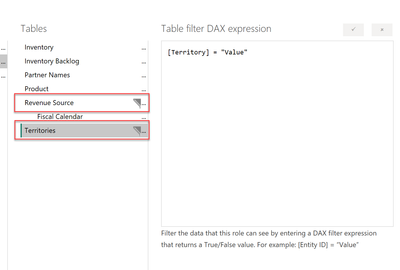
Thank you for the quick reply! I tried a few things last night, but I figured out where I was going wrong. I was filtering the role this way:

jwin2424_0-1674067807929.png


I was filtering on two tables, and it was giving me the filter ONLY for the revenue source. 

I created two roles - one for territory and one for revenue source. Then I gave both roles to the employee and they can see either/or. 

The formula you provided I believe is for dynamic RLS, and I want to do static RLS. 

View solution in original post

2 REPLIES 2
jwin2424
Resolver I
Resolver I

Thank you for the quick reply! I tried a few things last night, but I figured out where I was going wrong. I was filtering the role this way:

jwin2424_0-1674067807929.png


I was filtering on two tables, and it was giving me the filter ONLY for the revenue source. 

I created two roles - one for territory and one for revenue source. Then I gave both roles to the employee and they can see either/or. 

The formula you provided I believe is for dynamic RLS, and I want to do static RLS. 

Anonymous
Not applicable

HI @jwin2424,

I'd like to suggest you add a custom table to bind username with sources, then you can use current username to lookup correspond source and use it as condition to filter table records.

IF (
    LOOKUPVALUE ( 'Table'[Source], 'Table'[email], USERNAME () ) IN { "B", "C" },
    Territories[Territory] = "T23",
    Territories[Territory] = TRUE ()
)

Regards,

Xiaoxin Sheng

Helpful resources

Announcements
April Power BI Update Carousel

Power BI Monthly Update - April 2026

Check out the April 2026 Power BI update to learn about new features.

New to Fabric survey Carousel

New to Fabric Survey

If you have recently started exploring Fabric, we'd love to hear how it's going. Your feedback can help with product improvements.

Power BI DataViz World Championships carousel

Power BI DataViz World Championships - June 2026

A new Power BI DataViz World Championship is coming this June! Don't miss out on submitting your entry.

FabCon and SQLCon Highlights Carousel

FabCon &SQLCon Highlights

Experience the highlights from FabCon & SQLCon, available live and on-demand starting April 14th.