Join us at FabCon Atlanta from March 16 - 20, 2026, for the ultimate Fabric, Power BI, AI and SQL community-led event. Save $200 with code FABCOMM.
Register now!The Power BI Data Visualization World Championships is back! Get ahead of the game and start preparing now! Learn more
Long time viewer, first time poster.
I have a table of facts. There are ~60 columns with ~30,000 rows. The table tracks process parameters. Each row in the table represents a single event.
I would like to be able to have the report consumer select which column is used on the y-axis and the which is used on the x-axis.
There are about 3 columns that act as identifiers (event ID key, facility, date). The remainder are the data that is collected about the event.
The goal is a user-defined linear regression between any two non-identifier columns that exist in the table.
Ive tried using field parameters, unpivoting the table and cross joining to get all possible combinations (this was unworkable), using a copy of the fact table to get the x and y, calculated tables and using a slicer as the way to add columns, etc.
All the usual patterns that work for measures do not work for calculated tables when I tried.
Any ideas?
Thanks for the reply Amit. I partially solved the problem. Field parameters were the solution.
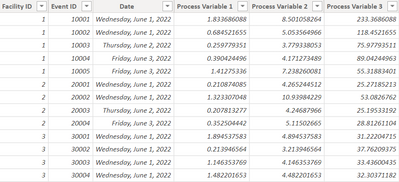
Sample Data:
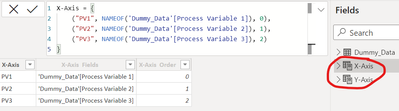
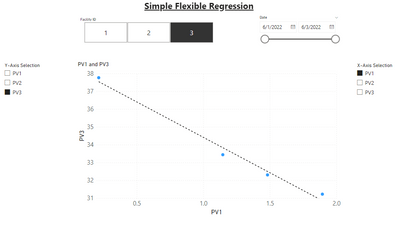
Set up two identical Field Parameter tables, one for the x-axis and one for the y-axis:
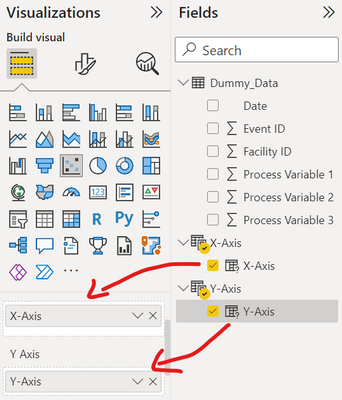
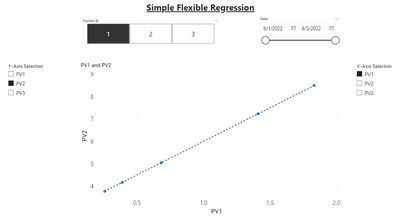
Created Scatterplot visual and put the "columns" in the x and y-axis fields of the visual.
|
|
Only thing left is to set up the regression. But I cannot refer to the data that underlies the field parameter columns. I need to create measures for the regression calculations {e.g. SUMX(X-Axis, X-Axis[X-Axis]), SUMX(X-Axis, X-Axis[X-Axis] ^ 2), etc.} but the relevant columns of the field parameter tables are strings. Is there any to access the data that the field parameter is referring to? I tried adding these parameter fields to an add-in visual that performs regression calculations and it works so there is a way to access the underlying data set to perform the calculations. I can't use the add-in because I don't have a license and the dataset is limited to 1000 points in the free version.
Any suggestions?
The Power BI Data Visualization World Championships is back! Get ahead of the game and start preparing now!
| User | Count |
|---|---|
| 16 | |
| 10 | |
| 6 | |
| 5 | |
| 4 |
| User | Count |
|---|---|
| 25 | |
| 17 | |
| 14 | |
| 11 | |
| 10 |