Join us at FabCon Atlanta from March 16 - 20, 2026, for the ultimate Fabric, Power BI, AI and SQL community-led event. Save $200 with code FABCOMM.
Register now!The Power BI Data Visualization World Championships is back! Get ahead of the game and start preparing now! Learn more
Hi,
I tried to look at other simulare questions but cant make it work.
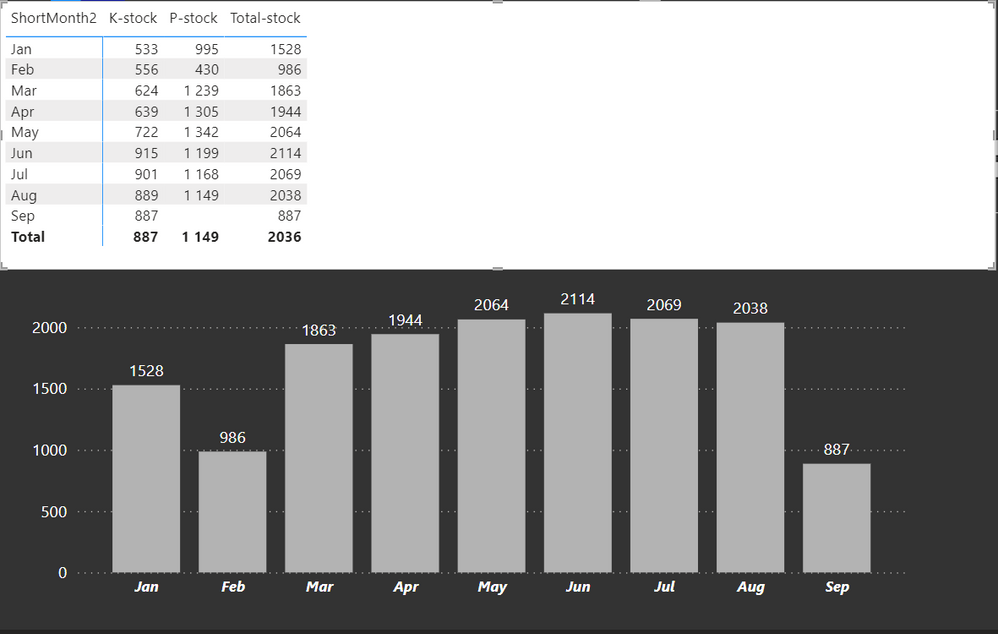
I need to use last month value if current month value is blank. (sep P-stock)
This is the measure I use for P-Stock
Orderstock - Poseidon Count - Test 2 =
VAR ReturnValue =
CALCULATE(
COUNT( FactPoseidonOrderStock[Location_KEY] ),
FILTER( FactPoseidonOrderStock ,
FactPoseidonOrderStock[StagingDateTime] = MAX( FactPoseidonOrderStock[StagingDateTime] )
)
)
RETURN
ReturnValue
This is the data
| Jan | 533 | 995 | 1528 |
| Feb | 556 | 430 | 986 |
| Mar | 624 | 1239 | 1863 |
| Apr | 639 | 1305 | 1944 |
| May | 722 | 1342 | 2064 |
| Jun | 915 | 1199 | 2114 |
| Jul | 901 | 1168 | 2069 |
| Aug | 889 | 1149 | 2038 |
| Sep | 887 | 887 |
This is the visuals
Solved! Go to Solution.
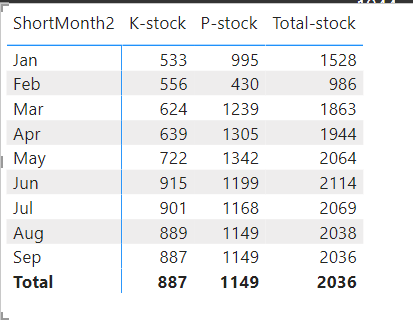
I think I fixed it (kind of) with this simple IF statement in the return.
Orderstock - Poseidon Count - Latest Date 2 =
VAR ReturnValue =
CALCULATE(
COUNT( FactPoseidonOrderStock[Location_KEY] ),
FILTER( FactPoseidonOrderStock ,
FactPoseidonOrderStock[StagingDateTime] = MAX( FactPoseidonOrderStock[StagingDateTime] )
)
)
RETURN
IF(
SELECTEDVALUE( 'Calendar'[Month_ID] ) = MONTH( TODAY() ),
[Orderstock - Poseidon Count - Latest Count],
ReturnValue
)
Orderstock - Poseidon Count - Latest Count
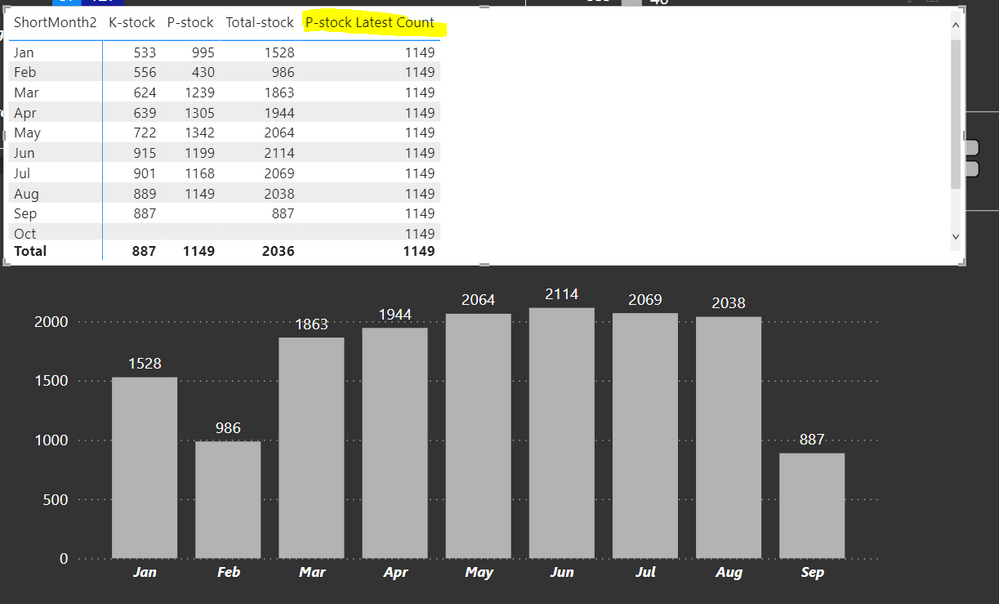
Will always return the latest count (as show in previous post)
@kmansweden This would be far simpler if you added an Index to your query or had a real date. For example, if you added an Index you could do this:
P-Stock Measure =
VAR __Previous = MAX([Index])-1
VAR __PStock = MAX('Table'[P-Stock])
RETURN
IF(
ISBLANK(__PStock,
MAXX(FILTER(ALL('Table'),[Index] = __Previous),[P-Stock])
__PStock
)
I have the previvous month value in another measure (yellow)
Orderstock - Poseidon Count - Latest Count =
VAR LastestTransfer =
CALCULATE(
MAX( FactPoseidonOrderStock[StagingDateTime] ),
REMOVEFILTERS()
)
VAR ReturnValue =
CALCULATE(
CALCULATE(
COUNT( FactPoseidonOrderStock[Location_KEY] ),
FILTER( FactPoseidonOrderStock ,
FactPoseidonOrderStock[StagingDateTime] = LastestTransfer
)
),
REMOVEFILTERS( 'Calendar' )
)
RETURN
ReturnValue
It is connected to a proper dateTable, Iam just showcasing it by shortMonth
I think my problem is that I dont know how to write the if statement so the visual will get it.
It should be something like:
If MAX(p-stock) is blank for the current month, use PreviousMonthMeasure, else use orginal measure.
I think I fixed it (kind of) with this simple IF statement in the return.
Orderstock - Poseidon Count - Latest Date 2 =
VAR ReturnValue =
CALCULATE(
COUNT( FactPoseidonOrderStock[Location_KEY] ),
FILTER( FactPoseidonOrderStock ,
FactPoseidonOrderStock[StagingDateTime] = MAX( FactPoseidonOrderStock[StagingDateTime] )
)
)
RETURN
IF(
SELECTEDVALUE( 'Calendar'[Month_ID] ) = MONTH( TODAY() ),
[Orderstock - Poseidon Count - Latest Count],
ReturnValue
)
Orderstock - Poseidon Count - Latest Count
Will always return the latest count (as show in previous post)
Hi:
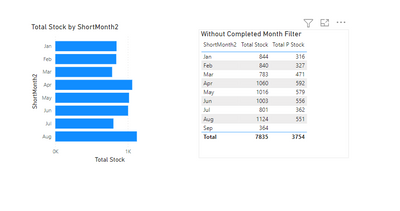
This is one way to do it, with a column to show if month is completed(in Date Table) and bring that into the filter pane.
https://drive.google.com/file/d/1dHR_RZfl-YPO-a-kOqK_8_KKLXO-VcRo/view?usp=sharing
I used dummy figures. I hope this helps.
@kmansweden Hi, I think you can try LASTNONBLANK funcion
VAR ReturnValue =
CALCULATE(
COUNT( FactPoseidonOrderStock[Location_KEY] ),
LASTNONBANK(FactPoseidonOrderStock[StagingDateTime],
COUNT( FactPoseidonOrderStock[Location_KEY])
)
)
I hope this helps.
The Power BI Data Visualization World Championships is back! Get ahead of the game and start preparing now!
Check out the November 2025 Power BI update to learn about new features.
| User | Count |
|---|---|
| 20 | |
| 10 | |
| 9 | |
| 4 | |
| 4 |
| User | Count |
|---|---|
| 33 | |
| 31 | |
| 19 | |
| 12 | |
| 11 |