cancel
Showing results for 
Search instead for 
Did you mean: 

The Power BI Data Visualization World Championships is back! Get ahead of the game and start preparing now! Learn more

Reply
Anonymous
Not applicable

Two tables(years), same structure, one relation, what function is used in this case?

Good morning. I have a problem to solve, if you can help me. I have two tables (different year: 2018-2019) with the same structure. I have two important variables in each of those tables : Clients and year. I want to identify two groups :
The clients that come again in 2019 and classify them as continuators
Customers who do not come in 2019 : classify them as lost.
Any idea how? Thank you very much.

1 ACCEPTED SOLUTION
rainer1
Resolver III
Resolver III

Hi,


It was quite fun to solve your Problem. 


At First two sample Tables based on your Information.
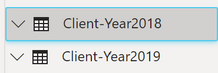
 

ClientTable2.png


The Data Inside of the Tables.

Clients Table.png


Then I build up a new calculated Table I call it Clients. With all Unique Clients as the first Column with this Dax Code.

Clients = DISTINCT(UNION(ALLSELECTED('Client-Year2018'[Client]);ALLSELECTED('Client-Year2019'[Client])))


After that you can calculate for each unique Client if it present or not with the Dax Code below in a new Calculated column.

I Modified it a bit to know if a customer comes new in 2019.


Classification = 

var present2018 = LOOKUPVALUE('Client-Year2018'[Client]; 'Client-Year2018'[Client]; Clients[Client])
var present2019 = LOOKUPVALUE('Client-Year2019'[Client]; 'Client-Year2019'[Client]; Clients[Client])
Return
IF(present2018 = Clients[Client] && present2019 = Clients[Client]; "continuators"; IF(present2018 = Clients[Client] && NOT(present2019 = Clients[Client]); "Lost"; IF(NOT(present2018 = Clients[Client]) && present2019 = Clients[Client]; "New")))


The new Table looks like this.
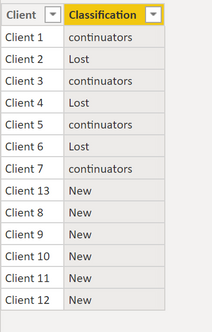
 

newTable.png


I hope this will help.


-------------------------------------------------------------------
Did I answer your question? Mark my post as a solution!
It was useful? Press Thumbs Up!

View solution in original post

2 REPLIES 2
rainer1
Resolver III
Resolver III

Hi,


It was quite fun to solve your Problem. 


At First two sample Tables based on your Information.


ClientTable2.png


The Data Inside of the Tables.

Clients Table.png


Then I build up a new calculated Table I call it Clients. With all Unique Clients as the first Column with this Dax Code.

Clients = DISTINCT(UNION(ALLSELECTED('Client-Year2018'[Client]);ALLSELECTED('Client-Year2019'[Client])))


After that you can calculate for each unique Client if it present or not with the Dax Code below in a new Calculated column.

I Modified it a bit to know if a customer comes new in 2019.


Classification = 

var present2018 = LOOKUPVALUE('Client-Year2018'[Client]; 'Client-Year2018'[Client]; Clients[Client])
var present2019 = LOOKUPVALUE('Client-Year2019'[Client]; 'Client-Year2019'[Client]; Clients[Client])
Return
IF(present2018 = Clients[Client] && present2019 = Clients[Client]; "continuators"; IF(present2018 = Clients[Client] && NOT(present2019 = Clients[Client]); "Lost"; IF(NOT(present2018 = Clients[Client]) && present2019 = Clients[Client]; "New")))


The new Table looks like this.


newTable.png


I hope this will help.


-------------------------------------------------------------------
Did I answer your question? Mark my post as a solution!
It was useful? Press Thumbs Up!

Anonymous
Not applicable

Thank you. Very thankful

Helpful resources

Announcements
Power BI DataViz World Championships

Power BI Dataviz World Championships

The Power BI Data Visualization World Championships is back! Get ahead of the game and start preparing now!

November Power BI Update Carousel

Power BI Monthly Update - November 2025

Check out the November 2025 Power BI update to learn about new features.

FabCon Atlanta 2026 carousel

FabCon Atlanta 2026

Join us at FabCon Atlanta, March 16-20, for the ultimate Fabric, Power BI, AI and SQL community-led event. Save $200 with code FABCOMM.