Join us at FabCon Atlanta from March 16 - 20, 2026, for the ultimate Fabric, Power BI, AI and SQL community-led event. Save $200 with code FABCOMM.
Register now!The Power BI Data Visualization World Championships is back! Get ahead of the game and start preparing now! Learn more
I am trying to create a measure based on this logic, and need your advice.
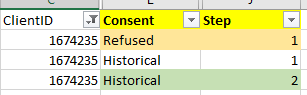
Basically, I need to specify four criteria:
I am trying to ask whether there is case that meet these four conditions:
( Step=1 && Consent = "Refused" ) with
( Step=2 && Consent = "Historical")
Depending on YES or NO, it iwll go to other measure to calculate:
I have a screenshot of the measure which I tried to create those four criteria.
I just used NOT(ISBLANK( ) to count for existence/row.
But, data does not display expected, and I am stuck where to modify.
I am having an issue with creating proper the logic because there are two Steps, instead of one Step.
Should I write like this?
VAR __ClientID = MAX(Table1[ClientID])
VAR __Table1 = FILTER(ALL(Table1),[ClientID]=__ClientID && [Step]=1 && Table1[Consent] = "Refused" )
VAR __Table2 = FILTER(ALL(Table1),[ClientID]=__ClientID && [Step]=2 && Table1[Consent] = "Historical")
VAR __Count1 = COUNTROWS(__Table1)
VAR __Count2 = COUNTROWS(__Table2)
RETURN
IF(__Count1 = 1 && __Count2 = 1 ,1,0)
Thanks for help.
Solved! Go to Solution.
[# Clients with Both Conditions] = // measure, not a calc column
var RefusedCondition =
{("Refused", 1)}
var HistoricalCondition =
{("Historical", 2)}
var Count_ =
SUMX(
DISTINCT( T[ClientID] ),
1 * CALCULATE(
NOT (
ISEMPTY(
FILTER(
T,
( T[Consent], T[Step] )
in RefusedCondition
)
)
||
ISEMPTY(
FILTER(
T,
( T[Consent], T[Step] )
in HistoricalCondition
)
)
)
)
)
return
IF( Count_, Count_ )
And here's another formulation of the same measure:
[measure_] =
var AttributeSet = {
("Refused", 1),
("Historical", 2)
}
var Count_ =
COUNTROWS(
FILTER(
GROUPBY(
SUMMARIZE(
filter(
T,
( T[Consent], T[Step] )
IN AttributeSet
),
T[ClientID],
T[Consent],
T[Step]
),
T[ClientID],
"@RowCount", SUMX( CURRENTGROUP(), 1 )
),
[@RowCount] = COUNTROWS( AttributeSet )
)
)
return
Count_
Because it's always true that:
p and q <=> ~(~p or ~q)
[# Clients with Both Conditions] = // measure, not a calc column
var RefusedCondition =
{("Refused", 1)}
var HistoricalCondition =
{("Historical", 2)}
var Count_ =
SUMX(
DISTINCT( T[ClientID] ),
1 * CALCULATE(
NOT (
ISEMPTY(
FILTER(
T,
( T[Consent], T[Step] )
in RefusedCondition
)
)
||
ISEMPTY(
FILTER(
T,
( T[Consent], T[Step] )
in HistoricalCondition
)
)
)
)
)
return
IF( Count_, Count_ )
And here's another formulation of the same measure:
[measure_] =
var AttributeSet = {
("Refused", 1),
("Historical", 2)
}
var Count_ =
COUNTROWS(
FILTER(
GROUPBY(
SUMMARIZE(
filter(
T,
( T[Consent], T[Step] )
IN AttributeSet
),
T[ClientID],
T[Consent],
T[Step]
),
T[ClientID],
"@RowCount", SUMX( CURRENTGROUP(), 1 )
),
[@RowCount] = COUNTROWS( AttributeSet )
)
)
return
Count_
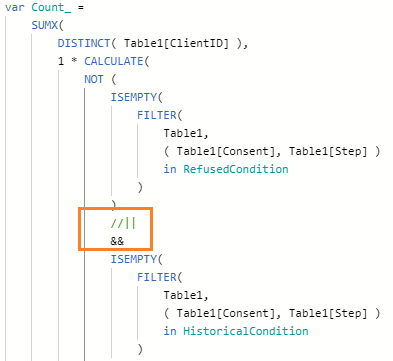
@Anonymous Thank you so much for your help. I have a quick question regards to the 1st query.
On the part where it has || (or), would it make difference if I chnage to && for the result? I am thinking since it basically calculates DISTINCT( Table1[ClientID] ) for the result, it would always come with same result, but I am curious why you had || there instead of &&. Thanks.
@JustinDoh1 , Create a new column like
New column =
var _1 = countx(filter(Table, [Consent] = "Refused" && [Step]=1 && [client_id] = earlier([Clinet_id])),[Clinet_id])+0
var _2 = countx(filter(Table, [Consent] = "Historical" && [Step]=2 && [client_id] = earlier([Clinet_id])),[Clinet_id])+0
return
if(_1 >0 && _2 >0 , "Yes", "No")
// Or if(_1 >0 && _2 >0 && [Consent] = "Historical" , "Yes", "No")
The one in comment at last in case you need yes on a particular step
@amitchandak Thank you so much for your help.
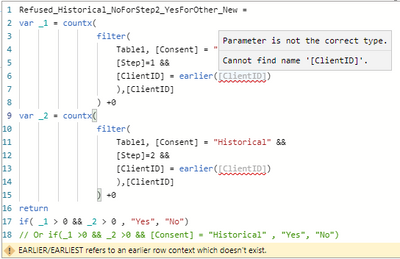
I am getting minor syntax/error message.
And how do we interpret the second option ([Consent] = "Historical")?
if(_1 >0 && _2 >0 && [Consent] = "Historical" , "Yes", "No")
Thank you.
The Power BI Data Visualization World Championships is back! Get ahead of the game and start preparing now!
Check out the November 2025 Power BI update to learn about new features.
| User | Count |
|---|---|
| 19 | |
| 10 | |
| 9 | |
| 4 | |
| 4 |
| User | Count |
|---|---|
| 34 | |
| 32 | |
| 20 | |
| 12 | |
| 11 |