cancel
Showing results for 
Search instead for 
Did you mean: 

The Power BI Data Visualization World Championships is back! Get ahead of the game and start preparing now! Learn more

Reply
Suzy123
New Member

Top N and Others

Hi all, 


I am doing a top 5 plus others for my report, and it works fine until i put the month in the columns it will show top 5 for each month and Total column will only add the Top 5 based on the total result. 


The measure I created is as below, and this is how it looks before I put the Month in the Columns:
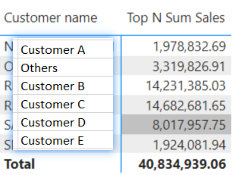
1.png


This is how it looks after I put the Month in the columns:
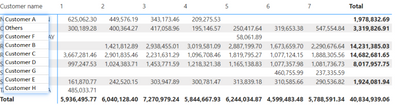
2.png


Does anyone has any idea how to resolve this... it seems so hard, and the result I want is just 

 

3.png


Mesure:

Top N Sum Sales = 
VAR TopSalesTable =
    TOPN (
        5,
        ALLSELECTED ('Unique Customers'),
        [Total Sales]
    )
VAR TopSales =
    CALCULATE (
        [Total Sales],
        KEEPFILTERS ( TopSalesTable )
    )
VAR OtherSales =
    CALCULATE (                  
        [Total Sales],
        ALLSELECTED ('Unique Customers' )
    )
        - CALCULATE (                        
            [Total Sales],
            TopSalesTable
        )
VAR CurrentProd = SELECTEDVALUE ( 'Unique Customers'[Customer name] )
RETURN
    IF (                                     
        CurrentProd <> "Others",
        TopSales,
        OtherSales
    )


1 ACCEPTED SOLUTION
Jihwan_Kim
Super User
Super User

Hi,

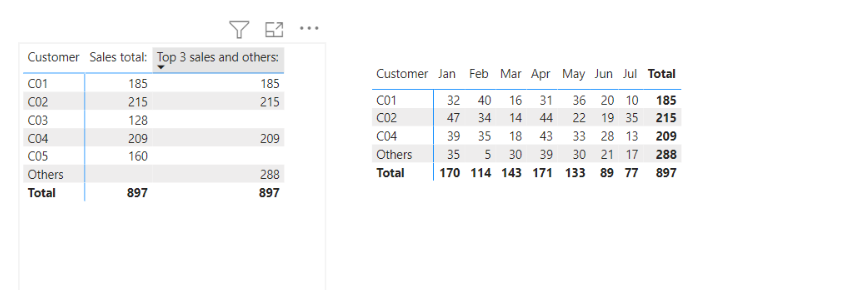
I tried to simplify the sample and created a new sample pbix file like below. (top3 and others)

Please check the below picture and the attached pbix file.

I hope the below can provide some ideas on how to create a solution for your data model.


Jihwan_Kim_0-1663399872694.png


Top 3 sales and others: =
VAR _topthreecustomerlistwholeyear =
    TOPN (
        3,
        ALLSELECTED ( Customer[Customer] ),
        CALCULATE ( [Sales total:], REMOVEFILTERS ( 'Calendar' ) ), DESC
    )
VAR _topthreefilter =
    TOPN ( 3, ALLSELECTED ( Customer[Customer] ), [Sales total:], DESC )
VAR _allsales =
    CALCULATE ( [Sales total:], REMOVEFILTERS ( Customer ) )
VAR _othersales =
    _allsales - CALCULATE ( [Sales total:], _topthreefilter )
RETURN
    SWITCH (
        TRUE (),
        HASONEVALUE ( Customer[Customer] ),
            IF (
                SELECTEDVALUE ( Customer[Customer] ) = "Others",
                _othersales,
                CALCULATE (
                    [Sales total:],
                    KEEPFILTERS ( Customer[Customer] IN _topthreecustomerlistwholeyear )
                )
            ),
        [Sales total:]
    )


If this post helps, then please consider accepting it as the solution to help other members find it faster, and give a big thumbs up.


Click here to visit my LinkedIn page

Click here to schedule a short Teams meeting to discuss your question.

View solution in original post

2 REPLIES 2
Jihwan_Kim
Super User
Super User

Hi,

I tried to simplify the sample and created a new sample pbix file like below. (top3 and others)

Please check the below picture and the attached pbix file.

I hope the below can provide some ideas on how to create a solution for your data model.


Jihwan_Kim_0-1663399872694.png


Top 3 sales and others: =
VAR _topthreecustomerlistwholeyear =
    TOPN (
        3,
        ALLSELECTED ( Customer[Customer] ),
        CALCULATE ( [Sales total:], REMOVEFILTERS ( 'Calendar' ) ), DESC
    )
VAR _topthreefilter =
    TOPN ( 3, ALLSELECTED ( Customer[Customer] ), [Sales total:], DESC )
VAR _allsales =
    CALCULATE ( [Sales total:], REMOVEFILTERS ( Customer ) )
VAR _othersales =
    _allsales - CALCULATE ( [Sales total:], _topthreefilter )
RETURN
    SWITCH (
        TRUE (),
        HASONEVALUE ( Customer[Customer] ),
            IF (
                SELECTEDVALUE ( Customer[Customer] ) = "Others",
                _othersales,
                CALCULATE (
                    [Sales total:],
                    KEEPFILTERS ( Customer[Customer] IN _topthreecustomerlistwholeyear )
                )
            ),
        [Sales total:]
    )


If this post helps, then please consider accepting it as the solution to help other members find it faster, and give a big thumbs up.


Click here to visit my LinkedIn page

Click here to schedule a short Teams meeting to discuss your question.

Appreciate your help!! Genius! It works now 🙂

Helpful resources

Announcements
Power BI DataViz World Championships

Power BI Dataviz World Championships

The Power BI Data Visualization World Championships is back! Get ahead of the game and start preparing now!

December 2025 Power BI Update Carousel

Power BI Monthly Update - December 2025

Check out the December 2025 Power BI Holiday Recap!

FabCon Atlanta 2026 carousel

FabCon Atlanta 2026

Join us at FabCon Atlanta, March 16-20, for the ultimate Fabric, Power BI, AI and SQL community-led event. Save $200 with code FABCOMM.