
Join us at FabCon Atlanta from March 16 - 20, 2026, for the ultimate Fabric, Power BI, AI and SQL community-led event. Save $200 with code FABCOMM.
Register now!Get Fabric Certified for FREE during Fabric Data Days. Don't miss your chance! Request now
Hi all,
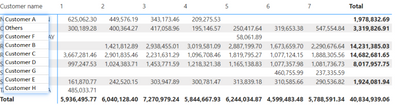
I am doing a top 5 plus others for my report, and it works fine until i put the month in the columns it will show top 5 for each month and Total column will only add the Top 5 based on the total result.
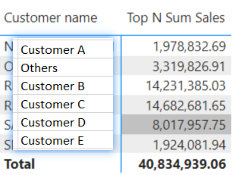
The measure I created is as below, and this is how it looks before I put the Month in the Columns:
This is how it looks after I put the Month in the columns:
Does anyone has any idea how to resolve this... it seems so hard, and the result I want is just
Mesure:
Top N Sum Sales =
VAR TopSalesTable =
TOPN (
5,
ALLSELECTED ('Unique Customers'),
[Total Sales]
)
VAR TopSales =
CALCULATE (
[Total Sales],
KEEPFILTERS ( TopSalesTable )
)
VAR OtherSales =
CALCULATE (
[Total Sales],
ALLSELECTED ('Unique Customers' )
)
- CALCULATE (
[Total Sales],
TopSalesTable
)
VAR CurrentProd = SELECTEDVALUE ( 'Unique Customers'[Customer name] )
RETURN
IF (
CurrentProd <> "Others",
TopSales,
OtherSales
)
Solved! Go to Solution.
Hi,
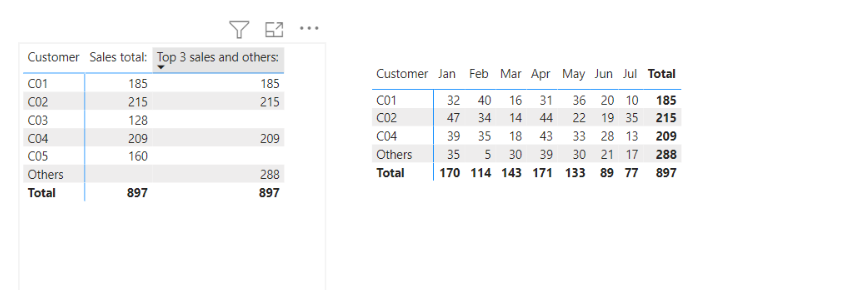
I tried to simplify the sample and created a new sample pbix file like below. (top3 and others)
Please check the below picture and the attached pbix file.
I hope the below can provide some ideas on how to create a solution for your data model.
Top 3 sales and others: =
VAR _topthreecustomerlistwholeyear =
TOPN (
3,
ALLSELECTED ( Customer[Customer] ),
CALCULATE ( [Sales total:], REMOVEFILTERS ( 'Calendar' ) ), DESC
)
VAR _topthreefilter =
TOPN ( 3, ALLSELECTED ( Customer[Customer] ), [Sales total:], DESC )
VAR _allsales =
CALCULATE ( [Sales total:], REMOVEFILTERS ( Customer ) )
VAR _othersales =
_allsales - CALCULATE ( [Sales total:], _topthreefilter )
RETURN
SWITCH (
TRUE (),
HASONEVALUE ( Customer[Customer] ),
IF (
SELECTEDVALUE ( Customer[Customer] ) = "Others",
_othersales,
CALCULATE (
[Sales total:],
KEEPFILTERS ( Customer[Customer] IN _topthreecustomerlistwholeyear )
)
),
[Sales total:]
)
Hi,
I tried to simplify the sample and created a new sample pbix file like below. (top3 and others)
Please check the below picture and the attached pbix file.
I hope the below can provide some ideas on how to create a solution for your data model.
Top 3 sales and others: =
VAR _topthreecustomerlistwholeyear =
TOPN (
3,
ALLSELECTED ( Customer[Customer] ),
CALCULATE ( [Sales total:], REMOVEFILTERS ( 'Calendar' ) ), DESC
)
VAR _topthreefilter =
TOPN ( 3, ALLSELECTED ( Customer[Customer] ), [Sales total:], DESC )
VAR _allsales =
CALCULATE ( [Sales total:], REMOVEFILTERS ( Customer ) )
VAR _othersales =
_allsales - CALCULATE ( [Sales total:], _topthreefilter )
RETURN
SWITCH (
TRUE (),
HASONEVALUE ( Customer[Customer] ),
IF (
SELECTEDVALUE ( Customer[Customer] ) = "Others",
_othersales,
CALCULATE (
[Sales total:],
KEEPFILTERS ( Customer[Customer] IN _topthreecustomerlistwholeyear )
)
),
[Sales total:]
)
Appreciate your help!! Genius! It works now 🙂
Check out the November 2025 Power BI update to learn about new features.
Advance your Data & AI career with 50 days of live learning, contests, hands-on challenges, study groups & certifications and more!
| User | Count |
|---|---|
| 10 | |
| 10 | |
| 8 | |
| 6 | |
| 6 |
| User | Count |
|---|---|
| 24 | |
| 21 | |
| 19 | |
| 16 | |
| 10 |