Join us at FabCon Vienna from September 15-18, 2025
The ultimate Fabric, Power BI, SQL, and AI community-led learning event. Save €200 with code FABCOMM.
Get registered- Power BI forums
- Get Help with Power BI
- Desktop
- Service
- Report Server
- Power Query
- Mobile Apps
- Developer
- DAX Commands and Tips
- Custom Visuals Development Discussion
- Health and Life Sciences
- Power BI Spanish forums
- Translated Spanish Desktop
- Training and Consulting
- Instructor Led Training
- Dashboard in a Day for Women, by Women
- Galleries
- Data Stories Gallery
- Themes Gallery
- Contests Gallery
- Quick Measures Gallery
- Notebook Gallery
- Translytical Task Flow Gallery
- TMDL Gallery
- R Script Showcase
- Webinars and Video Gallery
- Ideas
- Custom Visuals Ideas (read-only)
- Issues
- Issues
- Events
- Upcoming Events
Enhance your career with this limited time 50% discount on Fabric and Power BI exams. Ends August 31st. Request your voucher.
- Power BI forums
- Forums
- Get Help with Power BI
- DAX Commands and Tips
- TREATAS working as a calculate filter in DAX Studi...
- Subscribe to RSS Feed
- Mark Topic as New
- Mark Topic as Read
- Float this Topic for Current User
- Bookmark
- Subscribe
- Printer Friendly Page

- Mark as New
- Bookmark
- Subscribe
- Mute
- Subscribe to RSS Feed
- Permalink
- Report Inappropriate Content
TREATAS working as a calculate filter in DAX Studio but not Power BI Desktop
Ok, here goes:
I want to create a measure in Power BI Desktop that is SUM ( 'fact Back Order Demand'[Ordered Units Backordered] ) *but* only returns a value for Items (products) with the Top N number of backordered units. The following query in DAX Studio works exactly how I want it to:
EVALUATE
VAR Top_N =
    MAX ( 'TopN'[TopN] )
VAR filtered_items =
    SELECTCOLUMNS (
        TOPN (
            Top_N,
            SUMMARIZE (
                'fact Back Order Demand',
                'fact Back Order Demand'[OrderedItemKey],
                "OUBamt", SUM ( 'fact Back Order Demand'[Ordered Units Backordered] )
            ),
            [DUBamt]
        ),
        "OrderedItemKey", [OrderedItemKey]
    )
RETURN
    SUMMARIZECOLUMNS (
        'Item Details (Ordered Items)'[Item Description],
        "OUB",
            CALCULATE (
                SUM ( 'fact Back Order Demand'[Ordered Units Backordered] ),
                TREATAS ( filtered_items, 'fact Back Order Demand'[OrderedItemKey] )
            )
    )
I can set Top_N = 5, and the query returns the following:

There's a tie, so it returns 6 records, but it's acting exactly how I want. So what's the problem? I *cannot* get the measure to function in PBI Desktop:
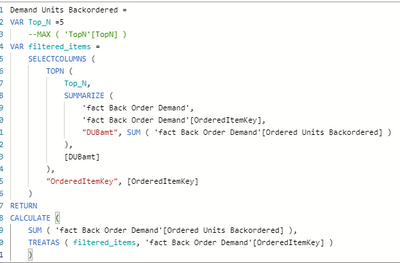

It returns data for all items, not just the Top 5! As far as I can tell, TREATAS is not working to filter the CALCULATE(SUM()) but I don't know why. What am I missing? Is there any alternative solution? Thanks!
Solved! Go to Solution.
- Mark as New
- Bookmark
- Subscribe
- Mute
- Subscribe to RSS Feed
- Permalink
- Report Inappropriate Content
Demand Units Backordered =
        CALCULATE (
            SUM ( 'fact Back Order Demand'[Ordered Units Backordered] ),
            TREATAS (
                SELECTCOLUMNS (
                    TOPN (
                        5,
                        SUMMARIZE (
                            ALLSELECTED ( 'bridge Build of Materials' ),
                            'bridge Build of Materials'[OrderedItemKey],
                            "OUB", SUM ( 'fact Back Order Demand'[Ordered Units Backordered] )
                        ),
                        [OUB]
                    ),
                    "OrderedItemKey", [OrderedItemKey]
                ),
                'fact Back Order Demand'[OrderedItemKey]
            )
        )
I finally got there in the end ... this measure works, and it's performance isn't too slow.


- Mark as New
- Bookmark
- Subscribe
- Mute
- Subscribe to RSS Feed
- Permalink
- Report Inappropriate Content
because with the filter context, each row only have one item.
try to change the code of filtered_items
VAR filtered_items =
    SELECTCOLUMNS (
        TOPN (
            Top_N,
            SUMMARIZE (
                ALLSELECTED('fact Back Order Demand'),
                'fact Back Order Demand'[OrderedItemKey],
                "OUBamt", SUM ( 'fact Back Order Demand'[Ordered Units Backordered] )
            ),
            [DUBamt]
        ),
        "OrderedItemKey", [OrderedItemKey]
    )
- Mark as New
- Bookmark
- Subscribe
- Mute
- Subscribe to RSS Feed
- Permalink
- Report Inappropriate Content
Demand Units Backordered =
        CALCULATE (
            SUM ( 'fact Back Order Demand'[Ordered Units Backordered] ),
            TREATAS (
                SELECTCOLUMNS (
                    TOPN (
                        5,
                        SUMMARIZE (
                            ALLSELECTED ( 'bridge Build of Materials' ),
                            'bridge Build of Materials'[OrderedItemKey],
                            "OUB", SUM ( 'fact Back Order Demand'[Ordered Units Backordered] )
                        ),
                        [OUB]
                    ),
                    "OrderedItemKey", [OrderedItemKey]
                ),
                'fact Back Order Demand'[OrderedItemKey]
            )
        )
I finally got there in the end ... this measure works, and it's performance isn't too slow.
- Mark as New
- Bookmark
- Subscribe
- Mute
- Subscribe to RSS Feed
- Permalink
- Report Inappropriate Content
You're definitely right, there's a problem with the filtered_items filter context:
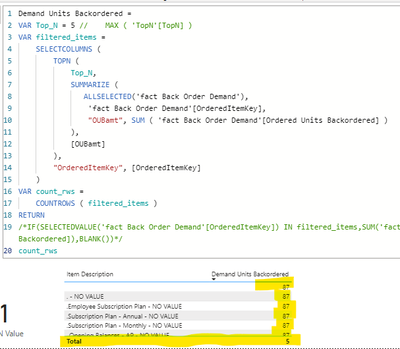
In this case, when I just want to count the number of items being returned, it's showing the correct number for the Total (5) and then seemingly ignoring the Top_N filter for the rest and returning the total number of items (87).
- Mark as New
- Bookmark
- Subscribe
- Mute
- Subscribe to RSS Feed
- Permalink
- Report Inappropriate Content
I see what you're saying.... however, adding an ALLSELECTED() to the 'fact Back Order Demand' table did not resolve the issue. The measure in Power BI is still returning a value for all items, not just the Top N. I will look at other ways to adjust the filter context for filtered_items.
- Mark as New
- Bookmark
- Subscribe
- Mute
- Subscribe to RSS Feed
- Permalink
- Report Inappropriate Content
I feel like there's something here with an iterator function, perhaps a SUMX()?


- Mark as New
- Bookmark
- Subscribe
- Mute
- Subscribe to RSS Feed
- Permalink
- Report Inappropriate Content
What is source table of the [Item Description] in your matrix?
- Mark as New
- Bookmark
- Subscribe
- Mute
- Subscribe to RSS Feed
- Permalink
- Report Inappropriate Content
'Item Details (Ordered Items)'[Item Description]

Helpful resources

Fabric Community Update - July 2025
Find out what's new and trending in the Fabric community.

Power BI Monthly Update - July 2025
Check out the July 2025 Power BI update to learn about new features.

| User | Count |
|---|---|
| 26 | |
| 12 | |
| 8 | |
| 8 | |
| 5 |


| User | Count |
|---|---|
| 30 | |
| 14 | |
| 12 | |
| 12 | |
| 7 |


