cancel
Showing results for 
Search instead for 
Did you mean: 

The FabCon + SQLCon recap series starts April 14th at 8am Pacific. If you’re tracking where AI is going inside Fabric, this first session is a can't miss. Register now

Reply
Anonymous
Not applicable

Mode of MAX values for each reaction plan

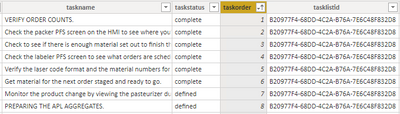
I have reaction plans that go into effect whenever there is a problem on the floor. Each plan has a sequence of ordered steps that a user will progress through until the problem is solved; the steps that are used are marked "complete" while the other unused steps remain with a status of "defined", as shown below:
 

bimmylee_1-1628185731817.png


A single reaction plan (indicated by the "tasklistid" column) may be used multiple times and have a different step used each time to resolve the problem. What I am having difficulty calculating is the most common step used as resolution for each reaction plan. Essentially, it is the MODE of the "taskorder" column, but only where it is the max value for that particular reaction plan AND where taskstatus is "complete". I have looked at this resource for calculating Mode in DAX, but I don't know how to incorporate the other two critera, particularly the "max" bit. This is what I have so far:


Most Common Step As Resolution = MINX (
    TOPN (
        1,
        ADDCOLUMNS (
            VALUES ( fact_subtask_snapshot[taskorder] ),
            "Frequency", CALCULATE ( COUNT ( fact_subtask_snapshot[taskorder] ), fact_subtask_snapshot[taskstatus] = "complete" )
        ),
        [Frequency],
        0
    ),
    fact_subtask_snapshot[taskorder]
)


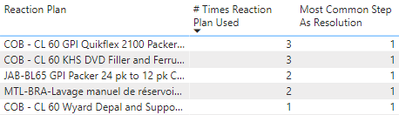
This of course always gives an answer of "1" since every plan has at least a Step 1:
 

bimmylee_0-1628187120299.png


I am at a loss as to how to tell it to instead look at the max completed step # for each plan when calculating the mode; this might involve some sort of "grouping" function as well. Lastly, if the above can be solved, I also need to count the number of times the most common resolution step was used, which would hopefully be a simple matter at that point.


Thanks in advance!

-Chris

1 ACCEPTED SOLUTION
AlexisOlson
Super User
Super User

The first step is to figure out the maximal complete taskorder for each taskid. Then you can proceed to calculate the frequency and extract the most frequent.

Most Common Step As Resolution =
VAR MaxOrder =
    ADDCOLUMNS (
        VALUES ( fact[taskid] ),
        "@MaxStep", CALCULATE ( MAX ( fact[taskkorder] ), fact[taskstatus] = "complete" )
    )
VAR AddFrequency =
    ADDCOLUMNS (
        VALUES ( fact[taskorder] ),
        "@Frequency",
            VAR CurrStep = fact[taskorder]
            RETURN
                COUNTROWS ( FILTER ( MaxOrder, [@MaxStep] = CurrStep ) )
    )
RETURN
    MINX ( TOPN ( 1, AddFrequency, [@Frequency], 0 ), fact[taskorder] )


If you want the frequency instead of the corresponding step, simply replace the final argument of MINX with [@Frequency] instead of fact[taskorder].

View solution in original post

2 REPLIES 2
Anonymous
Not applicable

This solution is brilliant and works perfectly. Thank you so much!

AlexisOlson
Super User
Super User

The first step is to figure out the maximal complete taskorder for each taskid. Then you can proceed to calculate the frequency and extract the most frequent.

Most Common Step As Resolution =
VAR MaxOrder =
    ADDCOLUMNS (
        VALUES ( fact[taskid] ),
        "@MaxStep", CALCULATE ( MAX ( fact[taskkorder] ), fact[taskstatus] = "complete" )
    )
VAR AddFrequency =
    ADDCOLUMNS (
        VALUES ( fact[taskorder] ),
        "@Frequency",
            VAR CurrStep = fact[taskorder]
            RETURN
                COUNTROWS ( FILTER ( MaxOrder, [@MaxStep] = CurrStep ) )
    )
RETURN
    MINX ( TOPN ( 1, AddFrequency, [@Frequency], 0 ), fact[taskorder] )


If you want the frequency instead of the corresponding step, simply replace the final argument of MINX with [@Frequency] instead of fact[taskorder].

Helpful resources

Announcements
New to Fabric survey Carousel

New to Fabric Survey

If you have recently started exploring Fabric, we'd love to hear how it's going. Your feedback can help with product improvements.

Power BI DataViz World Championships carousel

Power BI DataViz World Championships - June 2026

A new Power BI DataViz World Championship is coming this June! Don't miss out on submitting your entry.

Join our Fabric User Panel

Join our Fabric User Panel

Share feedback directly with Fabric product managers, participate in targeted research studies and influence the Fabric roadmap.

March Power BI Update Carousel

Power BI Community Update - March 2026

Check out the March 2026 Power BI update to learn about new features.