cancel
Showing results for 
Search instead for 
Did you mean: 

The Power BI Data Visualization World Championships is back! Get ahead of the game and start preparing now! Learn more

Reply
luizahenriques
Frequent Visitor

TOTAL VALUE CALCULATION - WRONG

Dear colleagues,


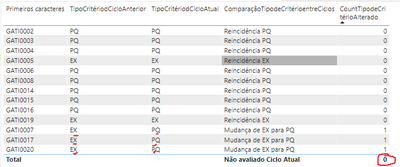
I have a problem with de total value. The column "Primeiros Caracteres" is from a dimension table and the other colums below are measures related to this table. My problem is on last column (CountTipodeCriterioAlterado) that is calculating very well (1 to Items that changed from EX to PQ or from PQ to EX and 0 to same Crtiério (PQ to PQ and EX to EX). But i need to get the sum of this number (All Items that had chaged), but the total shows 0, not the sum.


The formulas are below:


CountTipodeCritérioAlterado =
IF([TipoCritériodCicloAtual]= "PQ" && [TipoCritériodCicloAnterior]="EX" ,1,
IF([TipoCritériodCicloAtual]=BLANK(),0,
IF([TipoCritériodCicloAnterior]=BLANK(),0,
IF([TipoCritériodCicloAtual]= "EX" && [TipoCritériodCicloAnterior]="EX" ,0,
IF([TipoCritériodCicloAtual]= "PQ" && [TipoCritériodCicloAnterior]="PQ" ,0)))))


luizahenriques_0-1663685006671.png

 Thanks for helping

1 ACCEPTED SOLUTION
tamerj1
Super User
Super User

Hi @luizahenriques 

please try

CountTipodeCritérioAlterado =
SUMX (
    VALUES ( 'Table'[Premeirios caracteres] ),
    VAR Actual = [TipoCritériodCicloAtual]
    VAR Anterior = [TipoCritériodCicloAnterior]
    RETURN
        IF (
            Actual = "PQ"
                && Anterior = "EX",
            1,
            IF (
                Actual = BLANK (),
                0,
                IF (
                    Anterior = BLANK (),
                    0,
                    IF (
                        Actual = "EX"
                            && Anterior = "EX",
                        0,
                        IF ( Actual = "PQ" && Anterior = "PQ", 0 )
                    )
                )
            )
        )
)

View solution in original post

2 REPLIES 2
tamerj1
Super User
Super User

Hi @luizahenriques 

please try

CountTipodeCritérioAlterado =
SUMX (
    VALUES ( 'Table'[Premeirios caracteres] ),
    VAR Actual = [TipoCritériodCicloAtual]
    VAR Anterior = [TipoCritériodCicloAnterior]
    RETURN
        IF (
            Actual = "PQ"
                && Anterior = "EX",
            1,
            IF (
                Actual = BLANK (),
                0,
                IF (
                    Anterior = BLANK (),
                    0,
                    IF (
                        Actual = "EX"
                            && Anterior = "EX",
                        0,
                        IF ( Actual = "PQ" && Anterior = "PQ", 0 )
                    )
                )
            )
        )
)
Greg_Deckler
Community Champion
Community Champion

@luizahenriques This looks like a measure totals problem. Very common. See my post about it here: https://community.powerbi.com/t5/DAX-Commands-and-Tips/Dealing-with-Measure-Totals/td-p/63376

Also, this Quick Measure, Measure Totals, The Final Word should get you what you need:
https://community.powerbi.com/t5/Quick-Measures-Gallery/Measure-Totals-The-Final-Word/m-p/547907


Follow on LinkedIn
@ me in replies or I'll lose your thread!!!
Instead of a Kudo, please vote for this idea
Become an expert!: Enterprise DNA
External Tools: MSHGQM
YouTube Channel!: Microsoft Hates Greg
Latest book!:
DAX For Humans

DAX is easy, CALCULATE makes DAX hard...

Helpful resources

Announcements
Power BI DataViz World Championships

Power BI Dataviz World Championships

The Power BI Data Visualization World Championships is back! Get ahead of the game and start preparing now!

November Power BI Update Carousel

Power BI Monthly Update - November 2025

Check out the November 2025 Power BI update to learn about new features.

FabCon Atlanta 2026 carousel

FabCon Atlanta 2026

Join us at FabCon Atlanta, March 16-20, for the ultimate Fabric, Power BI, AI and SQL community-led event. Save $200 with code FABCOMM.