cancel
Showing results for 
Search instead for 
Did you mean: 

The Power BI Data Visualization World Championships is back! Get ahead of the game and start preparing now! Learn more

Reply
Anonymous
Not applicable

Sum values based on list of lists with column names

Hi,

I have a set of lists and each one has categorized ColumnNames.

I'm summing the values of each category step by step on PowerQuery, but it's taking a life time, even though my dataset isn't that big.


This is the formula I'm using
= Table.AddColumn(#"Previous Step name", "Total New Column", each List.Sum(Record.FieldValues(Record.SelectFields(_, List with ColumnNames))), type number)


I thought of having a list of lists and change the Column name and the List with ColumnNames dynamically, but I have no idea if I can do it and how to do it.

Each list would require its own Total column.


Start Table

DateColAColBColCColDColE
01/09/202312nullnull3
02/09/20231null3null2
03/09/2023null3211


listA = {ColA, ColC}
listB = {ColB}

listC = {ColD, ColE}


Result Table:

DateColAColBColCColDColETotal listATotal listBTotal listC
01/09/202312nullnull3123
02/09/20231null3null2402
03/09/2023null3211332


Could someone help me?


Thank you

1 ACCEPTED SOLUTION
v-zhangti
Community Support
Community Support

Hi, @Anonymous 


You can try the following methods.

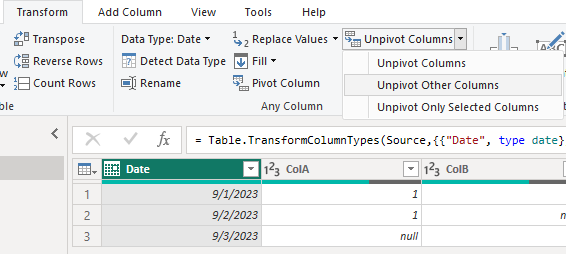
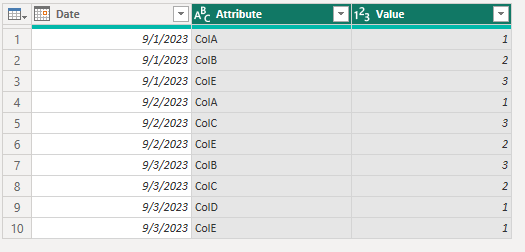
In the Power Query-Transform-Unpivot Other Column:

vzhangti_0-1695629750309.png

vzhangti_1-1695629769392.png

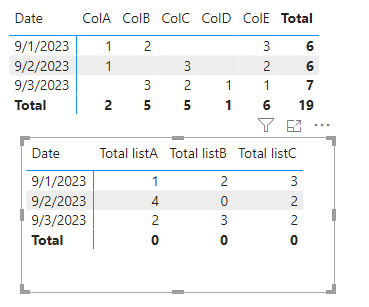
In the Power BI Desktop:

Measure:

Total listA = CALCULATE(SUM('Table'[Value]),FILTER(ALL('Table'),[Attribute] in {"ColA", "ColC"}&&[Date]=SELECTEDVALUE('Table'[Date])))+0
Total listB = CALCULATE(SUM('Table'[Value]),FILTER(ALL('Table'),[Attribute] in {"ColB"}&&[Date]=SELECTEDVALUE('Table'[Date])))+0
Total listC = CALCULATE(SUM('Table'[Value]),FILTER(ALL('Table'),[Attribute] in {"ColD", "ColE"}&&[Date]=SELECTEDVALUE('Table'[Date])))+0

vzhangti_2-1695630141501.png

Is this the result you expect?


Best Regards,

Community Support Team _Charlotte

If this post helps, then please consider Accept it as the solution to help the other members find it more quickly.

View solution in original post

4 REPLIES 4
v-zhangti
Community Support
Community Support

Hi, @Anonymous 


You can try the following methods.

In the Power Query-Transform-Unpivot Other Column:

vzhangti_0-1695629750309.png

vzhangti_1-1695629769392.png

In the Power BI Desktop:

Measure:

Total listA = CALCULATE(SUM('Table'[Value]),FILTER(ALL('Table'),[Attribute] in {"ColA", "ColC"}&&[Date]=SELECTEDVALUE('Table'[Date])))+0
Total listB = CALCULATE(SUM('Table'[Value]),FILTER(ALL('Table'),[Attribute] in {"ColB"}&&[Date]=SELECTEDVALUE('Table'[Date])))+0
Total listC = CALCULATE(SUM('Table'[Value]),FILTER(ALL('Table'),[Attribute] in {"ColD", "ColE"}&&[Date]=SELECTEDVALUE('Table'[Date])))+0

vzhangti_2-1695630141501.png

Is this the result you expect?


Best Regards,

Community Support Team _Charlotte

If this post helps, then please consider Accept it as the solution to help the other members find it more quickly.

technolog
Super User
Super User

I hope this message finds you well. I've noticed that this solution remain unresolved. If any of you have managed to find a resolution to the issue, I kindly request that you share your solution for the benefit of the entire community. Alternatively, if you're still facing challenges, please do let us know as well.

Your insights and updates will greatly assist others who might be encountering the same challenge.

v-zhangti
Community Support
Community Support

Hi, @Anonymous 


Can you provide sample data for testing? Sensitive information can be removed in advance. What kind of expected results do you expect? You can also show it with pictures or Excel. I look forward to your response.


Best Regards,

Community Support Team _Charlotte

If this post helps, then please consider Accept it as the solution to help the other members find it more quickly.

Anonymous
Not applicable

Thank you for having a look at it @v-zhangti .
I've added the table

Helpful resources

Announcements
Power BI DataViz World Championships

Power BI Dataviz World Championships

The Power BI Data Visualization World Championships is back! Get ahead of the game and start preparing now!

November Power BI Update Carousel

Power BI Monthly Update - November 2025

Check out the November 2025 Power BI update to learn about new features.

FabCon Atlanta 2026 carousel

FabCon Atlanta 2026

Join us at FabCon Atlanta, March 16-20, for the ultimate Fabric, Power BI, AI and SQL community-led event. Save $200 with code FABCOMM.