Hi @Anonymous ,
According to your description, here are my steps you can follow as a solution.
(1)My test data is the same as yours.
(2) Click "transform data" to enter the power query, click "Advanced Editor" to copy and paste the following code. Please check the steps in the right hand column.
let
    Source = Table.FromRows(Json.Document(Binary.Decompress(Binary.FromText("jZA9C8JADIb/itwcpL18XG4VHLu4OBwdBBWEorP/3lK5mogHboHnyZvwlhL6bewiBggRkIFznsfD43maNvv79XaZzmGEEqKxCHLDQpfVsshY2LzILosalhhLmheTt7rflv6VtfbVQ1SgpPO4G46+pYW9EypDwwRI0DAyrDZSGbs9JcvEMSYyLBmWvn5Rwxj0w8YX", BinaryEncoding.Base64), Compression.Deflate)), let _t = ((type nullable text) meta [Serialized.Text = true]) in type table [period = _t, #"Bike prize" = _t, Name = _t]),
    #"Changed Type" = Table.TransformColumnTypes(Source,{{"period", type number}, {"Bike prize", Int64.Type}, {"Name", type text}}),
    #"Duplicated Column" = Table.DuplicateColumn(#"Changed Type", "period", "period - Copy"),
    #"Split Column by Delimiter" = Table.SplitColumn(Table.TransformColumnTypes(#"Duplicated Column", {{"period - Copy", type text}}, "en-US"), "period - Copy", Splitter.SplitTextByDelimiter(".", QuoteStyle.Csv), {"period - Copy.1", "period - Copy.2"}),
    #"Changed Type1" = Table.TransformColumnTypes(#"Split Column by Delimiter",{{"period - Copy.1", Int64.Type}, {"period - Copy.2", Int64.Type}}),
    #"Renamed Columns" = Table.RenameColumns(#"Changed Type1",{{"period - Copy.2", "Year"}, {"period - Copy.1", "Month"}}),
    #"Added Custom" = Table.AddColumn(#"Renamed Columns", "Custom", each 1),
    #"Renamed Columns1" = Table.RenameColumns(#"Added Custom",{{"Custom", "Day"}}),
    #"Merged Columns" = Table.CombineColumns(Table.TransformColumnTypes(#"Renamed Columns1", {{"Year", type text}, {"Month", type text}, {"Day", type text}}, "en-US"),{"Year", "Month", "Day"},Combiner.CombineTextByDelimiter("-", QuoteStyle.None),"Merged"),
    #"Changed Type2" = Table.TransformColumnTypes(#"Merged Columns",{{"Merged", type date}}),
    #"Renamed Columns2" = Table.RenameColumns(#"Changed Type2",{{"Merged", "Year-Month"}}),
    #"Changed Type3" = Table.TransformColumnTypes(#"Renamed Columns2",{{"period", type text}})
in
    #"Changed Type3"

(3)We can create a measures.
Flag = IF(YEAR(MAX('Table'[Year-Month]))=YEAR(MAXX(ALLSELECTED('Table'),'Table'[Year-Month])) && MONTH(MAX('Table'[Year-Month]))=MONTH(MAXX(ALLSELECTED('Table'),'Table'[Year-Month])),1,0)
Bike prize Measure = CALCULATE(MAX('Table'[Bike prize]),FILTER(ALLSELECTED('Table'),[Flag]=1))
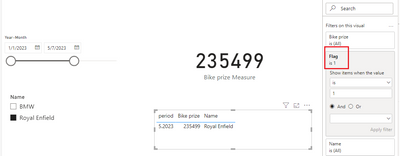
(4)Place [Flag]=1 on the visual object filter and then the result is as follows.
Best Regards,
Neeko Tang
If this post helps, then please consider Accept it as the solution to help the other members find it more quickly.


