Hello,
I am trying to show the effect that sales price changes have in comparison to the sales of the previous year.
That means: average of sales price per item and customer of shown period - average sales price per item and customer of previous year * quantity sold in shown period.
My measure:
Price change effect = IF(SUMX(VALUES(Data[Item No]),[Avg sales price PY]) =BLANK () && SUMX(VALUES(Data[Item No]),[Avg sales price]) <> BLANK () ,"",SUMX(VALUES('Data'[Item No]),([Avg sales price] - [Avg sales price PY])*[Quantities]))
It works fine on line level, but the total is incorrect.
The matrix should look like this (sample of April 2022), but with a correct total:
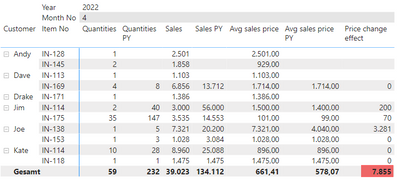
The left column shows the item numbers and the customers.
In the last column I have tried to calculate the price effect, but it does not work on the total sum. I need it to sum up the amounts shown, so the total should be 3.551 and not 7.855.
I have also measures for the average sales prices:
Avg sales price = DIVIDE(Sum(Tabelle[Sales Amount]),Sum(Tabelle[Quantity]))
Avg sales price PY = CALCULATE([Avg sales price],PREVIOUSYEAR(Kalender[Date]))
I have prepared a dummy table, since I unfortuntely cannot load a pbix file to a location outside my organisation.
| Posting Date | Customer | Item No | Quantity | Sales Amount |
| 11.01.2021 | Jim | IN-114 | 10 | 14.000 |
| 15.01.2021 | Dave | IN-153 | 1 | 1.028 |
| 20.01.2021 | Jim | IN-175 | 20 | 1.980 |
| 28.01.2021 | Dave | IN-169 | 2 | 3.428 |
| 01.02.2021 | Kate | IN-114 | 2 | 1.792 |
| 04.02.2021 | Jim | IN-175 | 42 | 4.158 |
| 12.02.2021 | Jim | IN-114 | 10 | 14.000 |
| 24.02.2021 | Kate | IN-114 | 2 | 1.792 |
| 01.03.2021 | Dave | IN-175 | 30 | 2.970 |
| 02.03.2021 | Jim | IN-175 | 10 | 990 |
| 22.03.2021 | Joe | IN-128 | 1 | 834 |
| 22.03.2021 | Joe | IN-138 | 2 | 2.200 |
| 29.03.2021 | Joe | IN-114 | 2 | 1.792 |
| 29.03.2021 | Joe | IN-175 | 2 | 198 |
| 23.04.2021 | Kate | IN-114 | 6 | 5.376 |
| 30.04.2021 | Dave | IN-114 | 2 | 1.792 |
| 21.05.2021 | Jim | IN-114 | 3 | 4.200 |
| 21.05.2021 | Jim | IN-175 | 3 | 297 |
| 21.05.2021 | Joe | IN-138 | 1 | 5.000 |
| 18.06.2021 | Dave | IN-114 | 12 | 10.752 |
| 21.06.2021 | Jim | IN-175 | 6 | 594 |
| 24.06.2021 | Jim | IN-118 | 6 | 8.850 |
| 28.06.2021 | Kate | IN-114 | 5 | 4.480 |
| 28.06.2021 | Kate | IN-118 | 1 | 1.475 |
| 28.06.2021 | Kate | IN-175 | 10 | 990 |
| 29.06.2021 | Joe | IN-114 | 2 | 1.792 |
| 12.07.2021 | Dave | IN-114 | 3 | 2.688 |
| 12.07.2021 | Dave | IN-153 | 3 | 3.084 |
| 12.07.2021 | Jim | IN-175 | 9 | 891 |
| 14.07.2021 | Jim | IN-114 | 2 | 2.800 |
| 14.07.2021 | Jim | IN-175 | 7 | 693 |
| 23.07.2021 | Dave | IN-166 | 1 | 1.729 |
| 23.07.2021 | Dave | IN-167 | 1 | 2.165 |
| 26.07.2021 | Kate | IN-114 | 5 | 4.480 |
| 02.08.2021 | Joe | IN-138 | 1 | 6.500 |
| 03.08.2021 | Jim | IN-175 | 8 | 792 |
| 10.08.2021 | Jim | IN-114 | 3 | 4.200 |
| 23.08.2021 | Dave | IN-169 | 2 | 3.428 |
| 26.08.2021 | Jim | IN-175 | 5 | 495 |
| 09.09.2021 | Jim | IN-114 | 3 | 4.200 |
| 09.09.2021 | Jim | IN-175 | 10 | 990 |
| 13.09.2021 | Dave | IN-169 | 2 | 3.428 |
| 13.09.2021 | Kate | IN-114 | 2 | 1.792 |
| 13.09.2021 | Kate | IN-175 | 2 | 198 |
| 28.09.2021 | Kate | IN-114 | 6 | 5.376 |
| 04.10.2021 | Joe | IN-153 | 1 | 1.028 |
| 20.10.2021 | Dave | IN-169 | 2 | 3.428 |
| 20.10.2021 | Jim | IN-114 | 5 | 7.000 |
| 20.10.2021 | Jim | IN-175 | 10 | 990 |
| 08.11.2021 | Jim | IN-114 | 2 | 2.800 |
| 08.11.2021 | Jim | IN-175 | 2 | 198 |
| 19.11.2021 | Jim | IN-114 | 1 | 1.400 |
| 19.11.2021 | Jim | IN-175 | 6 | 594 |
| 06.12.2021 | Joe | IN-138 | 1 | 6.500 |
| 06.12.2021 | Joe | IN-153 | 2 | 2.056 |
| 10.12.2021 | Dave | IN-169 | 0 | 0 |
| 13.12.2021 | Jim | IN-114 | 1 | 1.400 |
| 13.12.2021 | Jim | IN-175 | 9 | 891 |
| 11.01.2022 | Dave | IN-114 | 2 | 1.792 |
| 12.01.2022 | Jim | IN-114 | 5 | 7.500 |
| 12.01.2022 | Jim | IN-175 | 7 | 693 |
| 21.04.2022 | Dave | IN-113 | 1 | 1.103 |
| 21.01.2022 | Jim | IN-114 | 3 | 4.500 |
| 21.01.2022 | Jim | IN-175 | 2 | 198 |
| 25.01.2022 | Jim | IN-114 | 1 | 1.500 |
| 25.01.2022 | Jim | IN-175 | 28 | 2.772 |
| 31.01.2022 | Joe | IN-153 | 1 | 1.028 |
| 04.04.2022 | Drake | IN-171 | 1 | 1.386 |
| 08.02.2022 | Dave | IN-175 | 30 | 2.970 |
| 17.02.2022 | Joe | IN-114 | 1 | 896 |
| 17.02.2022 | Joe | IN-138 | 2 | 13.000 |
| 24.02.2022 | Jim | IN-114 | 3 | 4.500 |
| 24.02.2022 | Jim | IN-175 | 9 | 891 |
| 09.03.2022 | Jim | IN-114 | 3 | 4.500 |
| 09.03.2022 | Jim | IN-175 | 6 | 594 |
| 16.03.2022 | Jim | IN-114 | 2 | 3.000 |
| 16.03.2022 | Jim | IN-175 | 12 | 1.198 |
| 30.03.2022 | Jim | IN-114 | 5 | 7.500 |
| 01.04.2022 | Jim | IN-114 | 2 | 3.000 |
| 01.04.2022 | Jim | IN-175 | 0 | 0 |
| 05.04.2022 | Kate | IN-114 | 10 | 8.960 |
| 05.04.2022 | Kate | IN-118 | 1 | 1.475 |
| 08.04.2022 | Dave | IN-169 | 4 | 6.856 |
| 11.04.2022 | Joe | IN-138 | 1 | 7.321 |
| 11.04.2022 | Joe | IN-153 | 1 | 1.028 |
| 11.04.2022 | Andy | IN-128 | 1 | 2.501 |
| 11.04.2022 | Andy | IN-145 | 2 | 1.858 |
| 14.04.2022 | Jim | IN-175 | 35 | 3.535 |
I hope that someone can point me in the rigth direction.
Thanks for your help.


