cancel
Showing results for 
Search instead for 
Did you mean: 

Learn from the best! Meet the four finalists headed to the FINALS of the Power BI Dataviz World Championships! Register now

Reply
Anonymous
Not applicable

Stacked Column Chart Help with % Count

Hi,


I have a measure that gives the percentage of on time deliveries we make for each customer with the following formula

(Difot Monthly % = divide(sum(Difot[Difot Pass Count]),sum(Difot[Difot Count]))

eg Difot.PNG
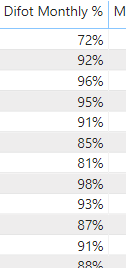
Im trying to think of a formula to give the count of how many customers would fall into each braket such as difot <50%, 50 - 60%, 70-80%, etc up to 100% so I can create a stacked column chart and show by month.
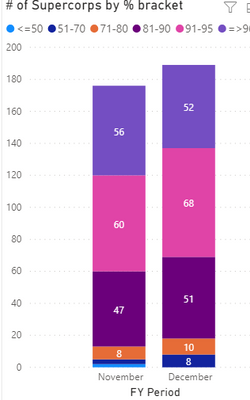
SuperCorp Graph.PNG

The Above is a manual upload that wont change with the new month

I have tried the following 

<50% = COUNTROWS(filter(Difot,DIVIDE(sum(Difot[Difot Pass Count]),sum(Difot[Difot Count]))<=50)) but it returns the number of rows.
But i realise I want to count how many customers fall into each bracket which I haven't been able to include.
 
Any ideas?
Thanks in advance,
EamG
1 REPLY 1
Greg_Deckler
Community Champion
Community Champion

Please see this post regarding How to Get Your Question Answered Quickly: https://community.powerbi.com/t5/Community-Blog/How-to-Get-Your-Question-Answered-Quickly/ba-p/38490


Follow on LinkedIn
@ me in replies or I'll lose your thread!!!
Instead of a Kudo, please vote for this idea
Become an expert!: Enterprise DNA
External Tools: MSHGQM
YouTube Channel!: Microsoft Hates Greg
Latest book!:
DAX For Humans

DAX is easy, CALCULATE makes DAX hard...

Helpful resources

Announcements
Join our Fabric User Panel

Join our Fabric User Panel

Share feedback directly with Fabric product managers, participate in targeted research studies and influence the Fabric roadmap.

March Power BI Update Carousel

Power BI Community Update - March 2026

Check out the March 2026 Power BI update to learn about new features.