cancel
Showing results for 
Search instead for 
Did you mean: 

The Power BI Data Visualization World Championships is back! Get ahead of the game and start preparing now! Learn more

Reply
Anonymous
Not applicable

Simple Division driving me crazy!

Hi all 


I just can't seem to understand why my tabular model is coming up with the wrong answer. 


All I'm doing is dividing one column by the other.

='Stock Analysis'[Physical Quantity (R)]/[Net Usage]
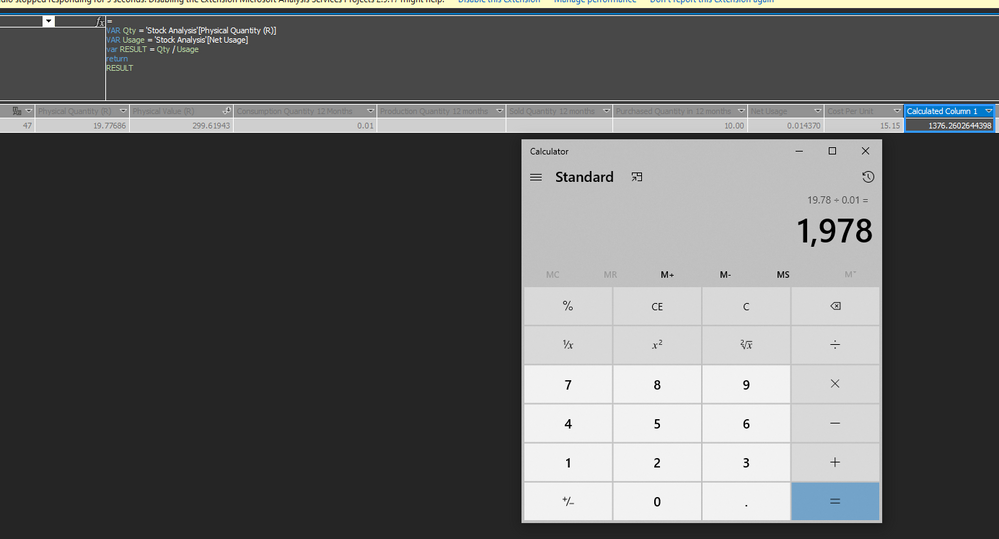
 

Division.PNG

I didn't need to use variables but I've tried lots of different ways to divide it but it keeps coming up with the same problem. 


19.77686 / 0.014370

The answer is 1,978 not 1,376. 


Note; the first column Physical Quantity (R) is a hard number created via power query.


The second number is a calcuated column which I'll include but I don't see how this should have an affect on this simple division:


Net Usage='Stock Analysis'[Consumption Quantity 12 Months]+'Stock Analysis'[Sold Quantity 12 months]


Consumption Quantity 12 Months=[Pick Quantity In Previous 12 Months]


Pick Quantity In Previous 12 Months:=
VAR CurrentDate = TODAY()
VAR PreviousDate = Date(Year(CurrentDate),MONTH(CurrentDate)-12,DAY(CurrentDate))
VAR RESULT =
CALCULATE( SUM([QtyReporting]),
FILTER( 'Primary Date Table',
'Primary Date Table'[Date] >= PreviousDate && 'Primary Date Table'[Date] <= CurrentDate
)
)
RETURN
RESULT


Thank you!

3 REPLIES 3
HashamNiaz
Solution Sage
Solution Sage

Hi !

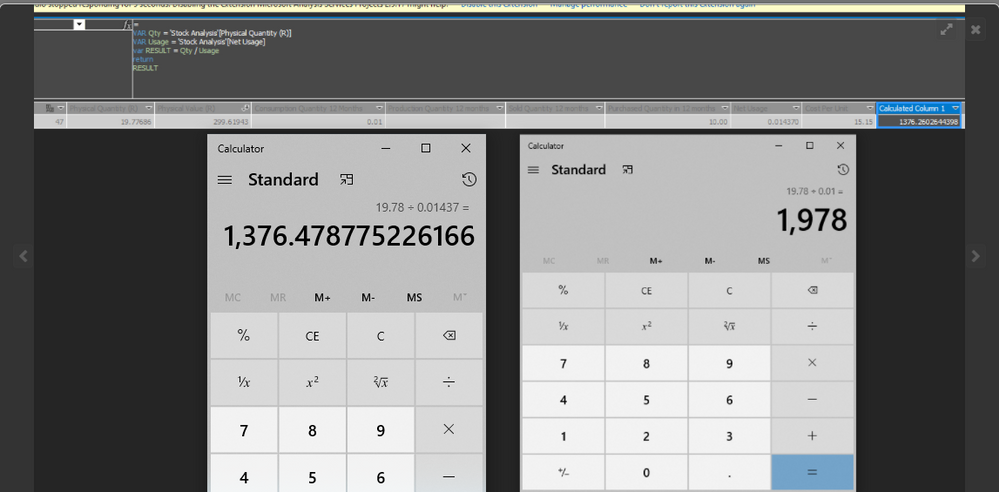
I think there is some misunderstanding, the answer for 19.77686 / 0.014370 = 1376 ~

You can use the calculator again, see below image;


CalcCalc


Semms like you are ignoring [437] while doing division. The actual divisor is [0.01437] not [0.01]. If you want only 2 decimal places to be used in divisor you can Round Off the number to 2 decimal places.


Regards,

amitchandak
Super User
Super User

@Anonymous ,Can you share a sample pbix after removing sensitive data.


First, we need to check is the value of the Numerator and denominator is as expected or not

Share with Power BI Enthusiasts: Full Power BI Video (20 Hours) YouTube
Microsoft Fabric Series 60+ Videos YouTube
Microsoft Fabric Hindi End to End YouTube
Anonymous
Not applicable

Hi @amitchandak 


Thanks for your response. 

This is a live connection to SSAS tabular model not a Power BI tabular model so sharing the model would not be possible. 


The value of the numerator is the second column along, Physical Quantity (R) @ 19.77

The value of the denominator is the 3rd column from the right, Net Usage @ 0.014


Thanks again

Helpful resources

Announcements
November Power BI Update Carousel

Power BI Monthly Update - November 2025

Check out the November 2025 Power BI update to learn about new features.

Fabric Data Days Carousel

Fabric Data Days

Advance your Data & AI career with 50 days of live learning, contests, hands-on challenges, study groups & certifications and more!

FabCon Atlanta 2026 carousel

FabCon Atlanta 2026

Join us at FabCon Atlanta, March 16-20, for the ultimate Fabric, Power BI, AI and SQL community-led event. Save $200 with code FABCOMM.