cancel
Showing results for 
Search instead for 
Did you mean: 

The Power BI Data Visualization World Championships is back! Get ahead of the game and start preparing now! Learn more

Reply
divyaaggarwalbA
Frequent Visitor

SELECTEDVALUE which selects two dates and feed into a DAX formula

Hi All,


Hope you can help.


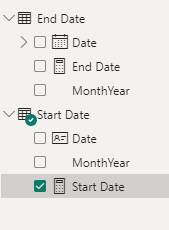
I am trying to use end user input values to feed into a DAX formula. For this I am using two different date tables.
End Date 
Start Date

the Formula for DAX for selecting single value from each table is 

End Date = DATEVALUE(FORMAT(SELECTEDVALUE('End Date'[Date],0),"dd/mm/yyyy"))
Start Date = DATEVALUE(FORMAT(SELECTEDVALUE('Start Date'[Date],0),"dd/mm/yyyy"))
divyaaggarwalbA_0-1693441282470.png

these two formula give me the expected result. But when i try to feed these two formulas into Calculated columns it is not working. The calculated column is basically tring to check if the column [P_date](Date type) in table 'A table' lies in Start and end date range.

Column =
if(AND('A table'[P_date]>= 'Start Date'[Start Date],'A table'[P_date]<= 'End Date'[End Date]),1,0)
the answer is always 0 even when the P_date is in Start an end date range.
 
Thanks


1 ACCEPTED SOLUTION

@mlsx4 yes found th solution with sth similar posting for future visitors. I created a measure instead.

Measure =

 if(MAX('A table'[P_date])>= 'Start Date'[Start Date] && Max('A table'[P_date])<= 'End Date'[End Date],"your required result",BLANK())

View solution in original post

2 REPLIES 2
mlsx4
Memorable Member
Memorable Member

Hi @divyaaggarwalbA 


If you want to check that the date is between two values, you should relate them with calendar table (without any active relationship) and use something like:


Start Date'[Start Date]<=MAX('A table'[P_date]) && 'End Date'[End Date]>=MAX('A table'[P_date])

@mlsx4 yes found th solution with sth similar posting for future visitors. I created a measure instead.

Measure =

 if(MAX('A table'[P_date])>= 'Start Date'[Start Date] && Max('A table'[P_date])<= 'End Date'[End Date],"your required result",BLANK())

Helpful resources

Announcements
November Power BI Update Carousel

Power BI Monthly Update - November 2025

Check out the November 2025 Power BI update to learn about new features.

Fabric Data Days Carousel

Fabric Data Days

Advance your Data & AI career with 50 days of live learning, contests, hands-on challenges, study groups & certifications and more!

FabCon Atlanta 2026 carousel

FabCon Atlanta 2026

Join us at FabCon Atlanta, March 16-20, for the ultimate Fabric, Power BI, AI and SQL community-led event. Save $200 with code FABCOMM.